Prioritize Risk with Initiatives
The hard part of security isn't finding issues, it's knowing which to fix first. Initiatives are Mondoo's answer: remediation goals that Mondoo creates for you and ranks by how much each one lowers your Space Risk Score. Instead of triaging thousands of alerts, you work down a short, ranked list.
Note: Initiatives are in beta. The Initiatives card on the space dashboard carries a BETA label.
What an initiative is
Each initiative is a piece of remediation work that removes vulnerability risk from your assets:
-
Mondoo builds initiatives from vulnerable software. For each asset, Mondoo finds the vulnerable software packages whose update removes the most risk from that asset and groups them into one goal. Assets that need the same set of updates share a single initiative.
-
The title names the work. An initiative is named after the software to update, such as
VMware Tools - 12.3.0.22234872. When an initiative covers more than one package, the title ends with "and N more packages." -
CI/CD assets are excluded. Mondoo doesn't create initiatives for ephemeral CI/CD scan assets.
Each initiative shows two metrics:
-
Risk reduction. How many points your Space Risk Score drops when the initiative is complete on every affected asset. See How Risk Reduction Is Calculated.
-
Mondoo Effort. The estimated hands-on time to complete the work with Mondoo's automated remediation, next to an
X FASTERmultiplier that compares it with an industry-standard manual effort. See How Effort Is Calculated.
Find initiatives
-
In the Mondoo App, navigate to a space and select Dashboard in the side navigation.
The Initiatives for risk reduction card lists the highest-impact initiatives, with the number of affected assets, risk reduction, Mondoo effort, and status of each.
-
Select VIEW INITIATIVES to open the full list.
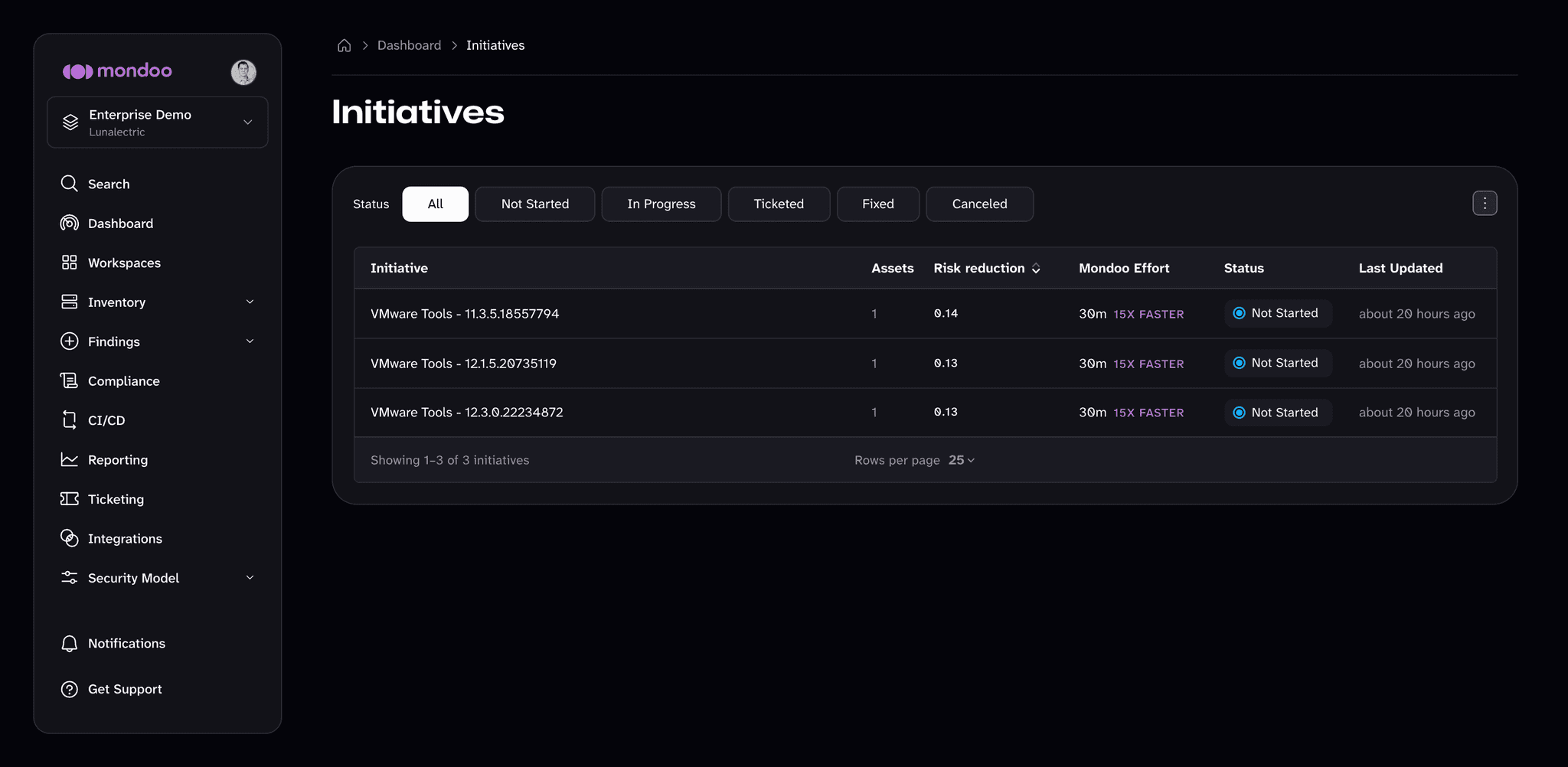
Filter the list by Status, or sort it by Risk reduction or Last Updated.
-
Select an initiative to open its detail page.
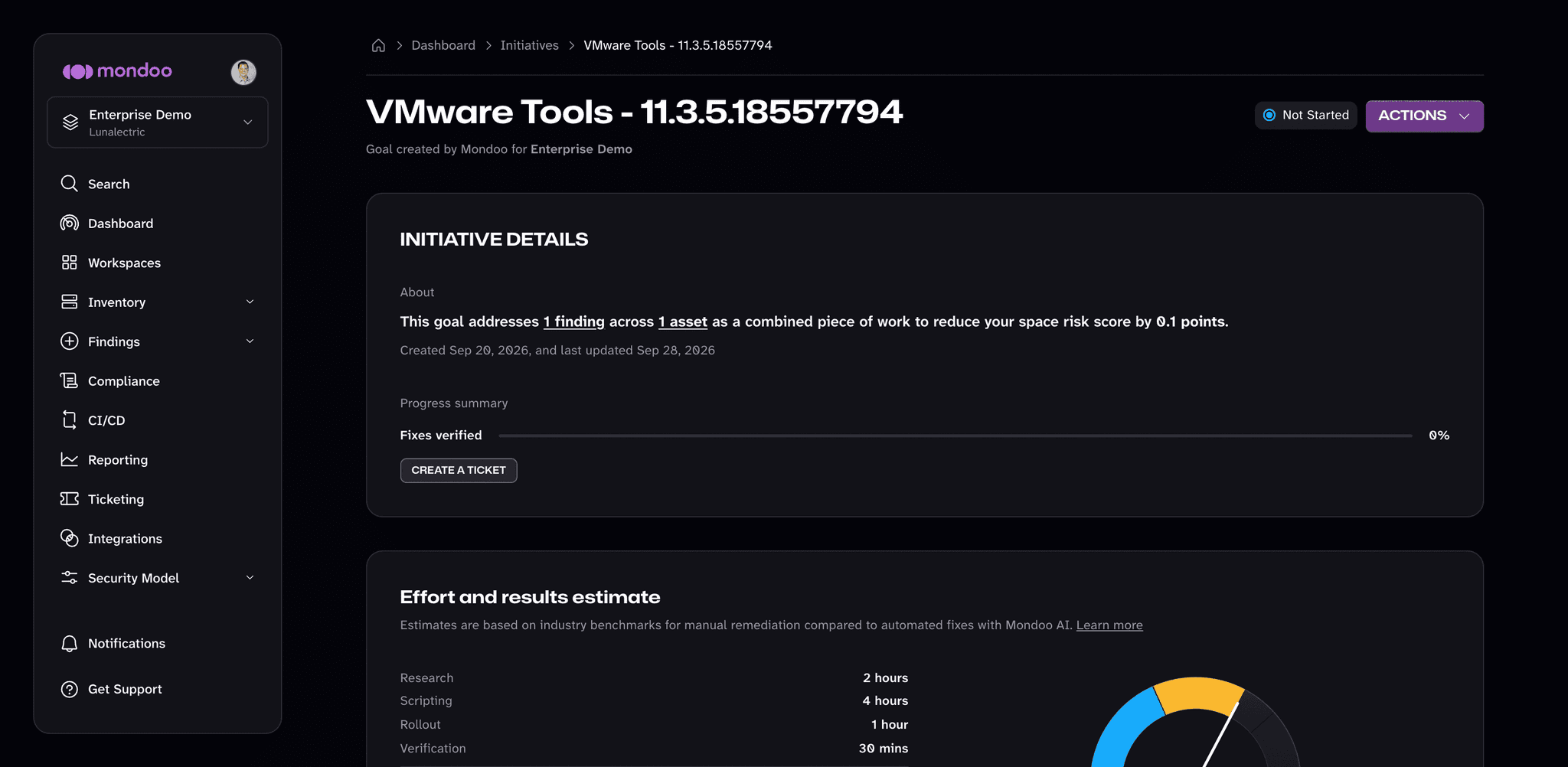
The detail page shows:
- Initiative details. How many findings and assets the initiative addresses, how many points it removes from the Space Risk Score, and a Fixes verified progress bar that tracks the share of affected assets Mondoo has confirmed as fixed.
- Effort and results estimate. The manual effort broken down by phase (research, scripting, rollout, and verification) next to the effort with Mondoo AI, and a gauge that previews your Space Risk Score once the initiative is complete.
- Goal scope. The Included Assets and Related Findings tabs list exactly what the initiative covers.
- Remediation. The script or steps to update the affected software.
Work the list
-
Start at the top. The list is ranked by risk reduction, so the first initiative removes the most risk.
-
Spot the quick wins. Look for high risk reduction paired with low effort. These deliver the most return for the least work.
-
Track the work. Open an initiative's status menu (or ACTIONS on its detail page) to create a ticket, copy a link to share it, or view its details. From the detail page you can also Close initiative if you don't plan to remediate it.
-
Plan with the numbers. Use risk reduction and effort to plan sprints, justify resource allocation, and assign work.
Mondoo keeps each initiative's status up to date as work progresses:
| Status | Meaning |
|---|---|
| Not Started | Default. No remediation work is recorded yet. |
| Ticketed | A ticket tracks the work. |
| In Progress | Remediation is underway. For example, some of the affected assets are already fixed. |
| Fixed | Mondoo has verified the fix on every affected asset. |
| Canceled | Someone closed the initiative, so Mondoo no longer counts it as work to be done. |
By working down the list, you keep your team focused on the changes that actually move the score.
How it all fits together
Next step
Once you know which fixes matter most, track and fix the findings by routing remediation into your ticketing system.