Find Vulnerabilities (CVEs)
Find known vulnerabilities (CVEs) in your infrastructure and use Mondoo's scoring to prioritize fixes.
A vulnerability is a weakness in software that an attacker can exploit. Vulnerabilities are catalogued in the CVE (Common Vulnerabilities and Exposures) database, each with a unique identifier like CVE-2025-21755. Mondoo continuously scans your infrastructure to find which CVEs affect which assets, and prioritizes them using risk scores that combine severity with asset context.
Vendors often release advisories recommending how to fix or mitigate a vulnerability. To learn more, read Find Advisories.
Find CVEs in a space
-
In the Mondoo App, navigate to the space.
You can also select a workspace to view a subset of assets.
-
In the side navigation, under Findings, select Security, then select the Vulnerabilities filter above the table.
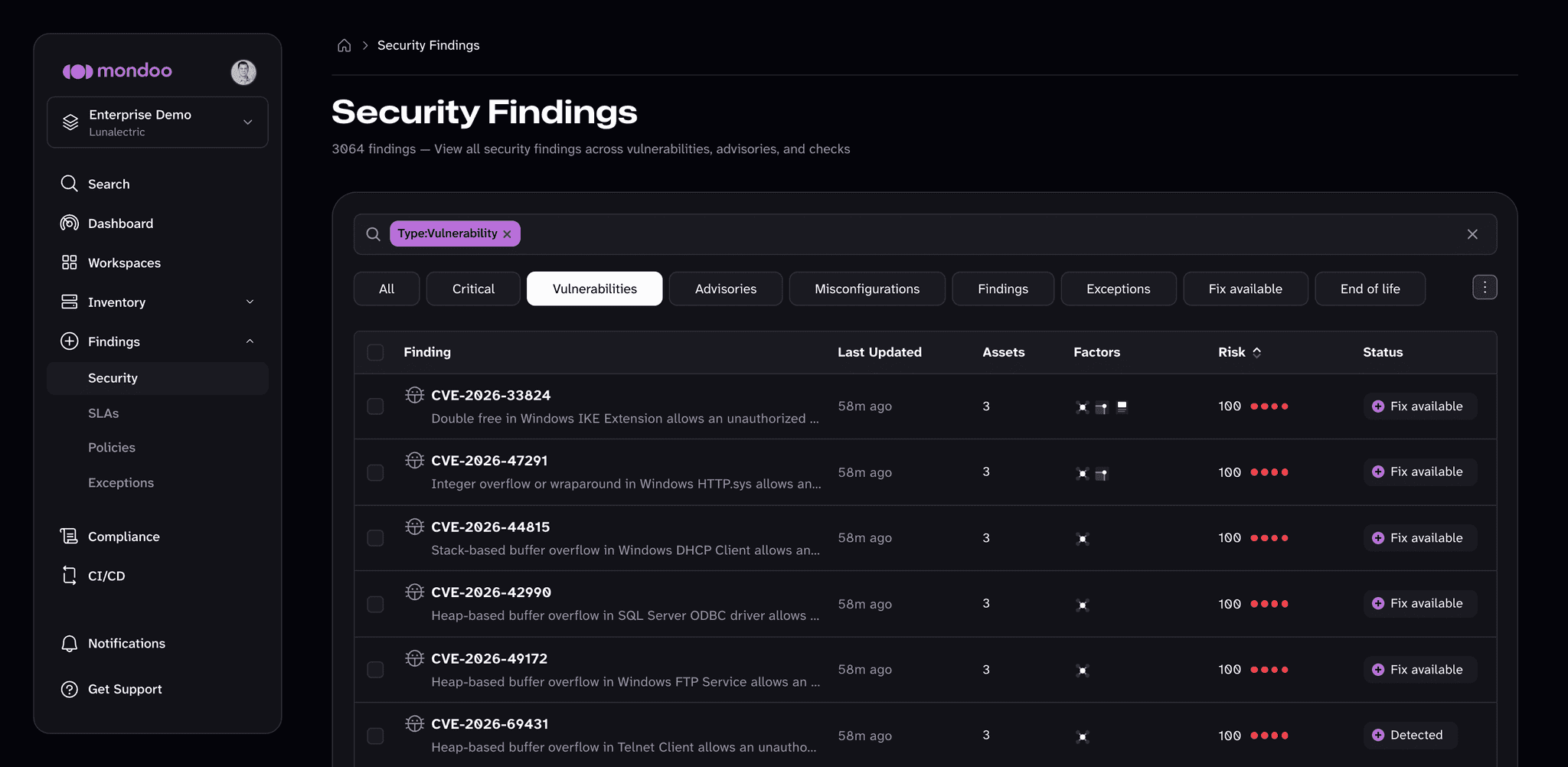
For each CVE, Mondoo shows when it was last updated, the number of assets it affects, its risk factors, its risk score, and its status (for example, Fix available or Detected).
-
Filter using the search bar. Examples:
- A platform name (
windows,debian,google) - A CVE number (
2025-21755,1325) - A service or tool (
winsock,curl,cim)
- A platform name (
-
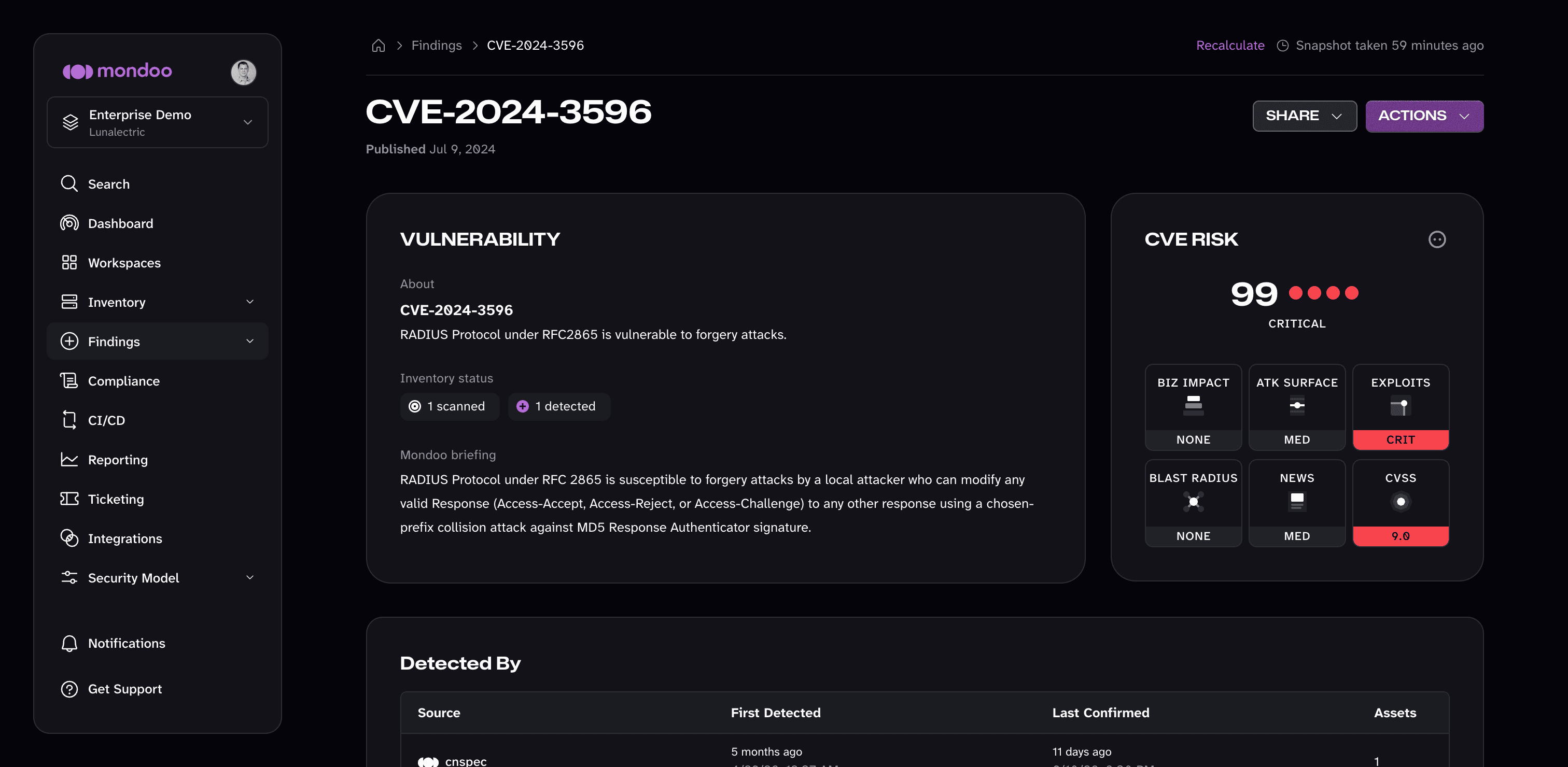
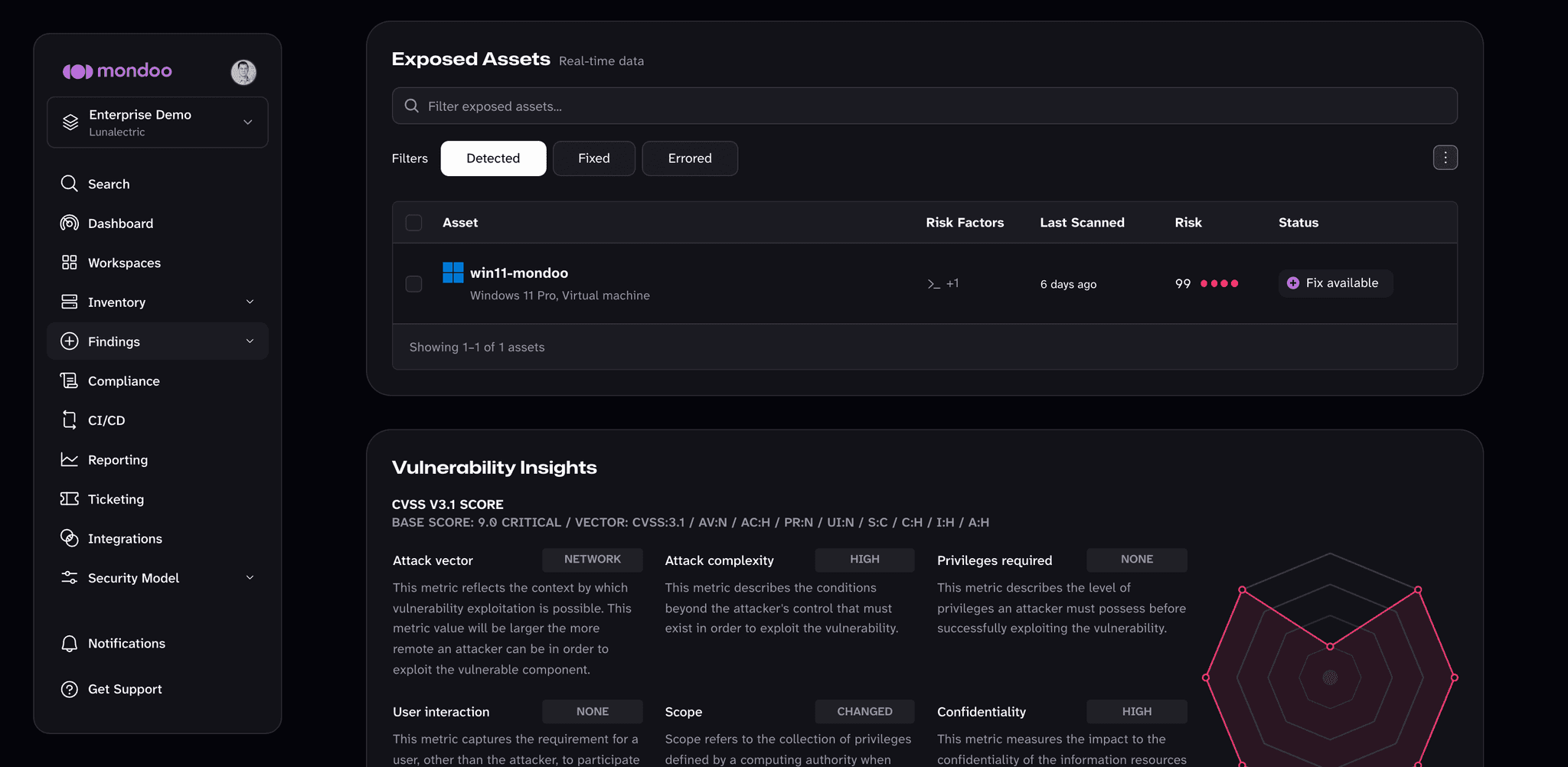
Select a CVE to open its detail page. It shows the CVE's description and CVE Risk card, which sources detected it, remediation steps, related advisories, the Exposed Assets it affects, and its CVSS and EPSS details.
Extended support subscriptions
Some operating system vendors sell subscriptions that keep a release patched after its standard support ends, or that pin a minor release for longer. When cnspec scans an asset, it detects which of these subscriptions are active. Mondoo then uses that information in two ways:
- Advisory matching. Mondoo checks the asset against the security advisories the vendor publishes for that subscription. An asset with the subscription gets credit for the fixes it delivers, and an asset without it isn't held to advisories it can't install.
- End of life. Mondoo uses the subscription's end date instead of the standard end-of-life date. The asset isn't flagged as end of life while the subscription still covers it.
There's nothing to configure. Mondoo reads the subscription from each asset during the scan, so assets in the same space can have different subscriptions.
| Vendor | Subscription | Changes which advisories apply | Extends end of life |
|---|---|---|---|
| Canonical | Ubuntu Pro (Expanded Security Maintenance) | Yes | Yes |
| Red Hat | Extended Life Cycle Support (ELS) | Yes | Yes |
| Red Hat | Extended Update Support (EUS) and Update Services for SAP Solutions (E4S), RHEL 8 and later | Yes | No |
| SUSE | Long Term Service Pack Support (LTSS) | Yes | Yes |
| SUSE | SUSE Linux Enterprise Server for SAP Applications | Yes | Yes |
| Oracle | Oracle Linux Extended Support | No | Yes |
| Microsoft | Windows Extended Security Updates (ESU) | No | Yes |
| AWS | Amazon EKS extended support for Bottlerocket Kubernetes variants (always applied, no subscription needed) | No | Yes |
Ubuntu Pro also affects software end of life. Some packages in Ubuntu's main archive stay on an older upstream release that Canonical keeps patching. Mondoo doesn't report those packages as end of life while the release is in standard support, or in Ubuntu Pro coverage on assets that have it.
cnspec detects Red Hat subscriptions from the repositories enabled on the asset. If a scan doesn't report a subscription, Mondoo checks the asset against the standard Red Hat Enterprise Linux advisories only, and fixes delivered only through a subscription stream aren't credited. This happens for Advanced Update Support (AUS) and Telecommunications Update Service (TUS), which cnspec doesn't detect, and for scans by older cnspec versions. EUS and E4S detection requires cnspec 12.1 or later. ELS detection requires cnspec 13 or later, and cnspec 14 or later on RHEL 8 and later.
How a CVE is scored
Mondoo combines a base severity with asset context to produce each CVE's risk score. To learn the full model, read How Mondoo Scores and Prioritizes Findings.
Risk factors
Risk factors explain why a CVE's risk score is higher or lower than its CVSS score alone.
Mondoo shows risk factors in three places:
-
Factors column. In the Security Findings table, the Factors column shows an icon for each risk dimension that rates Critical or High for the finding: Business Priority, Attack Surface, Exploitability, Blast Radius, or In the News. Hover over an icon to see its name. An empty column means no dimension raises the finding's risk significantly.
-
Risk card. On the finding's detail page, the risk card shows the finding's risk score and a rating for each risk dimension (BIZ IMPACT, ATK SURFACE, EXPLOITS, BLAST RADIUS, and NEWS), plus the CVSS score.
-
Exposed Assets. On the finding's detail page, the Risk Factors column of the Exposed Assets table lists conditions Mondoo detected on each affected asset, such as internet exposure, known exploits, code execution, exposed credentials, database access, end-of-life software, or defensive countermeasures like SELinux or AppArmor. Hover over an icon to see its name.
CVSS score
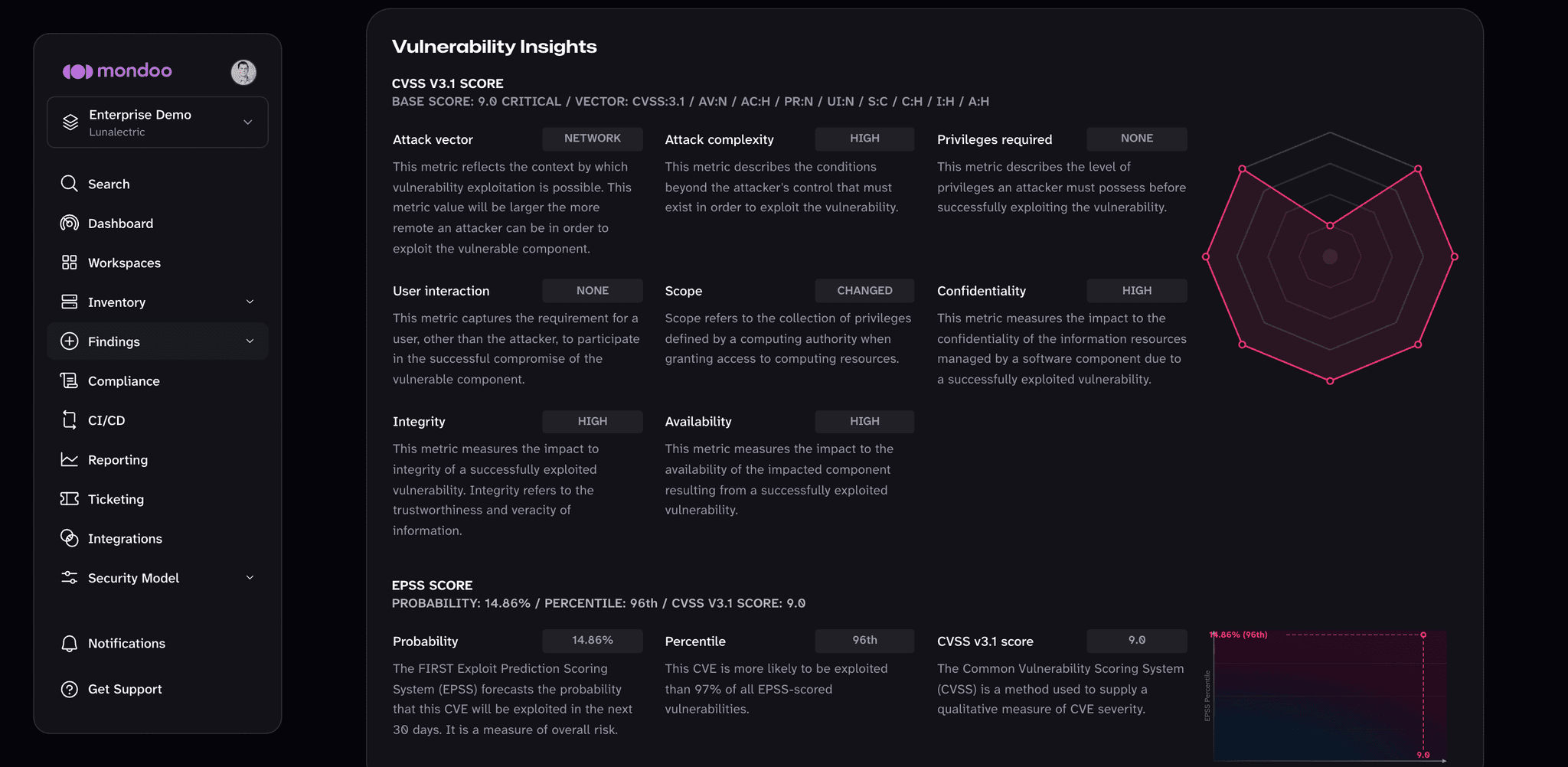
The CVSS base score is a single number from 0 (low) to 10 (critical) representing the severity of a vulnerability. It's published by FIRST and is the industry standard for ranking CVEs.
How CVSS is calculated
The CVSS base score combines three groups of metrics. To learn more, read the FIRST CVSS documentation.
Exploitability metrics describe how easy the CVE is to exploit:
- Attack vector: Network, Adjacent, Local, or Physical
- Attack complexity: Low or High
- Privileges required: None, Low, or High
- User interaction: None, Passive, or Active
Scope metric indicates whether the vulnerability impacts resources beyond its security scope:
- Unchanged or Changed
Impact metrics describe what an attacker gains:
- Confidentiality: None, Low, or High
- Integrity: None, Low, or High
- Availability: None, Low, or High
EPSS score
The Exploit Prediction Scoring System (EPSS), also from FIRST, estimates how likely a CVE is to be exploited in the next 30 days. It complements CVSS: a Medium-severity CVE that's actively being exploited often deserves more attention than a Critical one with no known exploits.
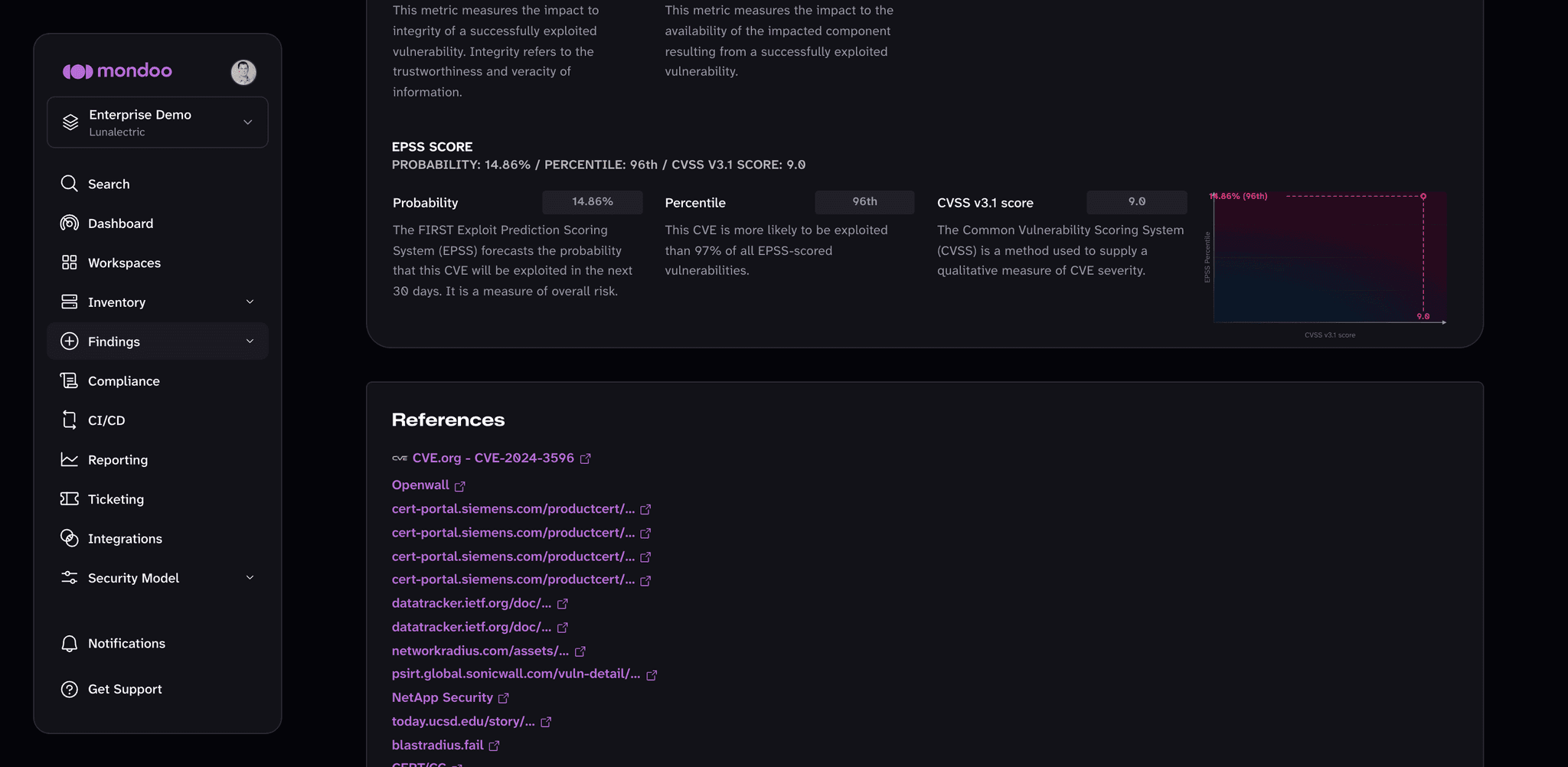
Mondoo shows three EPSS values:
-
Probability. Likelihood of exploitation in the next 30 days, as a percentage. 99% means an exploit is extremely likely; 1% means it's unlikely.
-
Percentile. Comparison to all CVEs. A CVE in the 96.9th percentile is more likely to be exploited than 96.9% of all CVEs ever evaluated.
-
CVSS v3.1 score. The CVSS base score described above.
To learn more, read the FIRST EPSS documentation.