Define Your Team's Service-Level Agreement
Set targets for how quickly your team commits to remediating findings, and track real performance against them.
A service-level agreement (SLA) in Mondoo is a target for how quickly your team commits to remediating security findings. Mondoo tracks your team's actual mean time to remediate (MTTR) and compares it against the targets you've set, so you can see how you're doing at a glance.
For how those findings are prioritized and driven to resolution, see Track and fix findings.
Review SLA performance
In the left navigation, expand Findings and select SLAs.
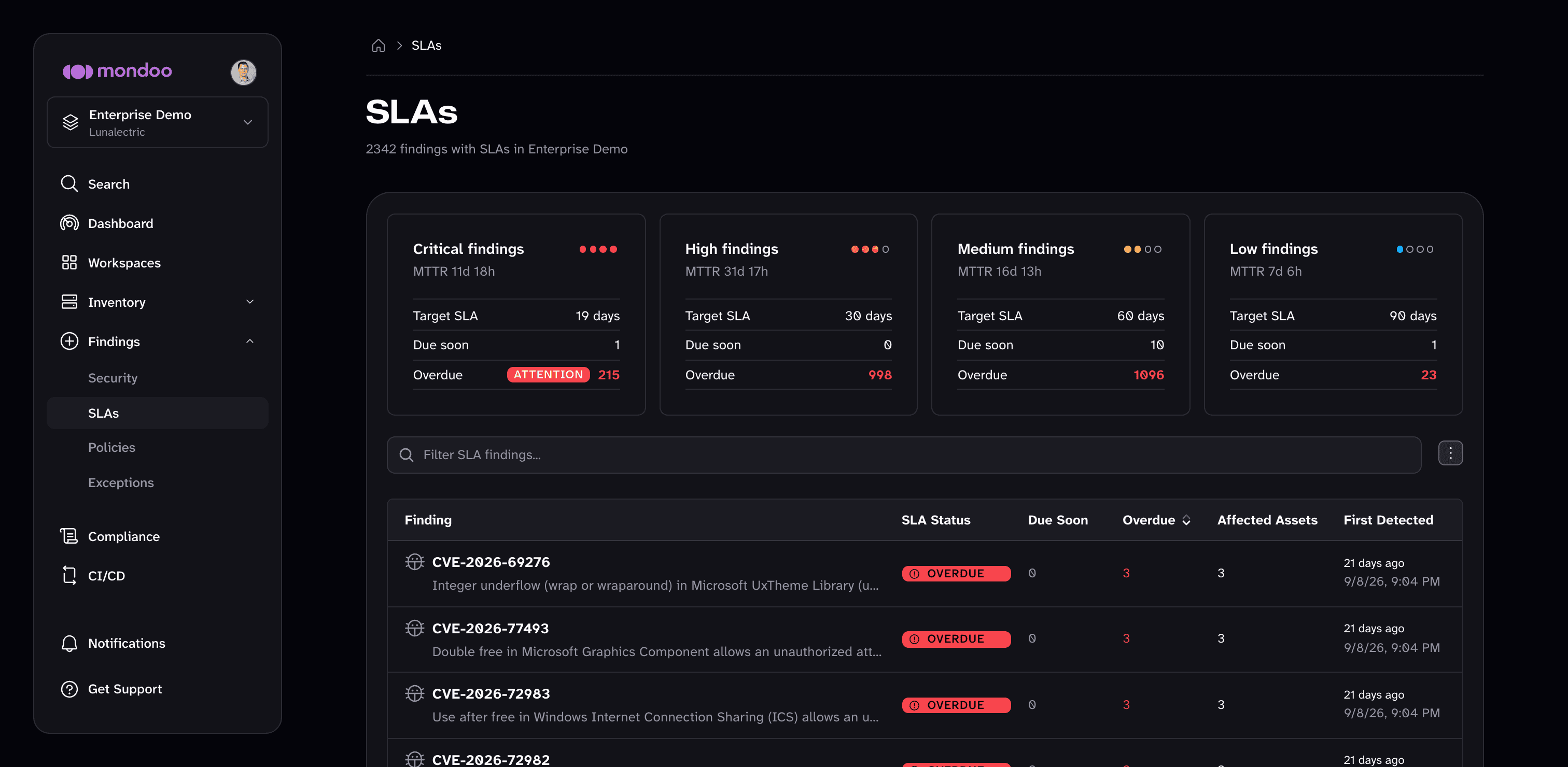
At the top of the page, a card for each risk level (Critical, High, Medium, and Low) shows:
- The team's MTTR for findings at that level
- The Target SLA in days
- How many findings are Due soon and how many are Overdue
Below the cards, a table lists every finding that has an SLA. For each finding it shows:
- Its SLA Status: Overdue, Due Soon, or On Track
- How many affected assets are Due Soon and how many are Overdue
- The number of Affected Assets and when the finding was First Detected
Use the search box to filter the list. To download the list as CSV, JSON, or XLSX, open the menu next to the search box.
Default targets
| Risk level | Days to resolve | Warning threshold (days) |
|---|---|---|
| Critical | 30 | 23 |
| High | 30 | 23 |
| Medium | 60 | 53 |
| Low | 90 | 83 |
By default, Mondoo uses the Mondoo risk score to decide a finding's risk level and starts the SLA clock when it first detects a vulnerability.
Customize the targets
Only team members with Owner, Editor, or SLA Manager access to the space can change SLA settings.
-
Navigate to the space.
-
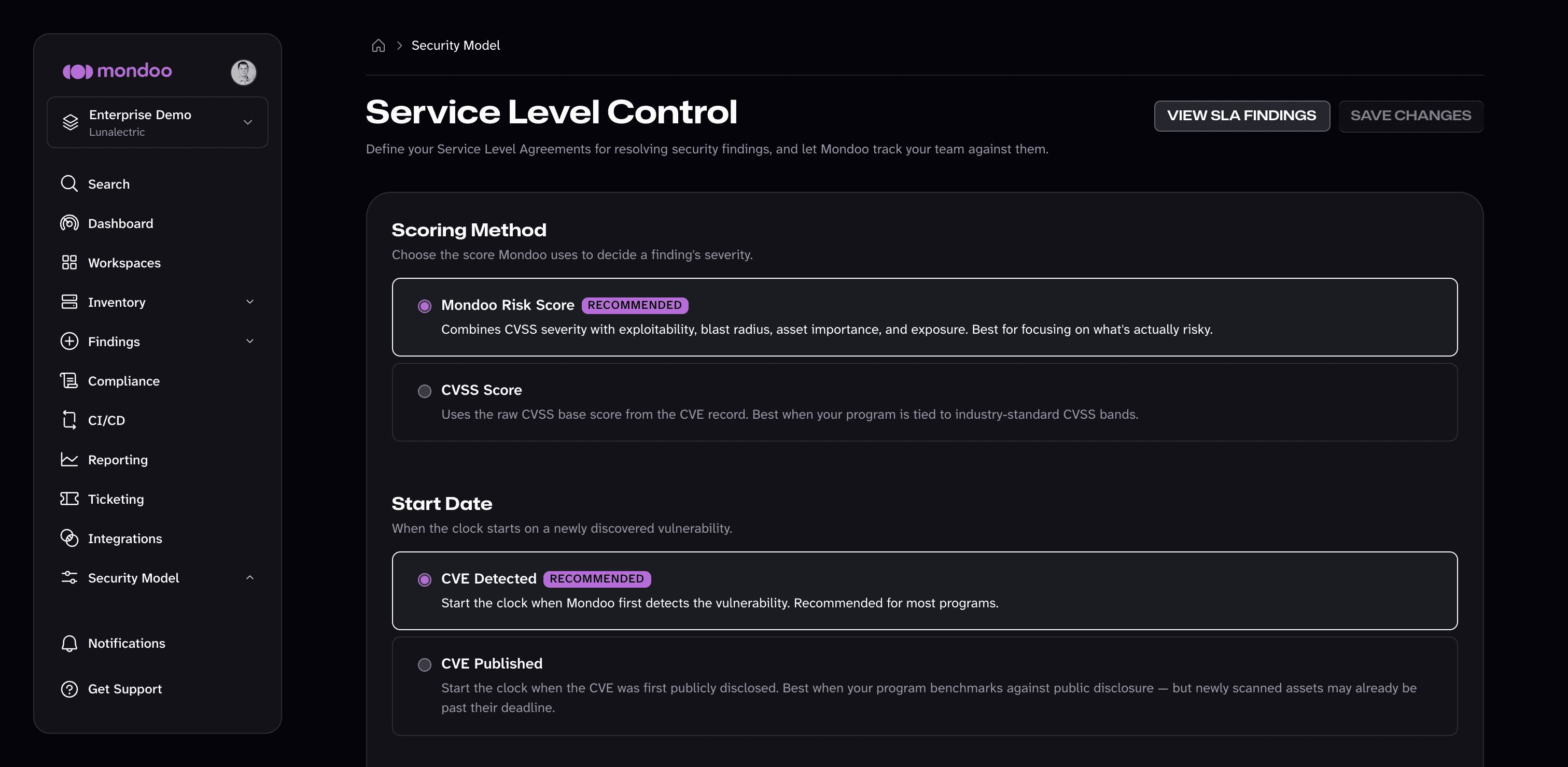
In the left navigation, expand Security Model, then select Service Level Control.
-
Under Scoring Method, choose the score Mondoo uses to decide each finding's risk level:
- Mondoo Risk Score (recommended) combines CVSS severity with exploitability, blast radius, asset importance, and exposure.
- CVSS Score uses the raw CVSS base score from the CVE record. Choose it when your program is tied to industry-standard CVSS bands.
-
Under Start Date, choose when the SLA clock starts on a newly discovered vulnerability:
- CVE Detected (recommended) starts the clock when Mondoo first detects the vulnerability.
- CVE Published starts the clock when the CVE was first publicly disclosed. Newly scanned assets may already be past their deadline.
-
Under Deadlines, set two numbers for each risk level:
- Days to resolve is how long your team has to fix a finding before it's overdue.
- Warning threshold (days) is when Mondoo starts flagging a finding as due soon. It must be less than Days to resolve.
-
Select SAVE CHANGES.
To see the findings these targets apply to, select VIEW SLA FINDINGS at the top of the page.