View Audit Logs
View, filter, and export organization and space audit logs in Mondoo, or pull them through the GraphQL API.
Mondoo records administrative events and user sign-ins in audit logs you can view and export in the Mondoo App or pull through the GraphQL API. There are two scopes:
- An organization log tracks changes across the organization, like organization settings updates, membership changes and invitations, spaces that are created or deleted, organization-level integrations, API tokens, and sign-ins by members of the organization.
- A space log tracks changes within a space, like policies that are added, removed, or changed, registration tokens, service accounts, agents, and integrations.
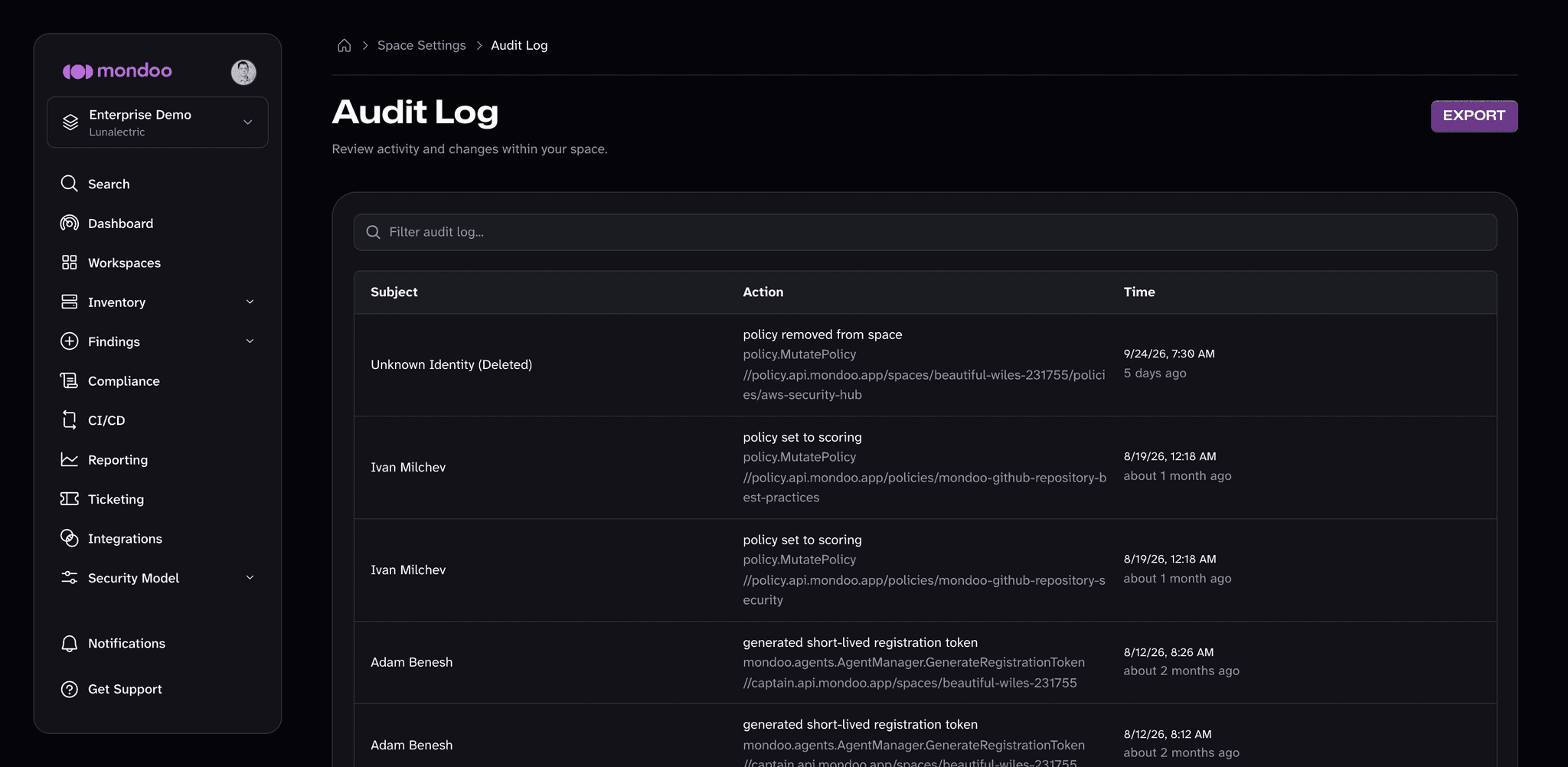
Each entry shows the Subject (the user or service account that made the change), the Action (a short description, the API operation, and the affected resource), and the Time.
View a space audit log
-
Navigate to the space.
-
In the side navigation, select Settings, then select Audit Log.
View an organization audit log
-
Navigate to the organization.
-
In the side navigation, select Settings, then select Audit Log.
Sign-in events
Mondoo records each user sign-in in the audit log of every organization the user is a member of. A sign-in entry shows who signed in, when, from which IP address, and through which sign-in provider.
Mondoo records a sign-in once per interactive authentication at your identity provider—not once per request, and not once per token refresh. Two behaviors follow from this that are easy to mistake for missing entries:
- Signing in again without actually re-authenticating doesn't create a new entry. If your identity provider's single sign-on session is still active and signs you straight in without prompting, that's the same authentication, already recorded. To produce a fresh entry, sign in from a private browser window, where the identity provider genuinely re-authenticates you.
- Mondoo only records sign-ins that reach it within 24 hours of the authentication at the identity provider.
Enterprise SSO: your identity provider must send the auth_time claim
If your deployment signs users in through Mondoo's standard sign-in, no setup is needed and you can skip this section. It applies to enterprise SSO (OpenID Connect) deployments.
Mondoo derives sign-in events from the auth_time claim in the OpenID Connect ID token—the identity provider's record of when the user authenticated. If your identity provider doesn't include the claim, Mondoo records no sign-in events. Nothing fails and nothing shows an error; the audit log simply contains no sign-in entries.
| Identity provider | Sends auth_time? | What to do |
|---|---|---|
| Microsoft Entra ID | Not by default | Add it as an optional claim (steps below) |
| Keycloak, Okta, authentik | Yes, by default | Nothing |
To add the claim in Microsoft Entra ID:
-
In the Azure portal, open Microsoft Entra ID > App registrations and select the application your organization uses to sign in to Mondoo.
-
Select Token configuration, then + Add optional claim.
-
Under Token type, select ID. Check auth_time, then select Add.
The change takes effect for new tokens; nothing needs to change in Mondoo. To verify, sign in from a fresh private browser window and check the organization audit log for a signed in entry.
For any other identity provider, check its documentation for the auth_time claim—or decode an ID token (it's a JWT) and look for auth_time in the payload.
Filter the audit log
To narrow down the list, use the Filter audit log box above the table:
- Select Action to show only entries for one API operation, such as
mondoo.captain.Captain.DeleteSpace. - Select Identity to show only entries made by one user or service account.
- Type any other text to search the entries.
To remove a filter, delete its chip from the box. To sort by time, select the Time column header.
Export the audit log
To download a copy of the audit log for the space or organization you're viewing:
-
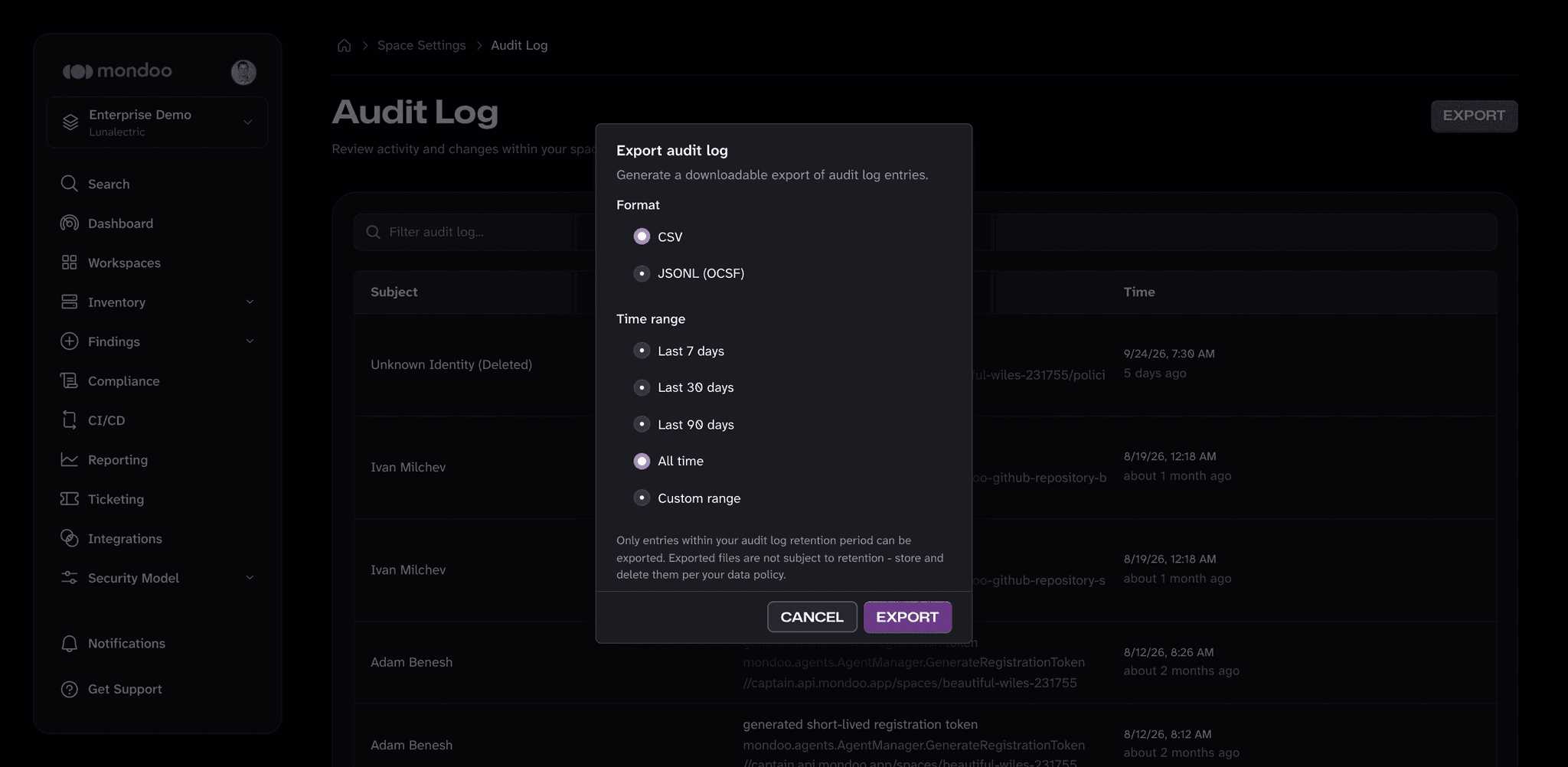
In the top right of the Audit Log page, select Export. (If you don't see the button, you don't have permission to export audit logs for this scope.)
-
Under Format, choose CSV or JSONL (OCSF). The JSONL format writes one OCSF event per line, the same format the continuous export uses.
-
Under Time range, choose Last 7 days, Last 30 days, Last 90 days, All time, or Custom range. For a custom range, pick the start and end dates.
-
Select Export. Mondoo prepares the file and your browser downloads it when it's ready.
You can only export entries that are still within your audit log retention period. Mondoo doesn't apply retention to files you download, so store and delete them according to your own data policy.
The steps above cover everyday audit-log review in the Mondoo App. The rest of this page is for pulling audit logs programmatically. Skip it if you only need the in-app view.
Retrieve audit logs through the API
Organization audit logs are available through Mondoo's GraphQL API. You need:
-
An API token with at least read access to the organization.
-
The organization ID. To find it, go to the organization's Settings > General page and copy the Organization ID. The same page also shows the Organization MRN, which is the
resourceMrnvalue the query below needs.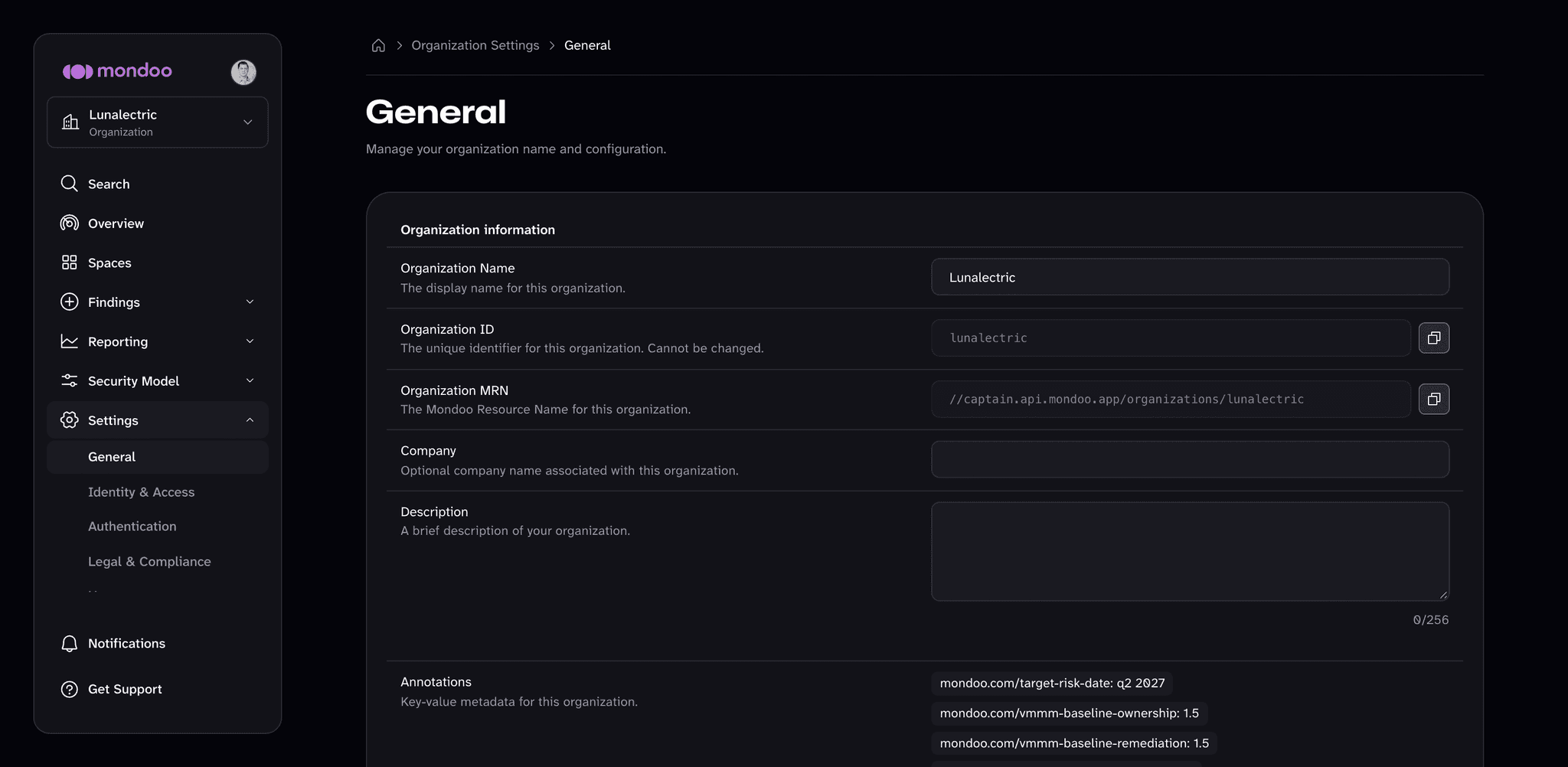
Query
Save this query to query.gql. Replace <ORG_ID> with your organization ID.
query AuditLogForwardPagination(
  $first: Int
  $after: String
  $orderBy: AuditLogOrder = { direction: DESC, field: TIMESTAMP }
  $resourceMrn: String!
) {
  auditlog(first: $first, after: $after, orderBy: $orderBy, resourceMrn: $resourceMrn) {
    totalCount
    edges {
      cursor
      node {
        identity {
          name
          mrn
        }
        resource
        action
        timestamp
        msg
      }
    }
    pageInfo {
      startCursor
      endCursor
      hasNextPage
    }
  }
}
Variables
Save this variables payload to variables.json, again replacing <ORG_ID>:
{
  "first": 25,
  "resourceMrn": "//captain.api.mondoo.app/organizations/<ORG_ID>"
}
Call the API
EU region
Replace https://api.mondoo.com/query with https://eu.api.mondoo.com/query if your organization
is in the EU region.
export TOKEN='YOUR_API_TOKEN'

curl -X POST \
  -H "Authorization: Bearer $TOKEN" \
  -H "Content-Type: application/json" \
  --data-binary @<(jq -nc --arg q "$(cat query.gql)" --argjson v "$(cat variables.json)" \
    '{query: $q, variables: $v}') \
  https://api.mondoo.com/query | jq
A successful response looks like:
{
  "data": {
    "auditlog": {
      "totalCount": 36,
      "edges": [
        {
          "cursor": "172213",
          "node": {
            "identity": {
              "name": "Jane Doe",
              "mrn": "//captain.api.mondoo.app/users/26OR1GOGsqmfjXOOO8joxgJDdtM"
            },
            "resource": "//agents.api.mondoo.app/organizations/mondoo-organization-1/serviceaccounts/2e3NzLkD73yQe7MTJZLw3",
            "action": "mondoo.agents.AgentManager.CreateServiceAccount",
            "timestamp": "2024-03-22T17:46:03Z",
            "msg": "created service account"
          }
        }
      ]
    }
  }
}
Filter by timestamp
Add a timestampFilter variable to limit results to events before or after a given time. Update the query to accept the variable:
query AuditLogForwardPagination(
  $first: Int
  $after: String
  $orderBy: AuditLogOrder = { direction: DESC, field: TIMESTAMP }
  $resourceMrn: String!
  $timestampFilter: TimestampFilter
) {
  auditlog(
    first: $first
    after: $after
    orderBy: $orderBy
    resourceMrn: $resourceMrn
    timestampFilter: $timestampFilter
  ) {
    # ...same body as above
  }
}
And include the filter in your variables:
{
  "first": 25,
  "resourceMrn": "//captain.api.mondoo.app/organizations/<ORG_ID>",
  "timestampFilter": {
    "timestamp": "2024-05-06T13:48:33+03:00",
    "operator": "LT"
  }
}
LT returns events before the timestamp; use GT for events after.
The auditlog query also accepts identityFilter (for example, { "name": "Jane Doe" }), actionFilter (an API operation such as mondoo.captain.Captain.DeleteSpace), and queryTerms (a list of search strings). These are the same filters the Mondoo App uses.
Continuously export audit logs
To continuously export audit logs to Google Cloud Storage in OCSF format for long-term retention, SIEM ingestion, or compliance evidence, see Continuously Export Audit Logs.
Get help
Can't find what you need? Join the Mondoo community Slack channel to chat with the Mondoo team and other users.
Remove a Space or Organization
Delete unused Mondoo spaces or organizations, delete all assets in a space, or leave a space or organization.
Export Audit Logs
Continuously export audit logs from Mondoo to Google Cloud Storage in OCSF format for long-term retention, SIEM ingestion, or compliance evidence.