Scan in GitHub Actions
Use the Mondoo GitHub Action to scan infrastructure code and containers for security issues in CI/CD workflows.
The Mondoo GitHub Action scans your Kubernetes manifests, Terraform configurations, and Docker containers for security issues during your CI/CD workflow. Catching misconfigurations before deployment makes them easier to fix and prevents them from reaching your production environment. The action handles the installation and configuration of cnspec, so you only need to specify what to scan and provide your Mondoo credentials. Scan results appear in both the GitHub Actions UI and the Mondoo App.
You can also use Mondoo to continuously assess the security of your GitHub repositories and organization. To learn more, read Secure GitHub with Mondoo.
Configure GitHub Actions security
To set up a GitHub Actions integration with Mondoo:
-
Create Mondoo credentials
-
Store those credentials in GitHub
Create credentials in Mondoo
Configure a Mondoo service account to fetch policies and send scan results to Mondoo Platform:
-
In the Mondoo App, navigate to the space where you want to add the integration. In the side navigation bar, select Integrations. In the top right, select INSTALL.
-
On the integrations page, under CI/CD, select GitHub Actions (or search by name).
-
Copy the value in the Copy the Mondoo Platform credentials box to use it as a variable in your pipeline.
The credential is a base64-encrypted code that contains all the information needed to send the results of the scan to Mondoo. You can decrypt and check the content easily using this command:
echo <Credentials> | base64 -dSecurely store credentials in GitHub
-
Go to your GitHub repo and, in the top-right corner, select Settings.
-
In the left navigation panel, under Security, select Secrets and variables and then select Actions.
-
Select the New repository secret button.
-
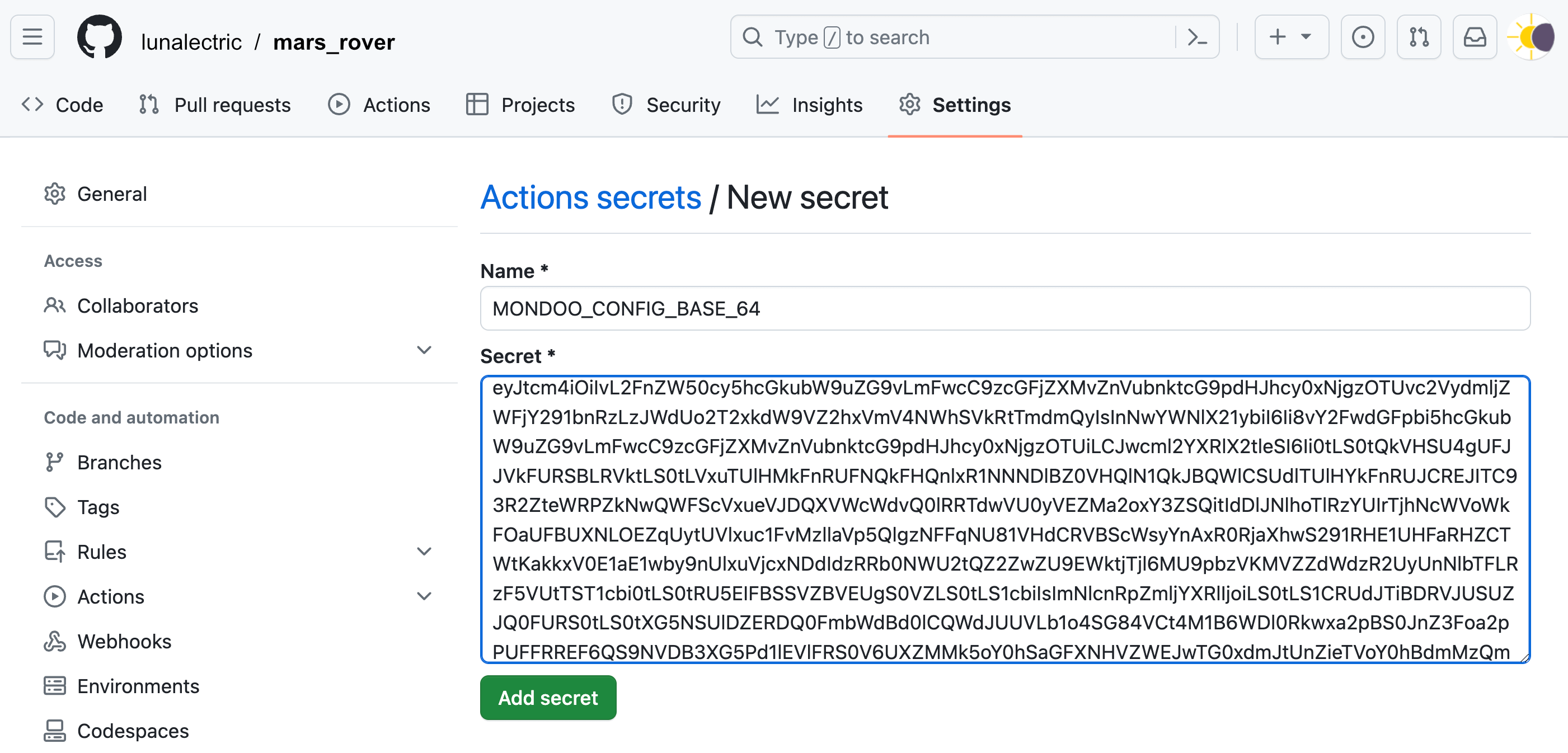
Name the secret MONDOO_CONFIG_BASE64 and, in the Secret box, paste the credentials you copied in the steps above.
-
Select the Add secret button.
Workflow configuration options
The Mondoo GitHub Action has two required with values that you must set in your workflow configuration file:
-
path is what to scan when using the
k8s-manifestorterraform-hclaction: the manifest file fork8s-manifest, or the Terraform working directory forterraform-hcl. -
image is the container image name when using the
docker-imageaction.
Each action also accepts an optional risk-threshold value. The job fails if any risk meets or exceeds it. The examples below use 90, which fails the job only on critical risks. To learn how to choose a value, read Exit code handling.
The Mondoo GitHub Action has one required env value: MONDOO_CONFIG_BASE64 is the Mondoo service account credentials that you stored in the GitHub secret. Never set credentials directly in the workflow configuration file. Reference the secret as ${{ secrets.MONDOO_CONFIG_BASE64 }}.
Example workflows
Kubernetes manifest scanning
This example runs a Mondoo scan against a Kubernetes manifest:
name: mondoo-scan

on:
  pull_request:
  push:
    branches: [main]

jobs:
  build:
    runs-on: ubuntu-latest

    steps:
      - uses: actions/checkout@v7
      - name: Scan with Mondoo
        uses: mondoohq/actions/k8s-manifest@main
        env:
          MONDOO_CONFIG_BASE64: ${{ secrets.MONDOO_CONFIG_BASE64 }}
        with:
          path: nginx.yml
          # fail the job on critical risks (90 or higher); lower it to fail on less severe risks
          risk-threshold: 90
Terraform configuration files scanning
This example scans the Terraform configuration in the repository's terraform directory:
name: mondoo-scan

on:
  pull_request:
  push:
    branches: [main]

jobs:
  build:
    runs-on: ubuntu-latest

    steps:
      - uses: actions/checkout@v7
      - name: Scan with Mondoo
        uses: mondoohq/actions/terraform-hcl@main
        env:
          MONDOO_CONFIG_BASE64: ${{ secrets.MONDOO_CONFIG_BASE64 }}
        with:
          path: terraform
          # fail the job on critical risks (90 or higher); lower it to fail on less severe risks
          risk-threshold: 90
Scan infrastructure as code
To scan every infrastructure as code entry point in the repository in one step, run cnspec scan iac. It finds and scans Ansible, Bicep, CloudFormation, Dockerfile, Helm, Kubernetes manifest, and Kustomize files, plus Terraform when you name it in --discover. New charts, templates, and modules are picked up without changing the workflow.
The iac provider requires cnspec 14.0 or later. The Mondoo GitHub Actions above run an earlier cnspec release, so this workflow installs cnspec directly:
name: mondoo-iac-scan

on:
  pull_request:
  push:
    branches: [main]

jobs:
  scan:
    runs-on: ubuntu-latest

    steps:
      - uses: actions/checkout@v7
      - name: Install cnspec
        run: bash -c "$(curl -sSL https://install.mondoo.com/sh)"
      - name: Scan infrastructure as code with Mondoo
        env:
          MONDOO_CONFIG_BASE64: ${{ secrets.MONDOO_CONFIG_BASE64 }}
        # fail the job on critical risks (90 or higher); lower it to fail on less severe risks
        run: |
          cnspec scan iac . \
            --discover auto,terraform \
            --risk-threshold 90 \
            --output junit --output-target cnspec-junit.xml
      - name: Save scan report
        if: always()
        uses: actions/upload-artifact@v7
        with:
          name: cnspec-junit
          path: cnspec-junit.xml
Add opentofu to --discover if the repository uses OpenTofu. The iac provider is experimental; to learn what it detects and how to tune it, read Scan a Whole Infrastructure as Code Repository.
To let engineers request exceptions in the repository, add a mondoo.yml file with an exceptions list and route its review through your owners file. cnspec reports the exceptions on every scan and submits them to Mondoo Platform from pushes to the default branch. To learn how, read Manage Exceptions in Your Code Repositories.
Docker image scanning
This example scans a Docker image in a registry or built in a previous GitHub Action:
name: mondoo-scan

on:
  pull_request:
  push:
    branches: [main]

jobs:
  build:
    runs-on: ubuntu-latest

    steps:
      - uses: actions/checkout@v7
      - name: Scan with Mondoo
        uses: mondoohq/actions/docker-image@main
        env:
          MONDOO_CONFIG_BASE64: ${{ secrets.MONDOO_CONFIG_BASE64 }}
        with:
          image: ubuntu:22.04
          # fail the job on critical risks (90 or higher); lower it to fail on less severe risks
          risk-threshold: 90
Once your workflow reports to Mondoo, head to the security overview to assess and prioritize the findings.