Secure GitHub with Mondoo
Continuously scan GitHub organizations and repositories for misconfigurations and vulnerabilities.
Mondoo continuously scans a GitHub organization or individual repositories for misconfigurations and vulnerabilities. Deploy the integration once and Mondoo keeps assessments up to date as repos change.
To scan Kubernetes manifests, Terraform configurations, or Docker containers inside a GitHub Actions workflow, read Scan in GitHub Actions instead.
Prerequisites
- Editor or Owner access to the Mondoo space
- Access to a GitHub organization or repository
Create a GitHub personal access token
A personal access token gives Mondoo permission to read GitHub resources on your behalf.
-
Log into GitHub. Verify your email if you haven't already.
-
Select your profile photo in the top-right corner, then Settings.
-
In the left sidebar, select Developer settings, then Personal access tokens > Tokens (classic).
-
Select Generate new token > Generate new token (classic).
-
Under Note, describe the token's purpose (for example,
Mondoo security scan access). -
Set an Expiration.
-
Under Select scopes, check:
public_reporead:orgread:repo_hookadmin:org_hookread:project
To scan private repositories, select the entire repo scope instead of only public_repo. The full repo scope is also required for checks that read a repository's Actions workflows (for example, verifying that a vulnerability scanner such as Dependabot, CodeQL, or Trivy runs in CI). Without it, GitHub returns a 404 for the workflows endpoint and those checks fail as if no scanning workflow were configured.
-
Select Generate token and copy the value. You need it in the next section.
Add a GitHub integration
In the Mondoo App, navigate to the space where you want to add the integration. In the side navigation bar, select Integrations. In the top right, select INSTALL. On the Install Integration page, find the integration you want by browsing a category or searching by name:
-
Under SaaS Security, select GitHub.
-
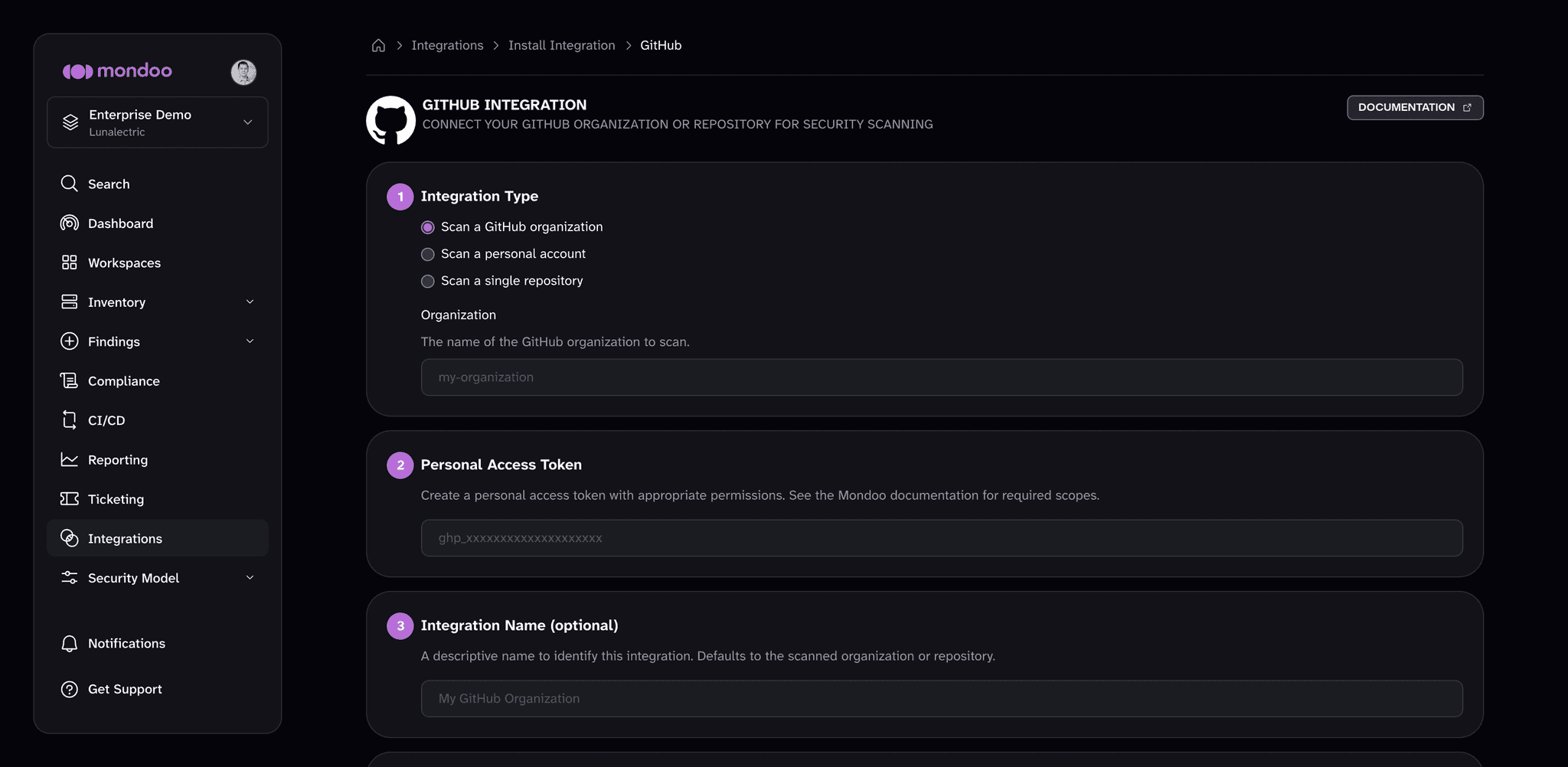
Under Integration Type, choose what to scan:
- Scan a GitHub organization. In Organization, enter the organization name.
- Scan a personal account. In Account, enter the login of the personal GitHub account.
- Scan a single repository. Enter the Owner and Repository names from the repo's URL. For example, if the URL is
github.com/Lunalectric/frontend, the owner isLunalectricand the repo isfrontend.
-
Paste your personal access token into Personal Access Token.
-
(Optional) In Integration Name, enter a name that identifies the GitHub organization, account, or repository. If you leave it empty, Mondoo uses the name of the organization or repository you scan.
-
(Optional) For GitHub Enterprise Server, enter your server's URL (for example,
https://github.mycompany.com) in GitHub Enterprise Server URL. Leave it empty for github.com. -
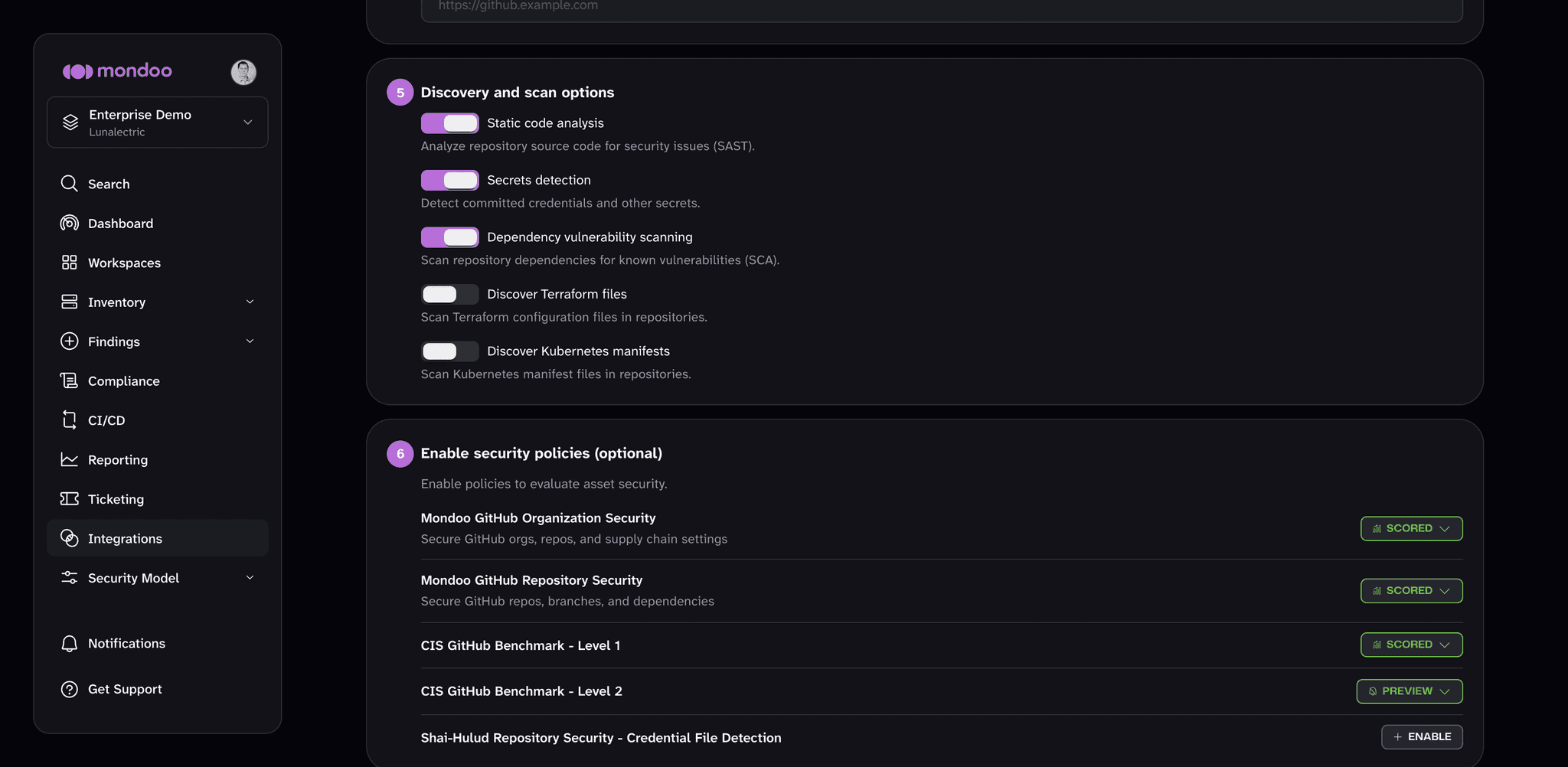
Under Discovery and scan options, turn on what you want Mondoo to scan inside the repositories:
- Static code analysis (on by default): analyze repository source code for security issues (SAST).
- Secrets detection (on by default): detect committed credentials and other secrets.
- Dependency vulnerability scanning (on by default): scan repository dependencies for known vulnerabilities (SCA).
- Discover Terraform files: scan Terraform configuration files in the repositories.
- Discover Kubernetes manifests: scan Kubernetes manifest files in the repositories.
-
(Optional) Under Enable security policies (optional), enable the policies you want Mondoo to score your GitHub assets against.
-
(Optional) Under Set Annotations (optional), select + ADD ANNOTATION to add key-value pairs that Mondoo applies to every asset this integration discovers. To learn more, read Annotate assets.
-
Select START SCANNING.
Mondoo scores this integration against the policies you enable under Enable security policies (optional) in the setup form. You can enable or disable policies at any time. To learn how policies work, read Manage Policies.
After you connect
Once GitHub scanning is enabled, explore your asset inventory, then assess and improve your security to review and prioritize your findings.