Plan Your Mondoo Organization - Overview
Plan how to structure your assets in Mondoo using regions, organizations, spaces, and workspaces.
Mondoo finds, prioritizes, and resolves vulnerabilities and misconfigurations across cloud platforms, workstations, servers, containers, SaaS applications, network devices, and more. Every individual thing Mondoo scans is an asset.
Most companies have hundreds or thousands of assets. To keep them manageable, Mondoo gives you four ways to group assets: regions, organizations, spaces, and workspaces. A good structure lets you apply the right security policies to the right assets, control which team members can access what, and focus on the parts of your infrastructure that matter most.
Plan your structure before you roll Mondoo out across your fleet. This page explains each level so you can decide what works for your company.
In a hurry? You don't have to design all of this before you try Mondoo. Start with a single space, connect one asset, and reorganize later. The Platform Quickstart gets you to your first findings fast. Come back here when you're ready to structure a real fleet.
-
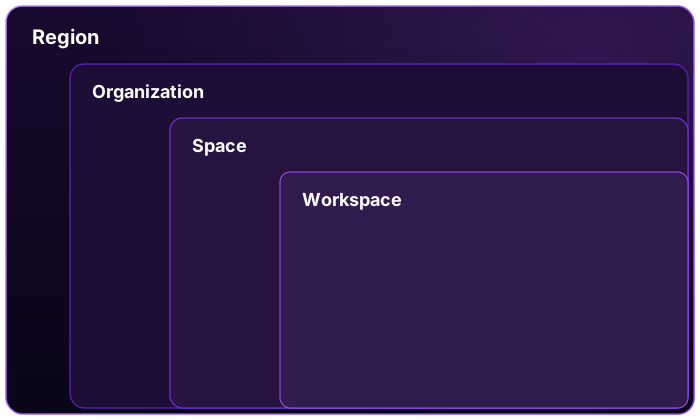
A region is where Mondoo stores your data. Regions let you follow localized data protection requirements such as GDPR. Mondoo currently supports two regions: US and EU. Privately hosted Mondoo Enterprise accounts run in a single region.
-
An organization separates the major parts of your business and controls which team members can access them. Most Mondoo customers need only one organization. Consider creating more than one only if you have business divisions that operate very differently and have separate dedicated teams.
-
A space is a collection of assets you manage together, along with their policies, compliance frameworks, security models, ticket system integrations, and reports. You can also control team member access separately for each space. Most Mondoo customers use several spaces.
-
A workspace is an ad hoc group of assets you want to view together. You might create a workspace for a project, for tracking a particular problem across your infrastructure, or for a single type of asset. As with spaces, you can control team member access separately for each workspace.
Organizations, spaces, and workspaces all have their own access controls. You can add a team member at any of these levels, which gives you precise control over what each person can see, from your whole organization down to a single workspace.
Regions, organizations, and spaces form a strict hierarchy:
- Each organization belongs to exactly one region.
- Each space belongs to exactly one organization.
- Each asset belongs to exactly one space.
Workspaces sit outside this hierarchy. They're flexible views, so the same asset can appear in any number of workspaces.
Examples of organizations
Imagine a US-based company called Lunalectric that makes rovers and rockets for space exploration. Lunalectric's business structure is divided by product type. There's a division focused on rovers and another focused on rockets. There's also a Commerce division containing finance, marketing, human resources, and so on. The company has a single operations team and a single security team.
Here's one way Lunalectric might organize their assets in Mondoo:
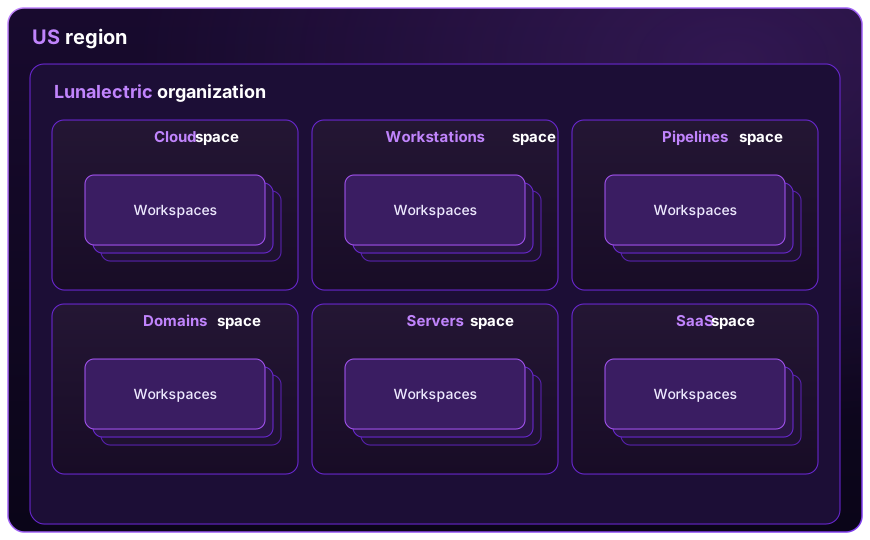
In this example, Lunalectric creates a single organization that contains a different space for each type of asset they monitor with Mondoo. Their AWS assets go in the Cloud space, all employee laptops are in the Workstations space, and so on. Each space contains many different workspaces for the different views and perspectives they need to assess.
Here's an alternative way Lunalectric might organize their assets:
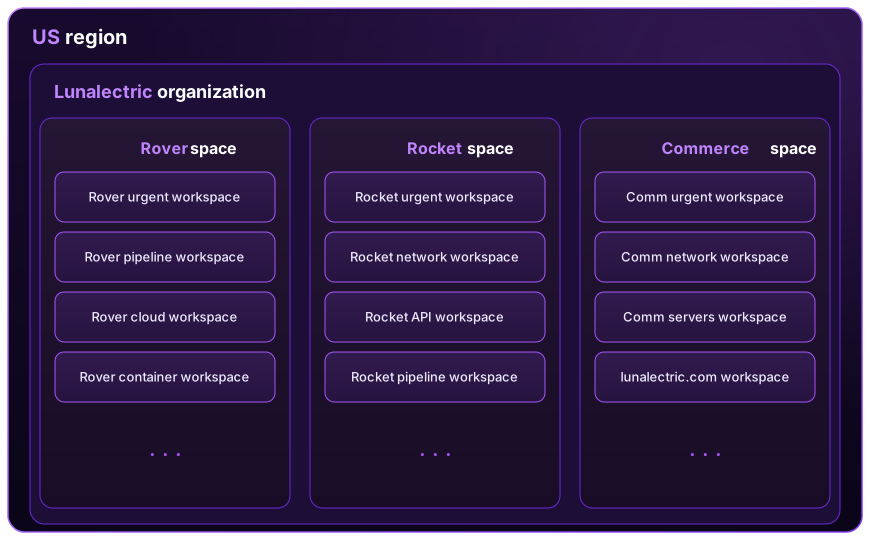
In this second example, Lunalectric creates a single organization that contains three spaces: one space for each business division. Each space contains a very large number of assets.
The Lunalectric team relies on many different workspaces, some examples of which are shown in the diagram above, to view subsets of assets in the different spaces. For example:
-
Each space has an "urgent" workspace that shows all the assets in the space that have serious security issues requiring immediate attention.
-
The Rocket space has a workspace that shows only assets used on federal projects.
-
The Rover space has workspaces dedicated to cloud assets.
-
Within the Rocket space, one team member, Stella, created a workspace to focus on assets relevant to her current projects.
-
The Commerce space includes a workspace specifically for assessing the security of Lunalectric web properties.
The best structure for you
There's no right way to organize your assets in Mondoo. Take some time to understand what you need to learn from Mondoo and outline a couple of different organizational ideas.
Once you have a plan, the next step is to integrate your assets so Mondoo can begin assessing them.