Mondoo Release Highlights October 2026
Introduction
This month, Mondoo secures more of what you run than ever before: the domains attackers probe from the outside, the AI agents on your developers' laptops, the cloud and SaaS platforms your teams depend on, the databases and network appliances behind them, and the code that ties it all together.
The new attack surface scanner starts from nothing more than your domain name and shows you your organization the way attackers see it. AI Security is now generally available, so the agents, MCP servers, and models across your fleet become an inventory you review and govern. And coverage grew on every front: six new providers, vulnerability detection on more platforms, 10,000+ more applications in the Mondoo Vulnerability Database, end-of-life detection for 300+ more applications, and 38 new CIS benchmarks spanning operating systems, databases, Kubernetes, network devices, browsers, and Office.
Acting on what you find got faster too. Your dashboard tells you whether the vulnerability in today's headlines affects you, xgrep inventories the AI and cryptography in your code, Windows scans over SSH finish 3x to 10x faster, SLAs are set once for the whole organization, every asset shows how its risk changed over the last 90 days, and every exception shows its full history from request to expiration. Let's dive in.
Attack Surface Scanning: See What Attackers See
Attackers do not start with your asset inventory. They start with your domain name, and from there they find the forgotten subdomain, the expiring certificate, the open port, and the staging site nobody took down. The new attack surface scanner gives you the same view from the outside in, with nothing to install.
Every Domain You Own, in One View
Give Mondoo a domain and it does the rest. It discovers the subdomains and hosts behind it, scans each one from Mondoo's own infrastructure, and keeps scanning on the cadence you choose. Whether your organization runs a handful of domains or thousands, the Attack surface page in each space shows all of them in one place: your overall external risk, how it changes over time, and every host Mondoo found, with its risk score, open findings, and when it was last scanned.
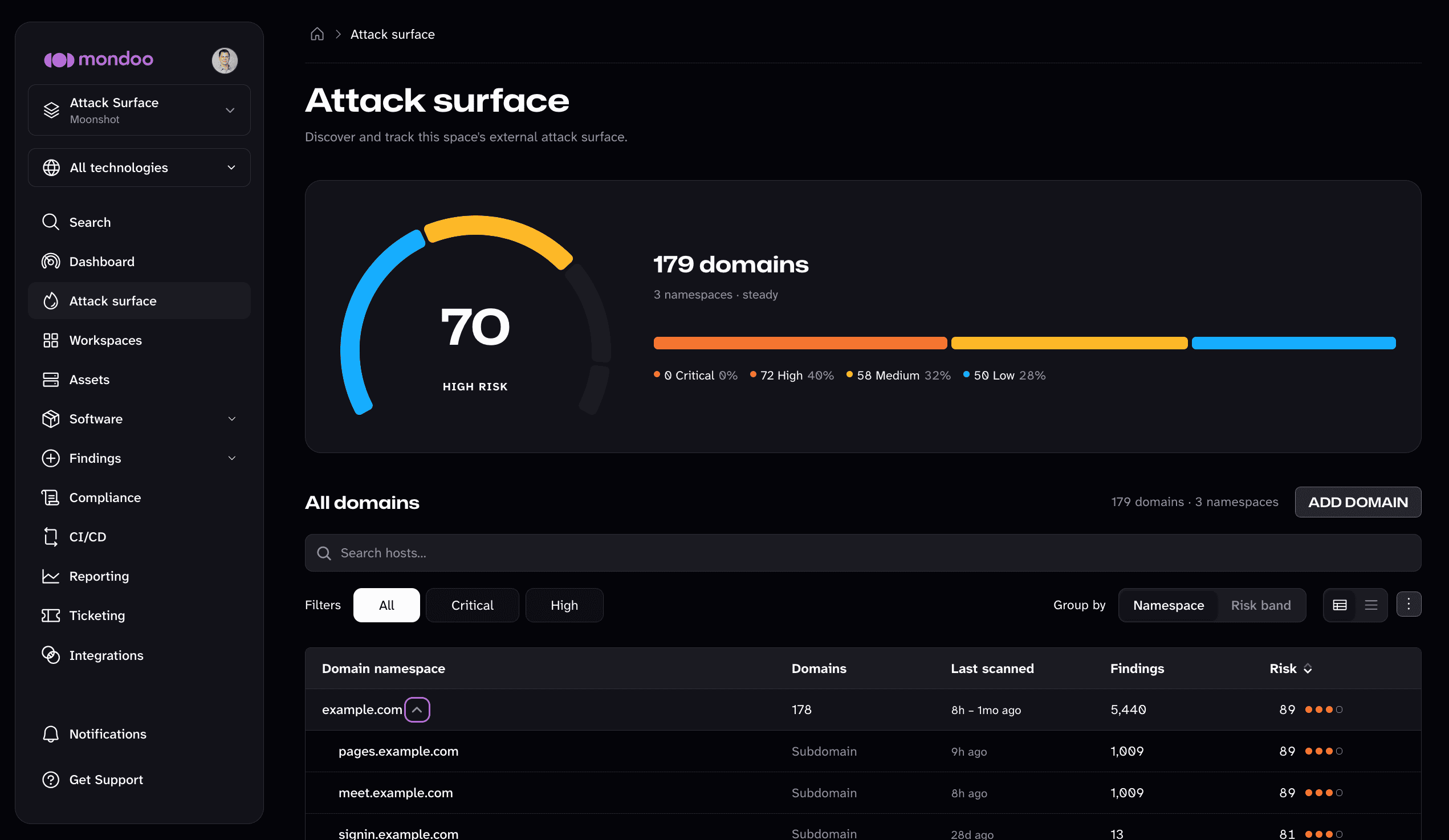
This is where the scanner earns its keep. Every organization accumulates hosts it no longer thinks about: the campaign site from three years ago, the developer's weekend experiment on a spare subdomain, the staging environment that outlived its project, the vendor tool someone pointed a CNAME at and forgot. None of them show up in your asset inventory, and all of them are still on the internet, running software nobody patches. Group the list by domain or by risk band, filter to critical and high, and the hosts you forgot about rise to the top.
A Map of Each Host, the Way an Attacker Sees It
Select a host and Mondoo maps its external exposure: the open ports, the third-party services attached to it, and the web technologies it runs. A Risk Profile scores the host and shows what drives that score, including known exploits, blast radius, and whether its vulnerabilities are in the news.
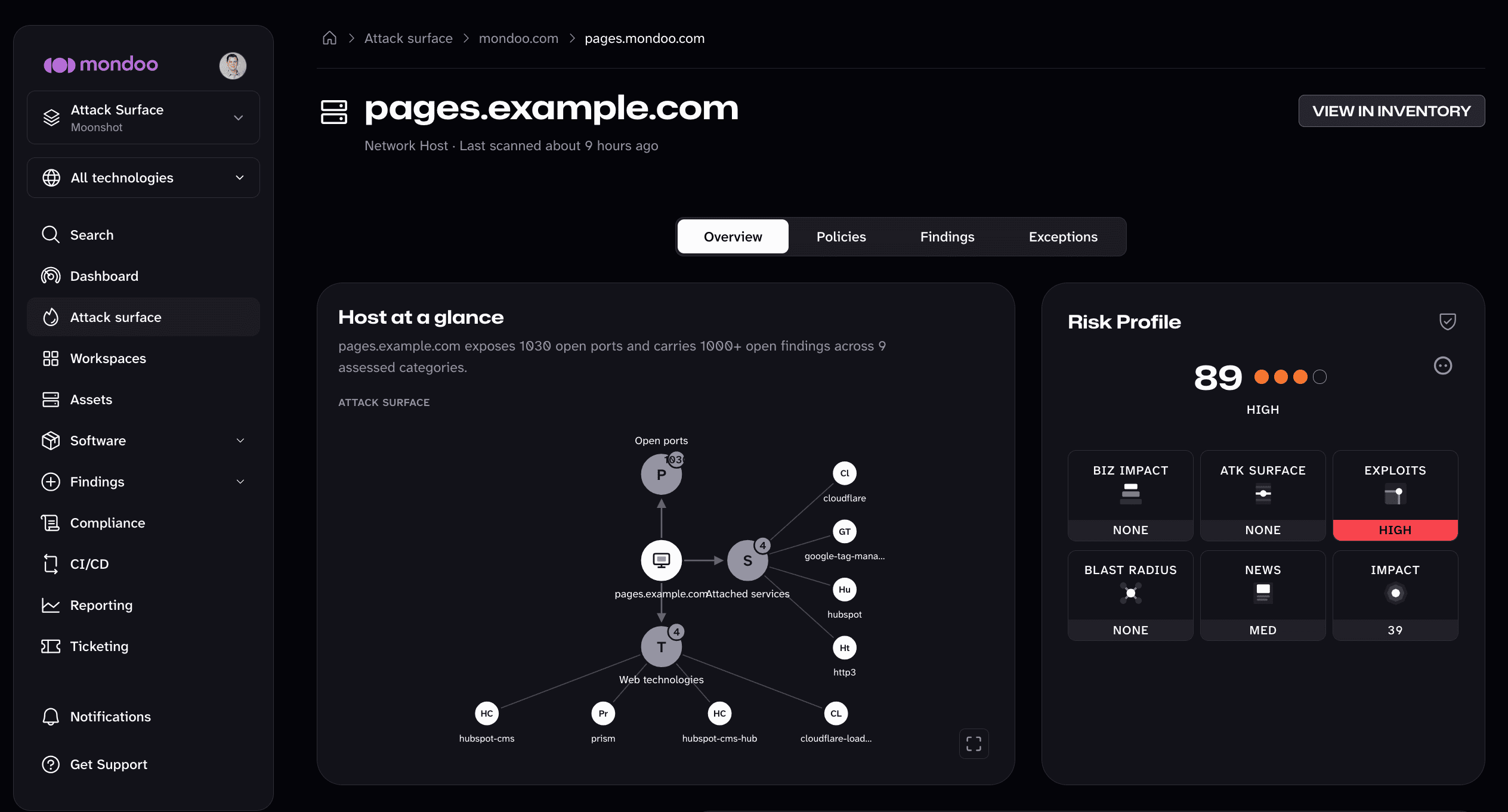
Behind the map, every scan runs a full set of assessments:
- TLS, HTTP, DNS, and email security. Certificate and TLS configuration, HTTP security headers, DNS configuration, and SPF, DKIM, and DMARC for every domain you send mail from.
- Discovery. Subdomain enumeration, a port scan that finds open ports and exposed services, and fingerprinting of the web technologies each host runs.
- Vulnerabilities. Known vulnerabilities in the services Mondoo finds, mapped to MITRE ATT&CK, plus active checks against known vulnerability and misconfiguration signatures.
From the host, dive into each risk category to find the exposures that need to be plugged. Open Ports & Services, for example, lists every port Mondoo found open and the service answering on it, such as a cPanel or WHM admin console, so you can confirm what is meant to be exposed and close the rest.
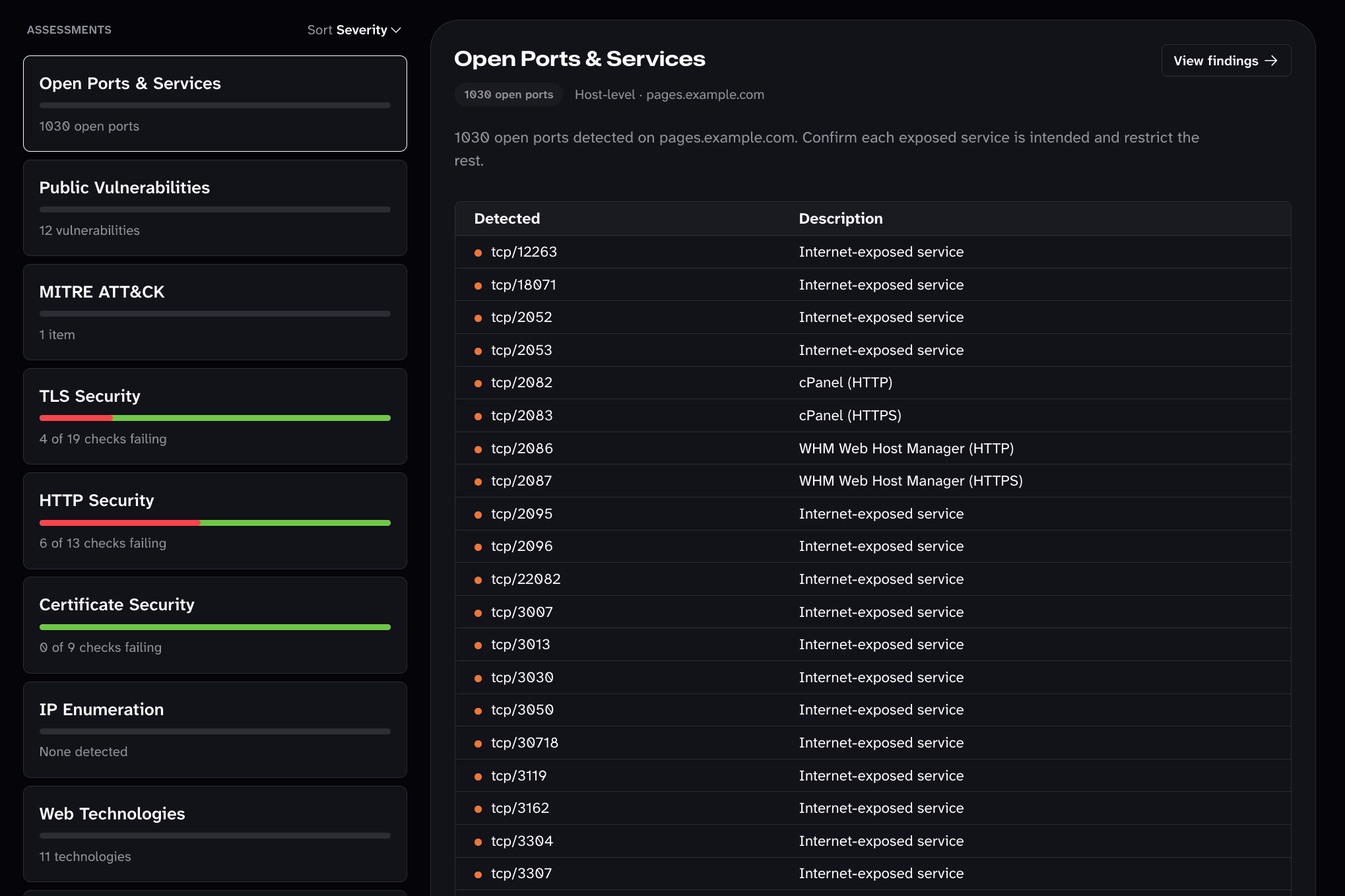
When you want to go deeper, turn on subdomain takeover detection for dangling DNS records, cloud resource discovery for exposed AWS, Azure, and GCP resources, and a dynamic web application scan (DAST) that crawls your web apps. These are off by default because they take longer and probe more actively.
Results land where the rest of your security work happens. Each host lists its findings, policies, and exceptions, so an exposed service gets triaged, fixed, or accepted like any other finding.
To get started, open Attack surface in a space, and Mondoo prompts you to add your first domain. To scan more domains later, select Add domain on the same page.
AI Security Is Generally Available
Your developers are installing AI agents, wiring them to MCP servers, and handing them skills faster than any approval process can keep up. You cannot govern what you cannot see, and most security teams cannot see any of it.
AI Security, which we introduced earlier this year, is now generally available to every Mondoo organization. It turns the AI tooling scattered across your laptops, servers, and repositories into an inventory you can review:
- One dashboard for your AI footprint. See how many AI components run across your fleet, how many assets run agents, what is awaiting your review, and what you have denied, along with the most widespread agents, MCP servers, and skills.
- Inventory by kind. Dedicated views list every agent, MCP server, model, and skill Mondoo finds, plus the repositories that carry AI configuration. Each detail page lists every installation, and you can search and sort the installations to find a specific host fast.
- A graph of how it connects. The graph view shows which agents use which MCP servers, models, and skills, and where they run, so a risky MCP server leads you straight to every agent that can call it.
- Review decisions that stick. Mark each agent, MCP server, or skill as allowed, denied, or out of scope. New tools show up as awaiting review, so shadow AI stops being something you discover by accident.
- Organization and space views. Work on one space at a time, or see your whole organization's AI footprint in one place.
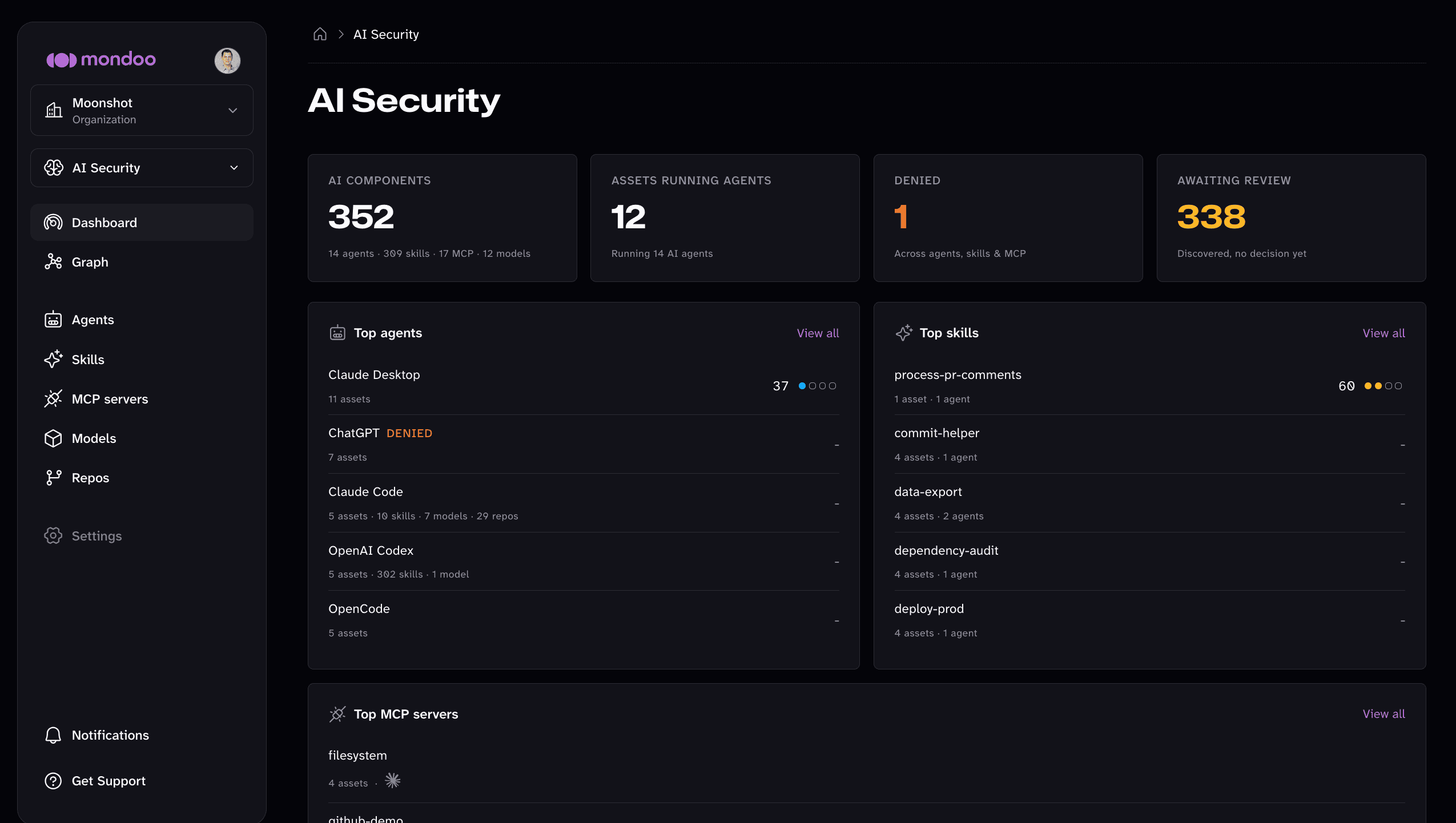
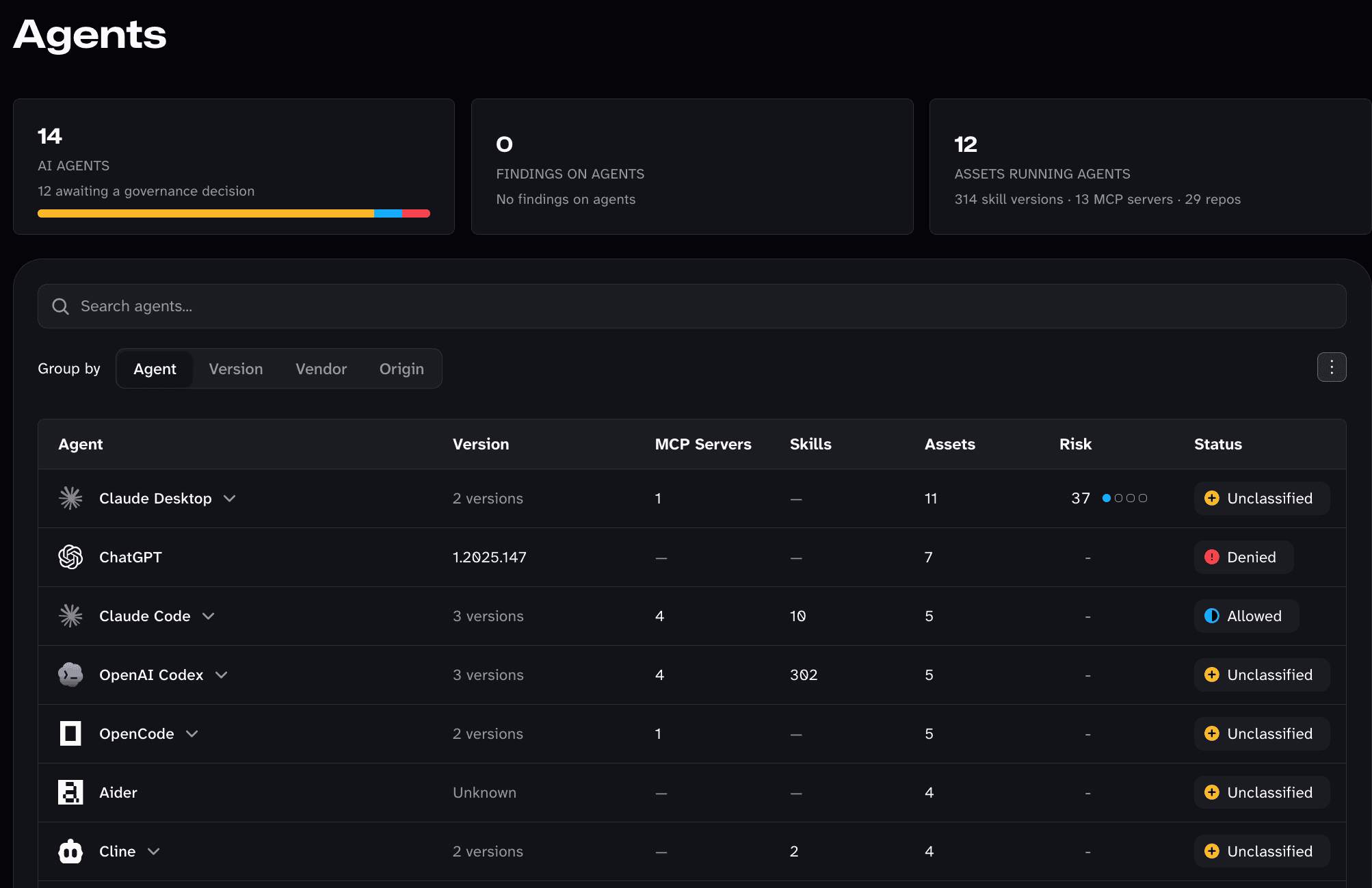
From the dashboard, open Agents to see where AI agents are being used across your organization. Every agent Mondoo finds gets a row with the versions in use, the MCP servers deployed to it, the skills installed in it, how many assets run it, its risk, and your review decision. One glance tells you that Claude Code is allowed and wired to four MCP servers, that ChatGPT is denied but still installed on seven assets, and that a dozen more agents are waiting for a decision. Group the list by version, vendor, or origin to spot outdated releases and unapproved vendors, and expand any agent to see each version and where it runs.
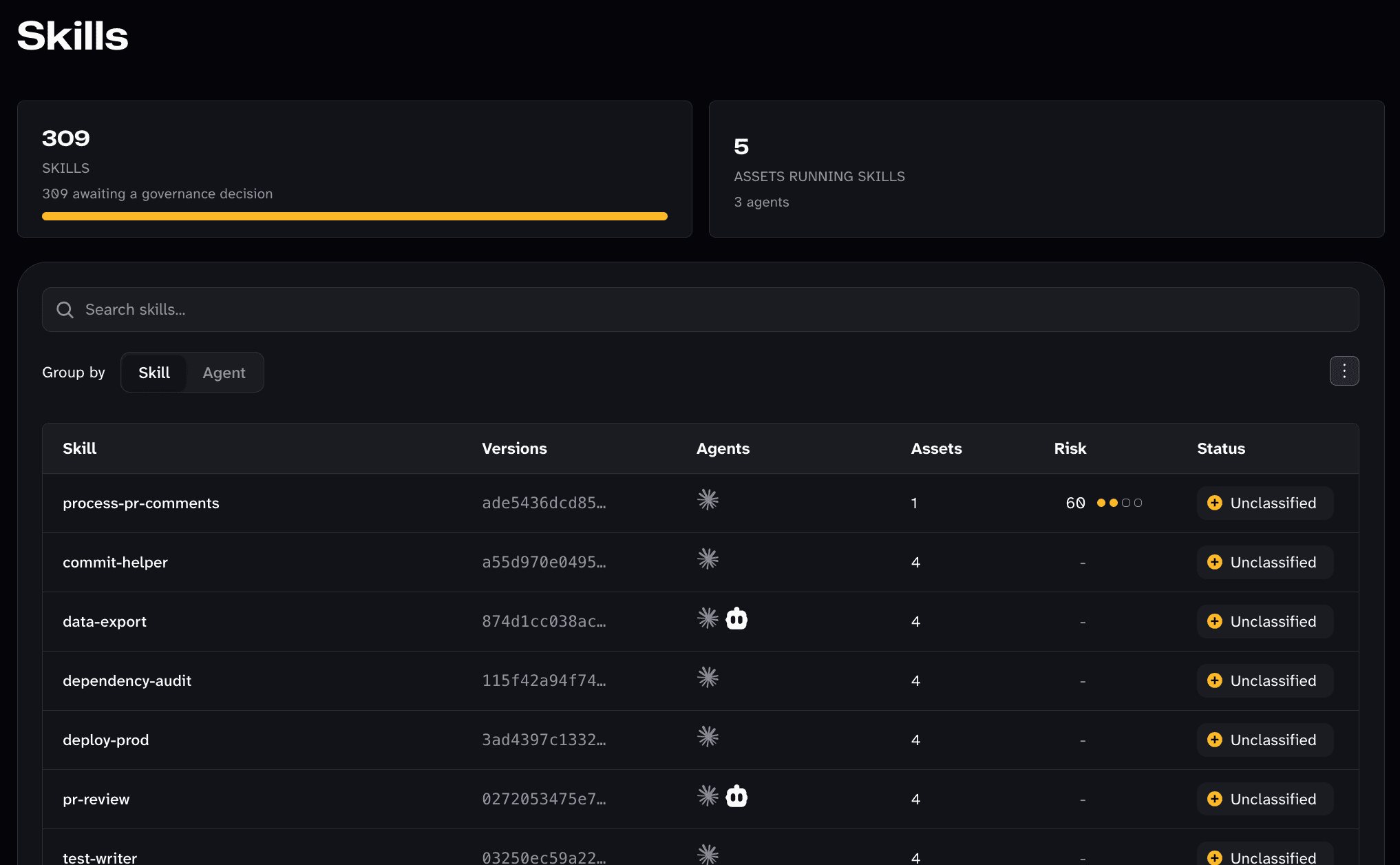
Skills deserve the same scrutiny. A skill hands an agent new instructions and abilities, and names like deploy-prod and data-export tell you exactly why you want to know where they are installed. The Skills view lists every skill Mondoo finds, with the agents that load it, how many assets carry it, its risk, and your review decision. Each version is identified by a hash, so you can tell which copy of a skill is running where. Group by agent to see everything a single agent has been taught.
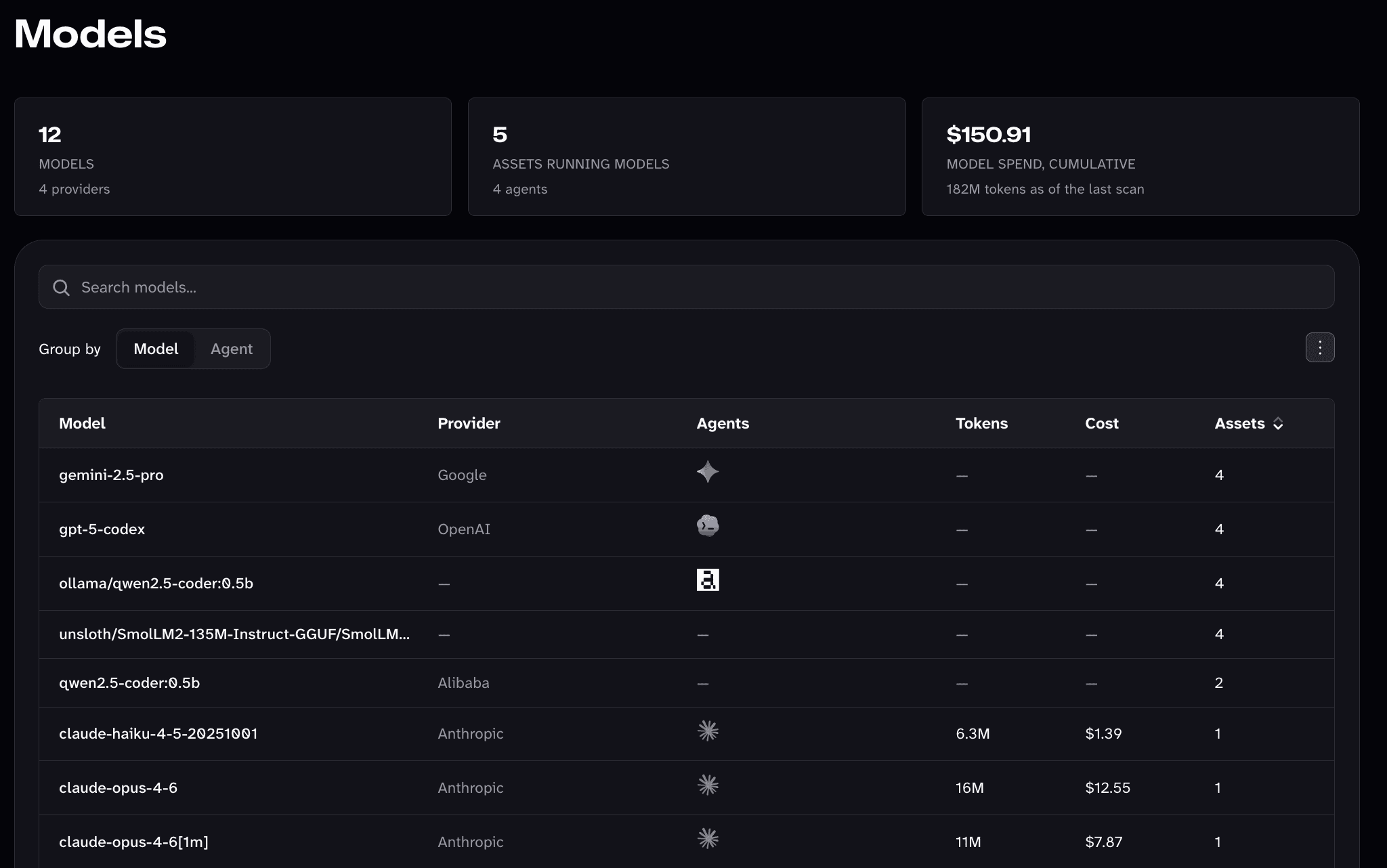
Then trace that usage back to spend. The Models view lists every model your employees' agents call, from hosted models at Anthropic, OpenAI, and Google to small local models pulled down through Ollama, with the provider, the agents that use each one, and how many assets run it. Where an agent records its usage, Mondoo adds the tokens consumed and what they cost, and totals your model spend across the organization, so you can see which models your teams lean on and what that costs.
And that is only part of it. The MCP servers and Repos views and the Graph show what your agents can reach and where AI configuration lives in your code. Open AI Security in your organization or any space and dive in today.
The inventory keeps getting broader. This month Mondoo learned to detect the Devin CLI and Devin Desktop, the Cursor CLI, the CodeRabbit CLI, DeepSeek Harness, Breezell, ZCode, Qualia, Builder.io, and the Claude Platform CLI. It also now reports the MCP servers, plugins, and extensions configured across every AI agent it detects, and reads the agent instruction files that tell those agents how to behave.
Query AI Usage on the Desktop and in the Cloud
Knowing an AI tool is installed is the start. The harder questions are how it is configured, who is using it, and what it is allowed to do. October added 60+ new MQL resources and hundreds of new fields to answer them, on every laptop and in every AI platform you run.
On the desktop:
- Is the agent locked down? Mondoo reads Claude Code's managed policy from every source IT can set it in (server-managed settings, MDM profiles, managed settings files, and Windows policy) and reports the effective result: whether users can turn on bypass mode, run commands outside the sandbox, or add MCP servers IT has not approved. For OpenAI Codex, it reports the approval policy, the sandbox mode, and the limits IT enforces, so you can find every machine where Codex runs commands without asking.
- What runs automatically? New resources model the hooks of Claude Code, Gemini CLI, and Codex, the commands an agent runs on its own at points in a session.
- What can each MCP server reach? Every MCP server resource, across 19 AI tools, now reports the same details: the environment variable and header names it receives, never their values, and the package it comes from. Secrets in AI tool settings, MCP server arguments and URLs, and git remotes are redacted.
- Is a model file safe to load?
ai.modelreports whether loading a model's weights runs code stored in them, such as a Python pickle, along with the weight digests its source records. - Are the operating system's AI features allowed? New
windows.recall,windows.copilot, andmacos.appleIntelligenceresources report whether Windows Recall, Windows Copilot, and Apple Intelligence are turned off by policy. - What do agents know? Vendor-neutral
agentinstructionsandagentskillsresources read the instruction files and Agent Skills that shape how every agent behaves, along with new skills, extensions, plugins, and hooks for Gemini CLI, GitHub Copilot, Claude Desktop, and more.
In the cloud:
- Who is using Claude and OpenAI, and how much? Usage and cost reports for both platforms now attribute every row to an API key, a member, a service account, or a project, so you can find dormant keys and see where your AI spend goes.
- Who can do what in your Claude organization? New resources cover RBAC groups and roles, effective spend limits, plugins and plugin marketplaces, customer-managed encryption keys, webhooks, Compliance API state, and enforcement actions on user profiles.
- Can your Amazon Bedrock AgentCore agents reach the internet? AgentCore browsers, code interpreters, and runtimes report their network mode, subnets, and security groups. Runtimes and gateways report who can invoke them, including whether a resource policy makes them public, and browsers report where session recordings are stored.
- Where do your Amazon Bedrock prompts and agent memories go? Model invocation logging now links to the CloudWatch log group, S3 buckets, and IAM role that receive prompts and completions, so a check can follow them to their retention, encryption, and public access settings. AgentCore memory reports its KMS key, execution role, event retention, and the Kinesis streams it sends records to. Guardrails report their contextual grounding filters, which catch hallucinated or off-topic answers, along with automated reasoning policies and cross-region routing. Batch inference jobs report their VPC, encryption key, and input and output buckets.
- Is Azure AI logged, watched, and private? Azure AI Services (including Azure OpenAI), Azure Machine Learning workspaces, and Azure AI Search now report their diagnostic settings, so you know whether model calls and index queries are logged anywhere. A new resource reads the subscription's Microsoft Defender for AI Services plan. AI Services accounts and AI Search services report whether they are reachable from the internet, Machine Learning compute reports public node IPs and public SSH access, and workspaces and search services list their role assignments, inherited ones included.
- Does your Google Cloud AI safety baseline reach every project? Model Armor floor settings are now readable at the organization and folder level that every project inherits, including whether traffic to Google-hosted MCP servers is screened. Vertex AI endpoints report whether they are reachable from the internet, RAG corpora report where their embeddings live and which secret holds the vector database key, and Vertex AI Search data stores report whether their customer-managed key still works and which Google Workspace content they index.
- Where can your OCI AI workloads be reached from? New resources list Generative AI and Data Science private endpoints with their subnets and network security groups. Model deployments report whether they have internet egress, along with their access and predict logs, and Generative AI agents report their knowledge bases, the subnets their tools call out from, and where endpoint output is stored.
More of Your Environment, Covered
Every security program runs into the same wall eventually: the systems nobody is checking. This month Mondoo reaches further into every kind of system you run, from public cloud and SaaS to databases, network appliances, Kubernetes, servers, and desktops, on three fronts at once.
- New things to scan. Six new providers bring Azure DevOps, CockroachDB, Exoscale, IBM Cloud, n8n, and NetScaler ADC and Gateway into Mondoo, for more than 100 providers out of the box. MQL gained 500+ new resources and 2,900+ new fields across new and existing platforms.
- New places to find and fix vulnerabilities. Vulnerability detection reaches new Linux distributions, FreeBSD, NetScaler appliances, and every edition of Microsoft Office. The Mondoo Vulnerability Database grew by 10,000+ applications, and end-of-life detection now covers 300+ more applications.
- New benchmarks to measure against. 38 new CIS benchmarks with 5,400+ checks, a new TISAX framework, NIST SP 800-171 Revision 3, and 7,700+ new control mappings that tie those checks to the frameworks you report on.
The next three sections cover each front in detail. Start with the one closest to your environment.
New Providers and 500+ New MQL Resources
Six New Providers
Each new provider comes with a policy or benchmark ready to run, so a new platform goes from unscanned to measured on its first scan:
- Azure DevOps: Your source code and the pipelines that ship it deserve the same scrutiny as production. Check the security settings of your Azure DevOps repositories with the new Mondoo Azure DevOps Repository Security policy.
- CockroachDB: Hold your distributed SQL clusters to the new CIS CockroachDB benchmark.
- Exoscale: Scan Exoscale organizations, compute instances, security groups, network load balancers, SKS clusters, and DBaaS services, with the new Mondoo Exoscale Security policy.
- IBM Cloud: Discover IBM Cloud accounts, VPC instances and security groups, and Power workspaces, and check them against the CIS IBM Cloud Foundations benchmark.
- n8n: Your workflow automation holds credentials for every system it connects. Scan n8n instances for their workflows and nodes, credentials, users, community packages, security settings, and n8n's own security audit.
- NetScaler ADC and Gateway: The appliances in front of your applications and remote access are some of the most targeted devices on the internet. Assess virtual servers, authentication policies, command policies, and cluster and high availability configuration.
Deeper Coverage Where You Already Scan
MQL gained 521 new resources and 2,977 new fields this month, and most of them deepen the platforms you already scan:
- AIX: 16 new resources for the AIX audit subsystem, IP security filter rules, Trusted Execution, password and login configuration, per-user security limits, ODM device attributes,
/etc/inittab, and/etc/filesystems. Mondoo also reads AIX memory, network interfaces and routes, and tunables, and detects PowerVM. - Container runtimes: New resources for the Docker Engine daemon, containerd configuration and registry hosts, CRI-O, Podman, and the
registries.confthat Podman, Buildah, Skopeo, and CRI-O share, plus confinement, host namespace, mount, and resource limit details on every container. Kubelet coverage grew to include drop-ins, certificates, kubeconfig, static pods, and hardening settings. - Microsoft Entra ID: 47 new resources covering administrative units, cross-tenant access partners, PIM role assignments and PIM for Groups, entitlement management, token lifetime and claims mapping policies, workload identities, Windows LAPS and BitLocker key escrow, and directory audit and provisioning logs.
- Network devices: PAN-OS gained 54 new resources, FortiOS 13, and Junos 5, giving the new network device benchmarks the data they need.
- Linux hardening: New resources for the system-wide crypto policy,
pwqualitypassword rules,authselect, the GNOMEdconfsettings, the defaultumask, and the audit rules the kernel has actually loaded. - Windows: On-premises Exchange Server configuration, hotpatch status, and ten more Microsoft Defender Antivirus preferences.
- Cloud and virtualization: AWS organization Config rules and conformance packs, Config retention, and Security Hub configuration policies; Microsoft Defender for Cloud governance, Sentinel data connectors, Azure Monitor private link scopes, and policy remediations and attestations; GCP tag keys, tag values, and Assured Workloads; STACKIT organization and folder role bindings, project internet access, Object Storage compliance locks, and SFS snapshot policies; and VM hardening settings, legacy devices, and distributed switch and port group settings on VMware vSphere.
Community Spotlight
Maximilian Rink of Deutsche Telekom contributed 20 new resources for FRRouting (FRR), covering both its configuration and its live routing state, including BGP neighbors and their address families. If FRR routes traffic in your network, you can now check what it is configured to do and what it is actually doing. Maximilian also built node scan profiles and a series of memory improvements for the Mondoo Kubernetes Operator. Thank you, Maximilian!
Expanded Vulnerability Support
You cannot fix a vulnerability on a platform you are not watching, in software you cannot name, or in a product its vendor has stopped patching. October widens all three: Mondoo matches vulnerabilities on more operating systems, network appliances, and editions of Microsoft Office, knows thousands more applications by name, and tells you when the software and operating systems you run have reached end of life.
Vulnerability Detection on More Platforms
Mondoo now detects vulnerabilities on:
- Alibaba Cloud Linux, MIRACLE LINUX, and TencentOS Server, with advisories straight from each release's own update metadata. Mondoo identifies all three, so their assets get the same vulnerability findings and fixed versions as the rest of your Linux fleet.
- FreeBSD packages, from the FreeBSD project's own vulnerability database, completing the FreeBSD support that arrived last month.
- NetScaler ADC and Gateway, so the appliances in front of your applications and remote access report their CVEs alongside the configuration checks of the new NetScaler provider.
- Windows 11 26H2, from its September 29 release, including Enterprise multi-session hosts on Azure Virtual Desktop, so upgraded machines keep their vulnerability findings and end-of-life date from day one.
- Amazon Linux 2027, while it is still in public preview, so you can adopt it without a gap in coverage.
- Alpine Linux back to 3.2, for the old base images that are still running somewhere in your containers.
- Every edition of Microsoft Office on Windows, Click-to-Run and volume licensed alike: the retail suites, Visio, Project, OneNote, and the Access Runtime all get Microsoft 365 Apps advisories and their fixed builds.
- PHP, Apache, MariaDB and MySQL, and OpenSSL installed on Windows, which Mondoo now reports as packages, so they get vulnerability findings and fixed versions just like they do on Linux.
Behind those matches are five new advisory sources: Alibaba Cloud Linux, MIRACLE LINUX, TencentOS Server, FreeBSD, and NetScaler. Mondoo also identifies CleanStart OS and SUSE Linux Micro 6, including Harvester nodes.
10,000+ More Applications in the Mondoo Vulnerability Database
10,000+ more applications joined the Mondoo Vulnerability Database this month. They range from developer tools and desktop utilities to industrial, medical, and line-of-business software, and include the top apps from Homebrew and the Microsoft Store, observed on real macOS and Windows installs.
Each one resolves to a vendor, a product name, a plain-language description, and a product page, whatever name it goes by on the asset. So when an advisory names one of them, Mondoo knows exactly which of your assets run it, and when you open a finding on a product nobody on your team recognizes, you already know what it is.
End-of-Life Detection for 300+ More Applications
Software that no longer gets security fixes is a vulnerability that never closes. This month Mondoo began reporting the end of life of 300+ more applications on every asset where they are installed. Many are products their vendors retired long ago that still turn up on real machines: Atom, Authy Desktop, Box Sync, Docker Toolbox, Google Backup and Sync, ICQ, Excel Viewer, InfoPath 2013, Lync Server 2013, Microsoft Baseline Security Analyzer, the Microsoft Deployment Toolkit, Shockwave Player, and Visual SourceSafe 2005 among them. Runtimes, frameworks, databases, and server applications gained lifecycle tracking too.
End-of-life tracking also covers two dozen more operating systems: Azure Linux and CBL-Mariner, CloudLinux, OpenCloudOS, Anolis OS, ALT Linux, Wind River Linux, eLxr, Bottlerocket, Talos Linux, Scientific Linux, Clear Linux, Qubes OS, Tails, MX Linux, Raspberry Pi OS, elementary OS, Zorin OS, SteamOS, NetBSD, OpenWrt, LEDE, MikroTik RouterOS, and MinimOS. On Windows, end-of-life tracking now also covers Windows 11 26H1, the release Microsoft ships only on new Arm devices.
MinimOS is a timely example. Its vendor stopped shipping images on October 22, so your MinimOS assets now show EOL instead of quietly aging in place.
Mondoo Platform also makes end-of-life software easier to act on:
- An End of life quick filter on an asset's findings, so you can pull up everything on a host that its vendor no longer supports.
- An end-of-life finding page that shows the product, the release cycle you run, the installed version, and the date it reached or reaches end of life.
- Critical, Vulnerable, and End of life quick filters on an asset's Software tab.
38 New CIS Benchmarks
A benchmark you cannot run automatically is a benchmark you audit once a year, by hand, and then hope nothing drifted. This month adds 38 new CIS benchmarks with 5,474 checks, so far more of your environment can be measured continuously against the standard your auditors already expect.
- Operating systems: Ubuntu 26.04 LTS, SUSE Linux Enterprise 16, Alibaba Cloud Linux 3, Wind River eLxr 12, Azure Container Linux, and Bottlerocket.
- Windows stand-alone: Windows 10, Windows 11, Windows Server 2019, Windows Server 2022, and Windows Server 2025, for machines that are not joined to a domain.
- Databases: PostgreSQL 13, 14, 15, and 16, MariaDB 10.6 and 10.11, Microsoft SQL Server 2022 and 2025, MongoDB 7, Apache Cassandra 4.1, and CockroachDB 25.
- Kubernetes: Amazon EKS Auto Mode, GKE Autopilot, AKS Automatic, and Oracle Container Engine for Kubernetes (OKE).
- Network devices: Palo Alto Firewall 11, FortiGate 7.4, and Juniper OS.
- Browsers and productivity: Google Chrome Group Policy, Mozilla Firefox ESR, Microsoft Office Enterprise, and Microsoft Intune for Office.
- Servers and containers: Docker, Apache Tomcat 9, and Microsoft IIS 10.
- Cloud foundations: IBM Cloud Foundations and DigitalOcean Foundations.
Updated Benchmarks
Existing benchmarks kept pace too, with 14 benchmarks moving to the latest CIS release:
- Linux: Red Hat Enterprise Linux 9, Rocky Linux 9, AlmaLinux 9, and Oracle Linux 9 v3.0.0, Debian Linux 13 v1.1.0, and Ubuntu 18.04 v2.2.0.
- Cloud and Kubernetes: AWS Foundations v7.0.0, Azure Kubernetes Service (AKS) v2.1.0, and Kubernetes v2.1.0.
- Windows and browsers: Windows 10 Enterprise v5.0.0 and Microsoft Edge v5.0.0.
- Servers and databases: Apache HTTP Server 2.4 v2.4.0, NGINX v3.1.0, and MongoDB 8 v2.0.0.
On top of that, 15 more benchmarks earned CIS certification, bringing the total to 122.
Compliance Frameworks
- VDA ISA 6 (TISAX): The information security assessment the automotive industry uses to qualify its suppliers is now a framework in Mondoo, so suppliers can track their readiness continuously instead of scrambling before an assessment.
- NIST SP 800-171 Revision 3: The framework moves to the current revision of the controls that protect Controlled Unclassified Information, so your evidence lines up with the requirements assessors now use.
- PCI DSS 4.0.1: The PCI DSS framework moves to the latest revision of the standard.
Behind those frameworks, 7,700+ new control mappings connect the new benchmarks to CIS Controls v8 and the other frameworks you report on, so a passing check counts as evidence the day you start scanning.
Know When the Vulnerability in the News Affects You
When a critical vulnerability makes headlines, the first question from your leadership is whether you are affected, and the answer cannot wait for a report. The organization and space dashboards now answer it with a new Headline Vulnerabilities card.
The card shows the vulnerability everyone is talking about right now, along with its CVEs, and tells you how many assets in your organization or space carry each one. Right now that is PHP2Shell, an unauthenticated remote code execution flaw in PHP that is being exploited in the wild. The Mondoo team updates the card as the news changes.
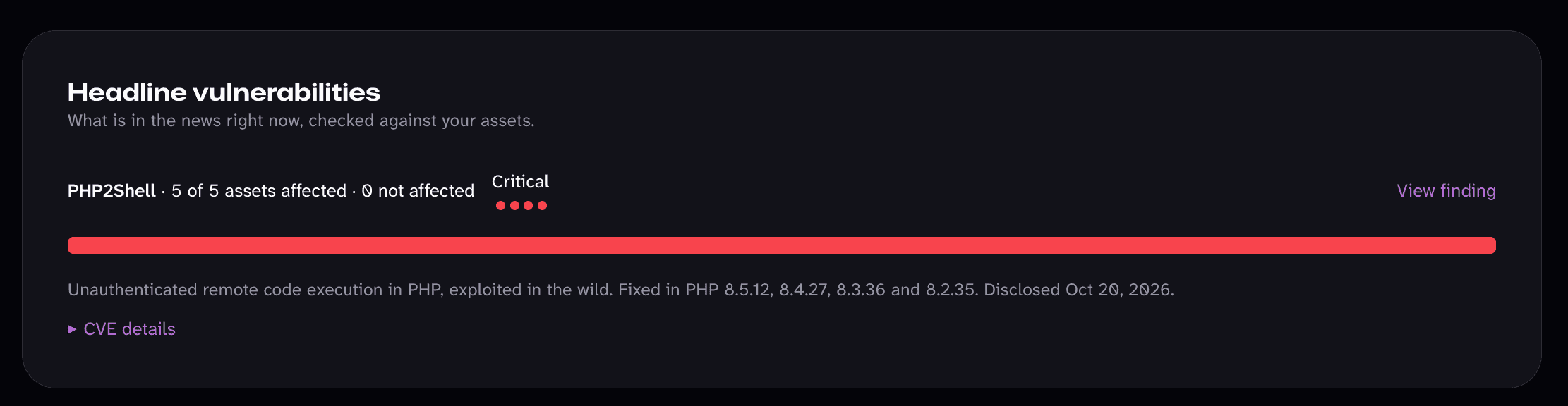
- Affected? The card moves to the top of the dashboard and shows how many assets carry each CVE, with a link straight to the finding so you can start fixing.
- Not affected? The card tells you how many assets Mondoo checked, so you can say you are in the clear with confidence.
Track Every Asset's Risk over 90 Days
A risk score tells you where an asset stands today. It does not tell you whether that asset is getting safer, getting worse, or quietly stuck, whether anyone has scanned it lately, or whether its findings are slipping past their deadlines. Those are the questions your team and your leadership actually ask.
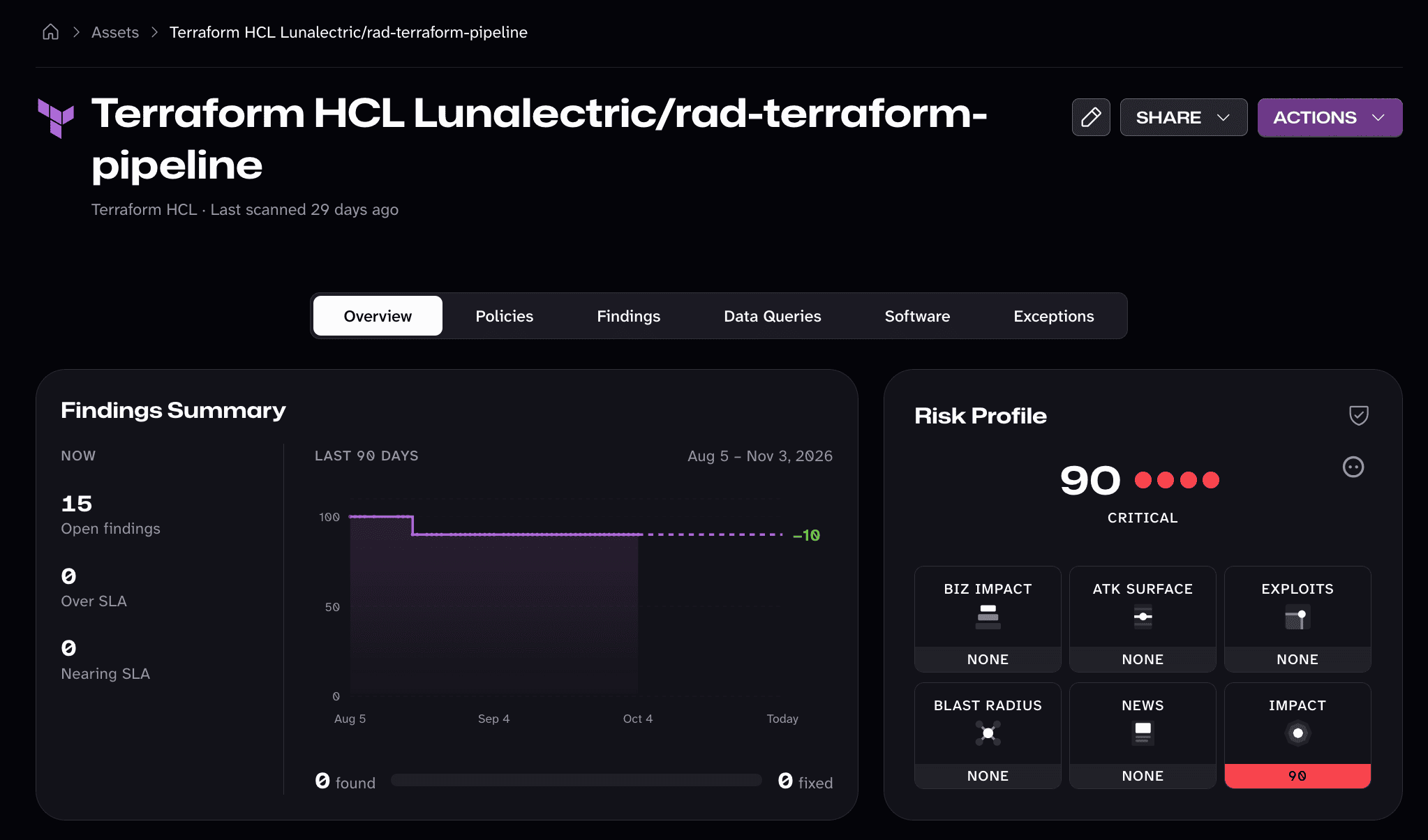
Every asset and CI/CD job overview now answers all three with a redesigned Findings Summary:
- How findings change over time. A 90-day trend shows how the asset's risk score moved with every scan, with the net change labeled at the end of the line. A single bar weighs the findings that appeared in that window against the ones you fixed, so you can tell at a glance whether your team is keeping up.
- Gaps in scanning. The line steps from scan to scan and never fills in a score Mondoo did not measure. The stretch since the last scan is dashed, so an asset that has not been scanned in weeks stands out instead of looking quietly healthy.
- Findings over SLA. Next to the open findings, the card counts how many are Over SLA or Nearing SLA on inventory assets, each one click from the asset's findings already filtered to what needs attention first.
Combined with the new organization-wide SLAs, you can set the standard once and see, asset by asset, whether it is being met.
Change an Asset's Settings in One Place
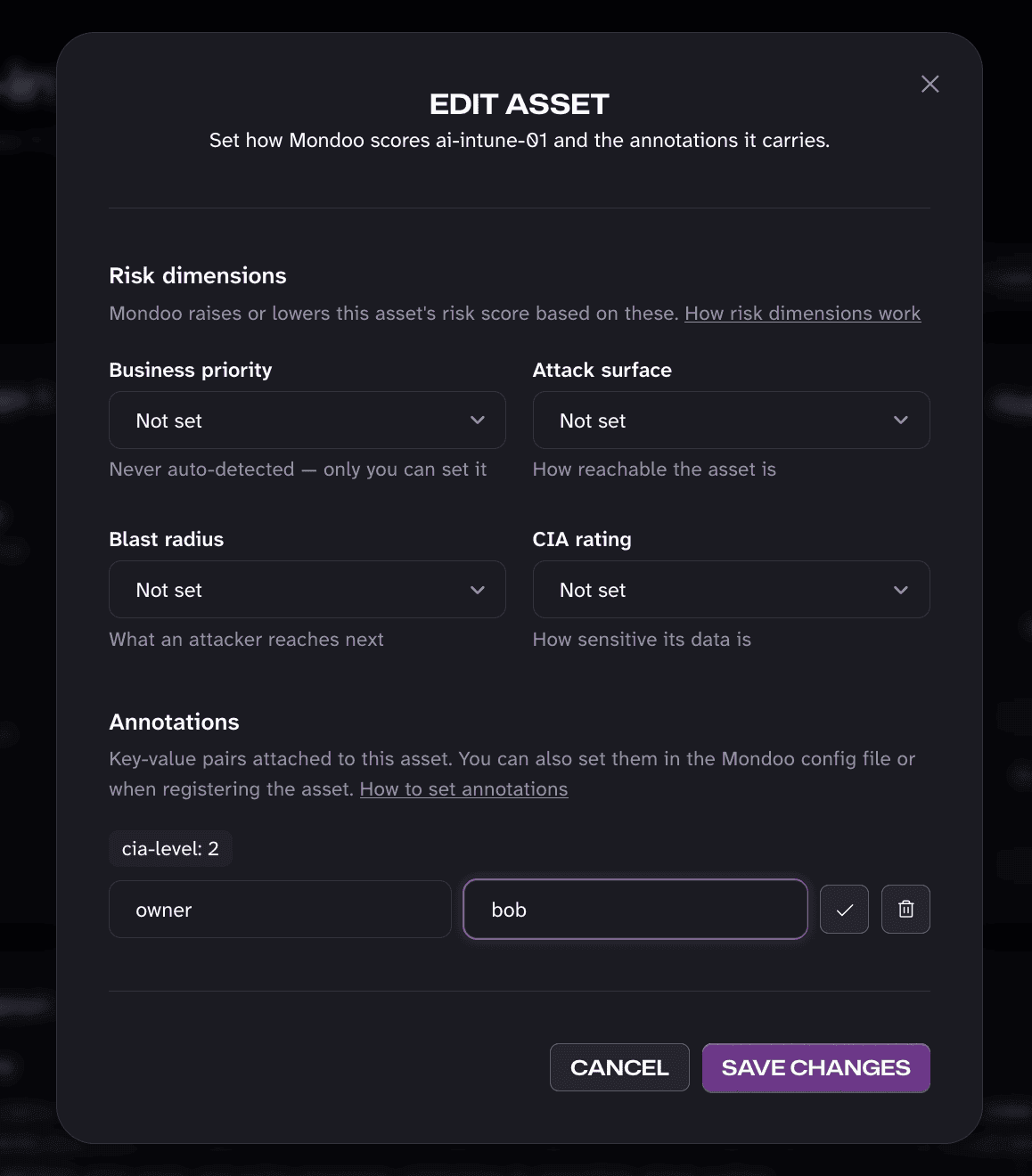
Spot something in the trend that does not look right? Need to change an asset's business priority or update the annotations it carries? An asset's risk score depends on context only you have: how critical it is to the business, how exposed it is, and how much damage it could do if compromised. Now you can change all of it from the new edit icon in the asset header, which opens a single dialog with the asset's business priority, attack surface, blast radius, and CIA rating, plus its annotations.
Each risk dimension picker tells you whether the value you chose raises or lowers the asset's risk, so you know the effect before you save. If you type a risk dimension key in the annotations, it moves into its picker, so nothing is edited in two places. The same dialog works on CI/CD job pages.
Read more in Annotations.
xgrep: Inventory the AI and Cryptography in Your Code
xgrep shipped more than 20 releases in October. The biggest changes help you answer two questions every security team is getting asked: which AI is running in our code, and which cryptography do we have to replace before quantum computers break it?
Every AI Agent, Model, and MCP Server
xgrep's AI Bill of Materials (AIBOM) now goes well beyond the SDKs a project imports. It inventories the agents, tools, MCP servers, models, and provider services your code actually uses, with new language packs for Go, Rust, Ruby, PHP, C#, Swift, Dart, Lua, PowerShell, Groovy, and the JVM languages. It reads model files by their headers (GGUF, safetensors, and ONNX), scans pickle files for code that runs when they load, finds inference servers and their models in Dockerfiles and Compose files, and picks up AI resources declared in Terraform and Kubernetes. The AIBOM can also be written in SPDX 3.0.1 with its AI and Dataset profiles.
Two new ways to act on that inventory:
xgrep aibom checkevaluates the inventory against a policy and flags unsafe or unpinned models, MCP servers, and tools.- New AI risk rules from the OWASP Top 10 for LLM Applications catch prompt injection (LLM01), unsafe handling of model output (LLM05), excessive agency where the model chooses a tool's arguments (LLM06), and risks in your model supply chain and MCP configuration.
Read more in Generating an AIBOM.
Get Ready for Post-Quantum Cryptography
The Cryptography Bill of Materials (CBOM) now finds cryptography wherever it hides: in source code across more languages, in the operations AWS KMS, Google Cloud KMS, Azure Key Vault, and HashiCorp Vault Transit perform for you, in TLS and SSH server configuration, in certificate and key files, in Java keystores and compiled JAR files, and in the crypto command line tools your scripts, Dockerfiles, and CI pipelines run.
The new xgrep cbom check judges every algorithm in that inventory against NIST IR 8547 and SP 800-131A by default, or against NSA CNSA 2.0, BSI TR-02102, ETSI TS 119 312, or your own standard. It then ranks your quantum-vulnerable public key assets, so you know what to migrate first.
Bashxgrep cbom check --policy cnsa2 .
CycloneDX 1.7 output is available with --spec-version. Read more in Cryptography Bill of Materials.
Scan Container Images
xgrep scan image://ghcr.io/org/app:1.4 scans the application inside a container image, a docker save tarball, or an OCI layout. xgrep inventories the image's operating system and runtime packages for dependency scanning, including PHP and Node.js builds compiled from source. With --dockerfile-base-images, xgrep also checks the base image of every Dockerfile in a directory, so a vulnerable base image shows up from the Dockerfile alone.
More in xgrep
- Secrets tied to their commit: A secret finding names the commit and author that introduced it, so you know who to ask and how long it has been exposed.
- Azure DevOps repositories: xgrep clones and scans Azure DevOps repositories, and the Mondoo Azure DevOps integration runs xgrep code, secret, and dependency scans on them.
- More findings in Mondoo Platform: xgrep now uploads up to 400 code findings per scan instead of 100, and every finding records the commit it was found in.
- New rules: Insecure direct object reference (IDOR) rules for Spring and ASP.NET Core, verification that fails open in C#, JavaScript and TypeScript, and Ruby, GitHub Actions pinned to any mutable ref, checkout credentials leaked through uploaded artifacts, and Dockerfiles that use an untagged base image.
- C and C++ dependencies: Dependency scanning reads CMake, Meson, and Make build files.
- Guard by category: Turn whole categories of guard hook rules on or off, or set them to ask or warn, instead of listing rule IDs.
- Faster on large repositories: Cross-file analysis of the Kubernetes repository runs up to 21x faster, and large Java codebases scan in well under half the time.
Windows Scans over SSH, 3x to 10x Faster
SSH is the simplest way to scan a Windows host without installing anything on it. Now it is fast too, so you can hold Windows hosts to a full CIS benchmark in 36 to 90 seconds, with no agent on the machine.
October rebuilt the Windows SSH path. Mondoo detects Windows first on an OpenSSH for Windows server, runs commands in the SSH server's own shell instead of starting a second one, reads the registry keys a policy needs in a handful of batched calls, and keeps the number of commands running at once under control. The result, measured on CIS benchmark scans of the same machines before and after:
| Scan over SSH | Before | After | Faster |
|---|---|---|---|
| Windows Server 2022, CIS hardened | 354 s | 36 s | 10x |
| Windows Server 2025, CIS hardened | 272 s | 40 s | 7x |
| Windows 11 25H2, CIS Level 1 | 278 s | 68 s | 4x |
| Windows 10 22H2, CIS Level 1 | 287 s | 90 s | 3x |
The number of PowerShell processes per scan dropped by more than 80%, and on Windows Server the results match a scan run on the machine itself, check for check. The Windows 10 Extended Security Updates license check also got its own speedup, from about 24 seconds to about 2.
Mondoo Kubernetes Operator 14: Node Scanning on Your Terms
Few Kubernetes clusters are made of identical nodes. GPU nodes, small edge nodes, and large general-purpose workers each need different resources to scan safely, and a scan that starts on every node at the same moment can strain the whole cluster. Mondoo Kubernetes Operator 14 moves to cnspec 14 and gives you control over how each node is scanned:
- Node scan profiles. Give groups of nodes their own resources and tolerations, selected by node labels, with
spec.nodes.profiles. Nodes that match no profile keep yourspec.nodessettings. - Scan only the nodes you choose.
spec.nodes.labelSelectorlimits node scanning to the nodes that match a label selector. - Spread node scan start times.
spec.nodes.scheduleSpreadgives each node a fixed startup delay, so node scans don't all start at once. - Inherit namespace labels.
spec.inheritNamespaceLabelscopies the namespace labels you list onto the workloads and container images discovered in that namespace, so labels such as team or environment follow each asset into Mondoo. - Lower memory use. The operator caches trimmed copies of Pods and Nodes, which lowers its memory use on large clusters. It also warns you when a node scan's memory limit is high enough to starve the node.
Before you upgrade, note two changes. The default scanner image is now ghcr.io/mondoohq/mondoo-operator/cnspec:14-rootless, so update the tag if you pin spec.scanner.image. And scans now check one asset at a time by default to stay within pod memory limits; set MONDOO_PARALLELISM in the scanner, container, or node env to change it. If you scan external clusters or registries with GKE Workload Identity, delete any scan Job left in Init:ImagePullBackOff from before the upgrade.
Read the full Mondoo Kubernetes Operator 14.0.0 release notes.
Set SLAs Once for the Whole Organization
Remediation deadlines are a policy decision, and policy decisions belong to the organization, not to each team that happens to own a space.
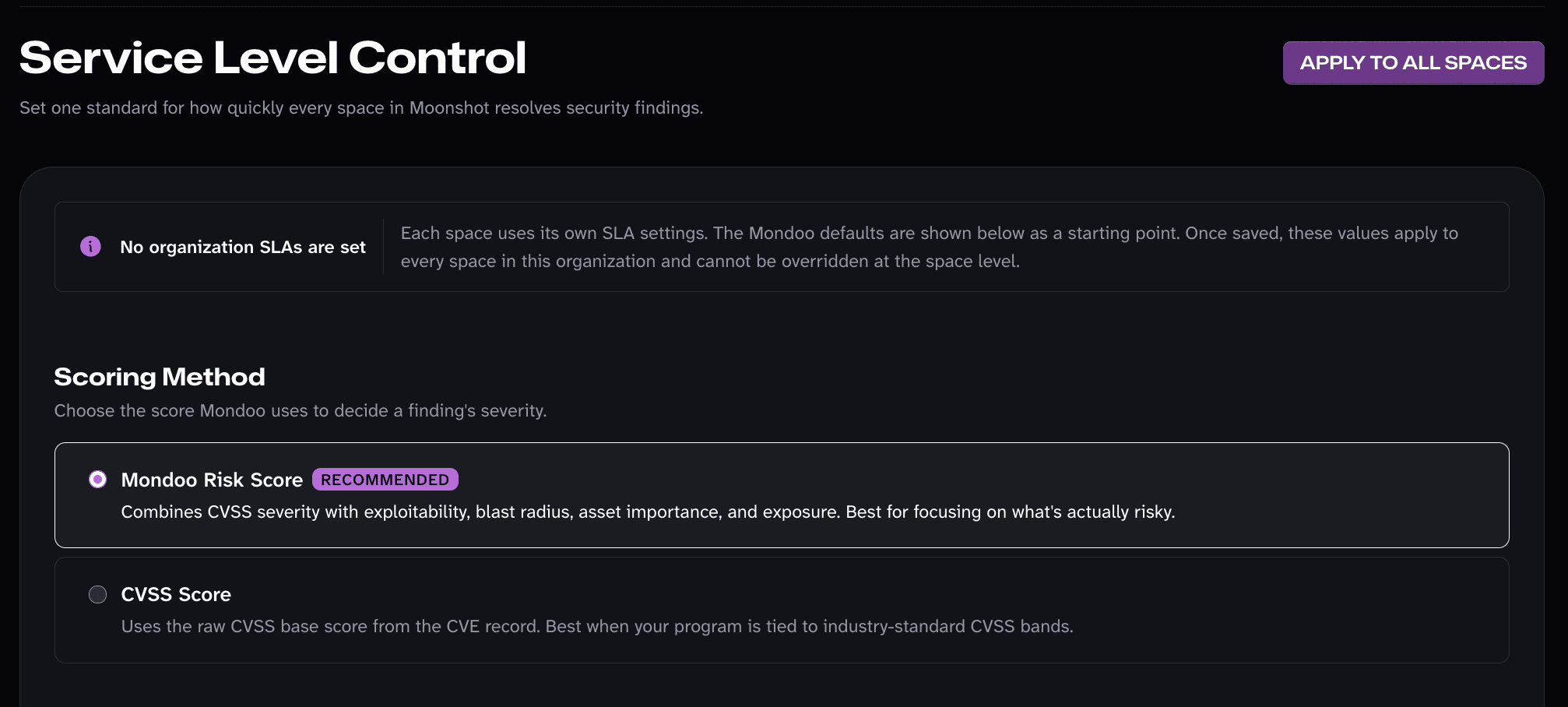
Set SLAs once on the organization in the new Service Level Control page, and every space inherits them, including spaces you create later. Spaces show the inherited SLAs read-only, so everyone works to the same deadlines and nobody has to wonder whether a space was missed. For spaces that keep their own SLAs, a new Manage SLAs button on the SLA dashboard opens the space's settings in one click.
The page also sets the scoring method for the whole organization: the Mondoo Risk Score, which weighs exploitability, blast radius, asset importance, and exposure alongside CVSS severity, or the raw CVSS Score when your program is tied to industry-standard bands.
Read more in Service level agreements.
See the Whole Story of an Exception
An exception is a decision to accept a risk, and that decision is only as trustworthy as the record behind it. The redesigned exception details now show an exception's full history, from request to approval to expiration: who requested it, who approved or rejected it and whether they approved their own request, every extension request and its review, any removal, and when it ends. A plain-language status tells you where the exception stands right now, such as waiting for review, in effect, or ending within the next 14 days.
Acting on an exception is easier too. Approve or reject a pending exception, or remove or extend an approved one, right from the exception's details, then move on to the next without closing them. On the Exceptions page, select Review all on the Pending Review or Expiring Soon card to step through every exception that needs your attention and decide on each one in place.
Read more in Exceptions.
New Security Policies and Checks
- Mondoo Oracle Solaris Security (71 checks): Hardening for Solaris hosts, from accounts and authentication to services, networking, and logging. Read more in Scan Oracle Solaris.
- Mondoo Exoscale Security (53 checks) and Mondoo Azure DevOps Repository Security (30 checks) for the two new providers.
- Mondoo Kubernetes Security (42 new checks): Checks for the kube-apiserver flags set in Pod manifests, so a control plane running as static pods is held to the same standard as any other.
- Mondoo AWS Security (13 new checks): New checks for IAM privilege escalation paths and confused deputy risks, and a check that EMR clusters have a security configuration assigned.
- Mondoo TLS Certificate Authority Compromise: Flags certificates issued through the eMudhra G3 intermediates.
Quality-of-Life Improvements
A number of smaller additions this month that make everyday work smoother:
- Passed is its own filter: The asset findings page has a Passed quick filter next to Fixed, so you can separate checks that always passed from findings you actually fixed.
- Scan History shows removed checks: When a policy update removes a check, the asset's Scan History tab shows it, so a disappearing finding never looks like a fix.
- More useful exports: The inventory export includes each asset's first seen date and discovery source, and you can download a finding's full document from the finding page. BigQuery exports can use your own KMS key.
- More in the audit log: The audit log captures more events, including user sign-ins and bulk asset deletions, so you can better understand how your team uses Mondoo and track changes that can affect your security scores.
- Sort software by CVSS: The software list and versions table sort by CVSS score, so the most severe software rises to the top.
- Filter the policy list: New filters in the policy navigation make it easy to sort through 500+ out-of-the-box policies and find the ones that fit your environment.
- Clearer package remediation: Remediation guidance for vulnerable packages is easier to read, so you see at a glance what to update and how.
- More reliable Linux scanning: Detection of outdated packages, the last system update, and pending reboots is more reliable across more distributions, SUSE and openSUSE support is more complete, and remote scans over SSH hold up on more hosts.
- More from your AWS EC2 scans: EBS volume scans in the AWS integration now include an instance's data volumes, not only its root volume (Windows instances are still scanned from the root volume). EC2 instance and ECR assets carry the
mondoo.com/aws-account-idannotation, so you can filter and group them by AWS account, and account scans follow the integration's Discovery targets setting. - AWS scans that ride out capacity shortages: When AWS has no capacity for the scanner's instance type in an availability zone, the AWS integration now falls back to other instance types and, in a custom VPC, to other tagged subnets instead of failing the scan. Update your CloudFormation stack to allow every fallback instance type.
- Scheduled scans at a fixed time:
cnspec servecan run scans at a fixed time of day with--start-time.
And There's Even More
Beyond the highlights above, October brought a long list of smaller improvements throughout the product, too many to call out individually. And we're already hard at work on what's next, so look for more new functionality next month.