Search Your Inventory
Find assets, CVEs, checks, and vendor advisories anywhere in your Mondoo organization with full-text search.
The Mondoo App has a single search box that looks across everything in scope (assets, spaces, security checks, CVEs, and vendor advisories) using a case-insensitive substring match.
A few examples of what that lets you do:
- Search a Google Cloud project ID like
luna-discoveryto find the project asset, every storage bucket tagged with that project, and Terraform files that mention it. - Search an email like
stella@lunalectric.comto find every asset that has that email in any resource field. - Search
rdsacross an organization to find every RDS asset and every RDS-related check defined in your policies.
Run a search
-
In the Mondoo App, navigate to the organization or space where you want to search.
-
Select the magnifying glass in the top-right corner to expand the search box.

-
Type your query and press Enter.
-
Use the drop-down on the right to change the scope:
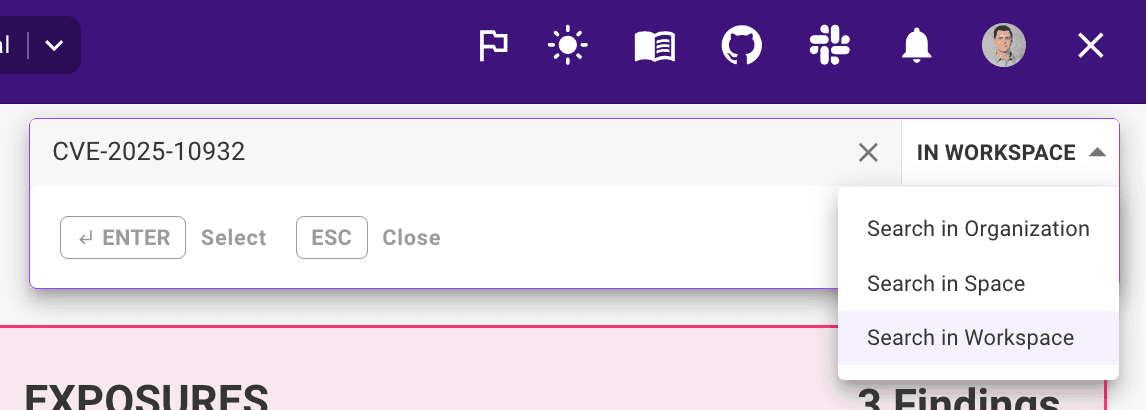
- Search in Workspace: limit results to the current workspace. Available only when you're in a workspace.
- Search in Space: limit results to the current space. Available only when you're in a space or workspace.
- Search in Organization: search every space in the current organization.
-
Pick a result from the list to open it.
To dismiss search, press Esc or select the x on the right of the search box.
What the search box matches
- The match is case-insensitive and is a substring match. For example,
eu-centralfindseu-central-1,eu-central-2, and so on. - Multi-word phrases match the exact substring.
rds backupmatches anywhere that string appears, in that order. - Special characters are treated literally. The search box does not support regular expressions or boolean operators.
The match is run against asset names, resource fields, and the metadata on spaces, checks, CVEs, and advisories.
Related
- Annotate assets: annotations are indexed by search, so you can find assets by their custom metadata.