AWS Serverless Integration Troubleshooting
Debug deployment, scanning, and update issues for the Mondoo serverless AWS integration.
Troubleshoot the Mondoo serverless AWS integration: CloudFormation, Lambda updates, VPC access, logging, and Terraform interactions.
To stop scheduled scans at any time, open the ... menu on the integration page and select Pause. Select Resume from the same menu to start scanning again.
CloudFormation
Single-account stack failed to create
If CloudFormation can't complete a single stack, Mondoo reports the failure.
- Check the AWS CloudFormation console for the error details.
- Resolve the error.
- Open the integration page in Mondoo. While the integration waits for the stack, it shows a Waiting for CloudFormation banner. Select LAUNCH AWS CLOUDFORMATION in the banner to launch the stack again. If Mondoo reports that the stack was deleted, select recreate the stack in the CloudFormation Stack Deleted banner instead.
Organization StackSet failed to create
If the StackSet doesn't complete, you see an incomplete list of AWS accounts in Mondoo.
- Check the AWS CloudFormation console for the error details and resolve it.
- Open the StackSet in the AWS CloudFormation console.
- From the Actions menu in the top-right corner, select Edit StackSet details.
- Step through the wizard without changing values. Some fields require you to re-enter them.
- Submit to update the StackSet.
- On the Operations tab, refresh to see the update progress.
Requirements for deploying the Mondoo StackSet at the organization level
Your AWS Organization must follow AWS core principles. The most common blocker is missing organizational units (OUs).
In the AWS Organizations console, confirm:
- The top-level entity is
root, with an ID liker-ab12. rootcontains one or more OUs with IDs likeou-ab12-1234abcd.
If the entities below root have IDs like o-abcd5678, an organization-level integration won't deploy. Use a single-account install for each account instead.
A failed org-level attempt leaves StackSets and roles in the target accounts. AWS often blocks deleting them from the console with this error:
An error occurred (ValidationError) when calling the DeleteStackInstances operation:
StackSets with SERVICE_MANAGED permission model can only have OrganizationalUnit as target
You must remove these StackSet instances with the AWS CLI.
Remove a faulty StackSet from the organization root
Use aws cloudformation delete-stack-instances:
WARNING
Read the AWS CLI reference before running this in your infrastructure.
STACK-SET-NAME-USUALLY-MONDOO: the StackSet name (defaultMondoo).ROOT-OU-ID: your Organization root ID, such asr-85mw.REGION: the Organization's region, such asus-east-1.
aws cloudformation delete-stack-instances \
--stack-set-name STACK-SET-NAME-USUALLY-MONDOO \
--deployment-targets OrganizationUnitIds=ROOT-OU-ID \
--regions REGION \
--no-retain-stacks
Manually remove Mondoo roles from an AWS account
If you remove a Mondoo integration by hand, also delete every Mondoo IAM role in the account:
ebs-volume-scan-instanceecsecsInstanceRoleecsTaskExecutionRoleMondooEventBusRoleMondooLambdaRole
Updates
Every 3 hours, an EventBridge rule triggers the Mondoo Updater Lambda, which checks Mondoo's S3 bucket for a new build and updates the Mondoo Lambda's function code directly, without a CloudFormation stack update. When Mondoo publishes a new version of the CloudFormation template itself, updating the stack can land in Update Failed: sometimes it's a chicken-and-egg issue that resolves on the next pass, sometimes it needs a manual stack update to grant extra permissions.
Pinned scanner versions
If you pinned the scanner to a specific release when you created the integration (the Scanner version option), the Updater Lambda doesn't update it. The integration page shows the deployed version beside the integration name. When a newer release is available, select the version to see how to update the stack: in the AWS CloudFormation console, update the stack with the existing template and set the FixedVersion parameter to the new release.
Lambda VPC access
The Mondoo Lambda role has the AWSLambdaVPCAccessExecutionRole policy attached so it can discover and scan assets.
If the Lambda needs VPC access to reach private instances, follow Configuring a Lambda function to access resources in a VPC.
SSM-managed instance security groups must allow outbound traffic on port 443 (HTTPS) to Mondoo Platform so scan results can be sent back. That includes both the API endpoint (us.api.mondoo.com) and the ingest endpoint (ingest.us.mondoo.com). For the full list of hosts and IP addresses, read Communication matrix, IPs, and DNS names.
Logging and metrics
Lambda logs go to CloudWatch under the log group /aws/lambda/MondooLambda in the install region. Open the log group and use Search Log Group to query messages or filter by time range.

Enable debug logging
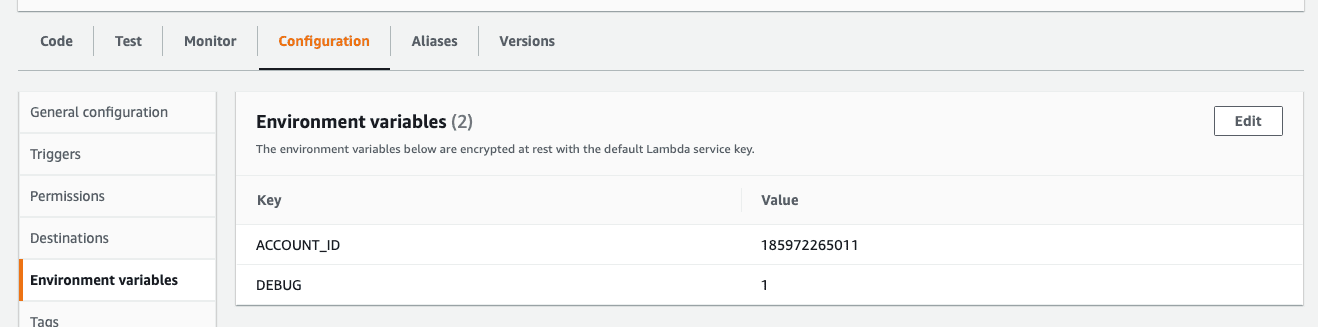
Add the environment variable DEBUG=1 to the MondooLambda function in the AWS Lambda console.
Send diagnostics or metrics to Mondoo
If you're working with Mondoo support, you can share Lambda diagnostics and metrics from the integration page:
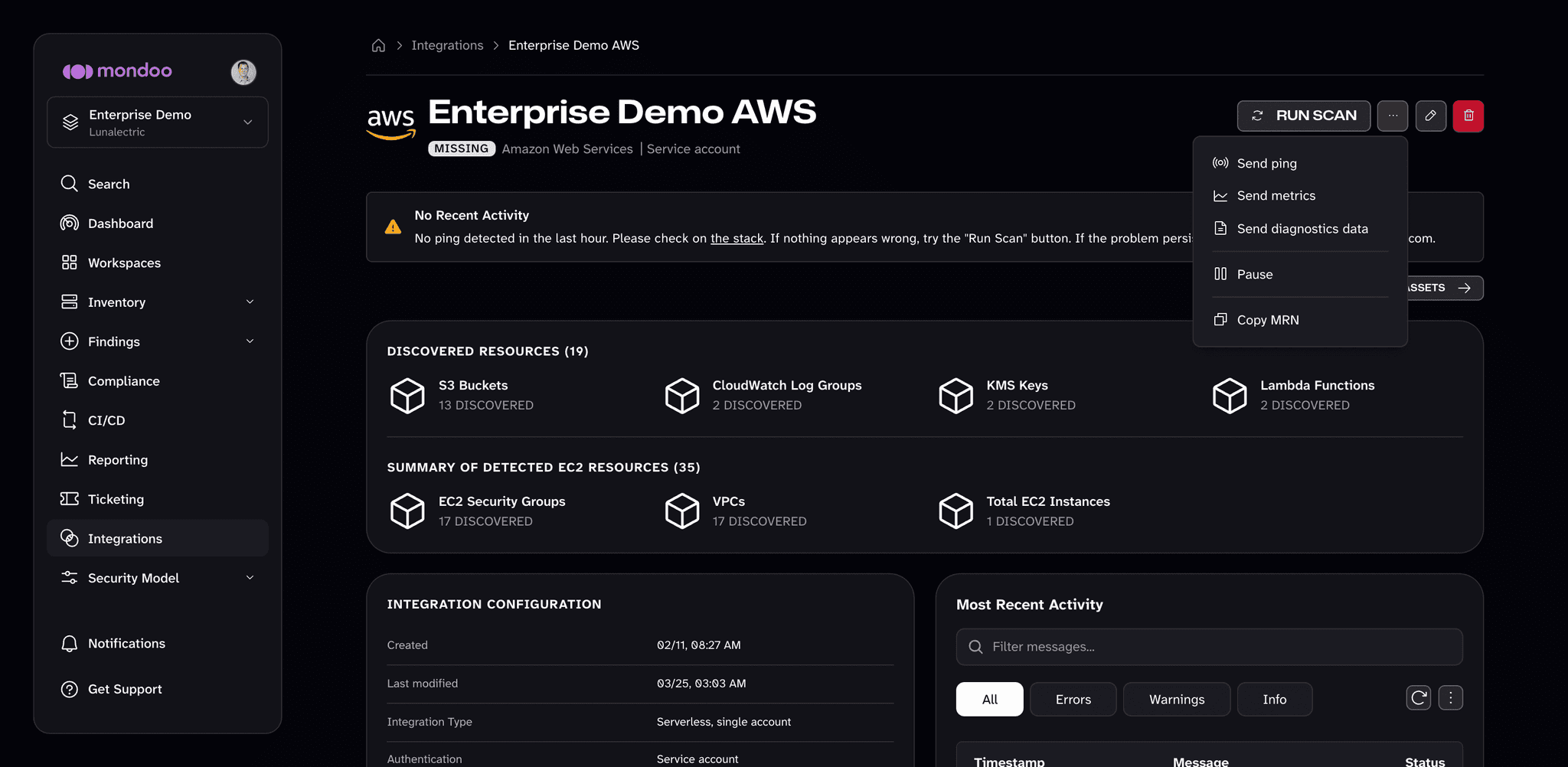
- Open the AWS integration.
- In the top-right corner, select the ... (more integration actions) button.
- Select Send metrics or Send diagnostics data.
To check that Mondoo can reach the Lambda at all, select Send ping from the same menu.
403 errors with Terraform
The Terraform aws_iam_policy_attachment resource creates exclusive attachments. Per HashiCorp's guidance:
Across the entire AWS account, all of the users/roles/groups to which a single policy is attached must be declared by a single
aws_iam_policy_attachmentresource. This means that even any users/roles/groups that have the attached policy via any other mechanism (including other Terraform resources) will have that attached policy revoked by this resource.
If you attach a managed policy that Mondoo also uses to a role you manage with Terraform, Terraform revokes the attachment from Mondoo's role. Use a non-exclusive resource instead:
aws_iam_role_policy_attachmentaws_iam_user_policy_attachmentaws_iam_group_policy_attachment
Advanced debugging
The CloudFormation stack can always be deleted and recreated without data loss.
Mondoo Platform expects a check-in from the integration every 10 minutes. If no check-in arrives, the status updates in the Mondoo App. After an hour without a check-in, the integration page shows a No Recent Activity banner with a link to the stack in the AWS CloudFormation console.
If the status is not active or deleted:
- Select Send ping from the ... menu on the integration page to check that Mondoo can reach the Lambda, then try RUN SCAN.
- Check the CloudFormation stack status and the CloudWatch logs.
- Confirm the Mondoo credentials are present in the SSM Parameter Store under
MondooAgentConfig(in the install region). - Confirm the EventBridge rule
mondoo-customevent-lambda-ruleexists.
Still stuck? Email support@mondoo.com or join the Mondoo Community Slack.