Exceptions
Use exceptions to acknowledge findings without letting them clutter your priorities.
Not every finding needs immediate action. Exceptions let you acknowledge a finding while preventing it from affecting risk scores or competing for attention with urgent issues. Use them to:
- Document a finding you've decided to accept
- Record a compensating control
- Flag a false positive
- Stop a check from running at all
In new spaces, an exception stays pending until a team member with the Owner, Exception Reviewer, or Exception Manager role approves it. If a space owner turns off Require exception approvals, exceptions apply as soon as they're created and reviewers approve or reject them afterward as an audit step. The exact behavior is governed by three space-level settings described below.
Space-level exception settings
Each space has three settings that shape how exceptions behave. You find them in the space's Settings > General page, under Exceptions. The defaults favor review and governance; loosening them speeds up iteration.
| Setting | Default | What changes when toggled |
|---|---|---|
| Require exception approvals | On | When on, new exceptions start in a pending state and don't apply until a reviewer approves them. When off, exceptions apply as soon as they're created. |
| Allow non-expiring exceptions | On | When off, every exception must have an expiration date. |
| Allow users to approve their own exceptions | Off | When on, the user who creates an exception can also approve it, as long as they have a role that can review exceptions. By default, a different team member must approve. |
Spaces created before mid-2025 may have Require exception approvals off. Check your space's value in Settings > General.
The approval history gives you a clear audit trail regardless of which settings you choose.
Only team members who can review exceptions can approve or reject them: members with the Owner, Exception Reviewer, or Exception Manager role. The Editor role can create exceptions but can't review them. To learn more about these roles, read Manage Team Members.
The four exception types
| Exception type | What happens | When to use it |
|---|---|---|
| Risk Accepted | Check still runs; finding doesn't affect the score | You know about the risk and plan to fix it later. |
| Workaround | Check still runs; finding doesn't affect the score | A compensating control is in place that mitigates the finding. |
| False Positive | Check still runs; finding doesn't affect the score | The finding is inaccurate or doesn't apply in your environment. |
| Disable | Check does not run | The check is causing stability or performance impact and you want to skip it entirely. |
When you set an exception, you also choose:
- Time Limit: how long the exception lasts (1 week, 1 month, 3 months, 6 months, a custom number of days, or Indefinitely if the space allows non-expiring exceptions)
- Name (optional): a short label that makes the exception easier to find. If you leave it blank, Mondoo generates one.
- Justification: the reason for the exception, which reviewers see when they approve or reject it
Where exceptions can be set
You can set exceptions at two levels.
Space-wide:
- Policy checks
- Vulnerabilities
- Vendor advisories
- Compliance framework controls
- Compliance framework control checks
On a single asset:
- Checks on an asset
- Vulnerabilities on an asset
- Vendor advisories on an asset
When you set an exception from an asset's findings, you can still apply it to the Entire space instead of only that asset.
In a code repository: For infrastructure as code, engineers can request check exceptions in a mondoo.yml file next to the code and have them reviewed in a pull request. cnspec submits them to your space when it scans the default branch. To learn more, read Manage Exceptions in Your Code Repositories.
Manage exceptions
Each space has a centralized Exceptions page. In the left navigation, expand Findings and select Exceptions.
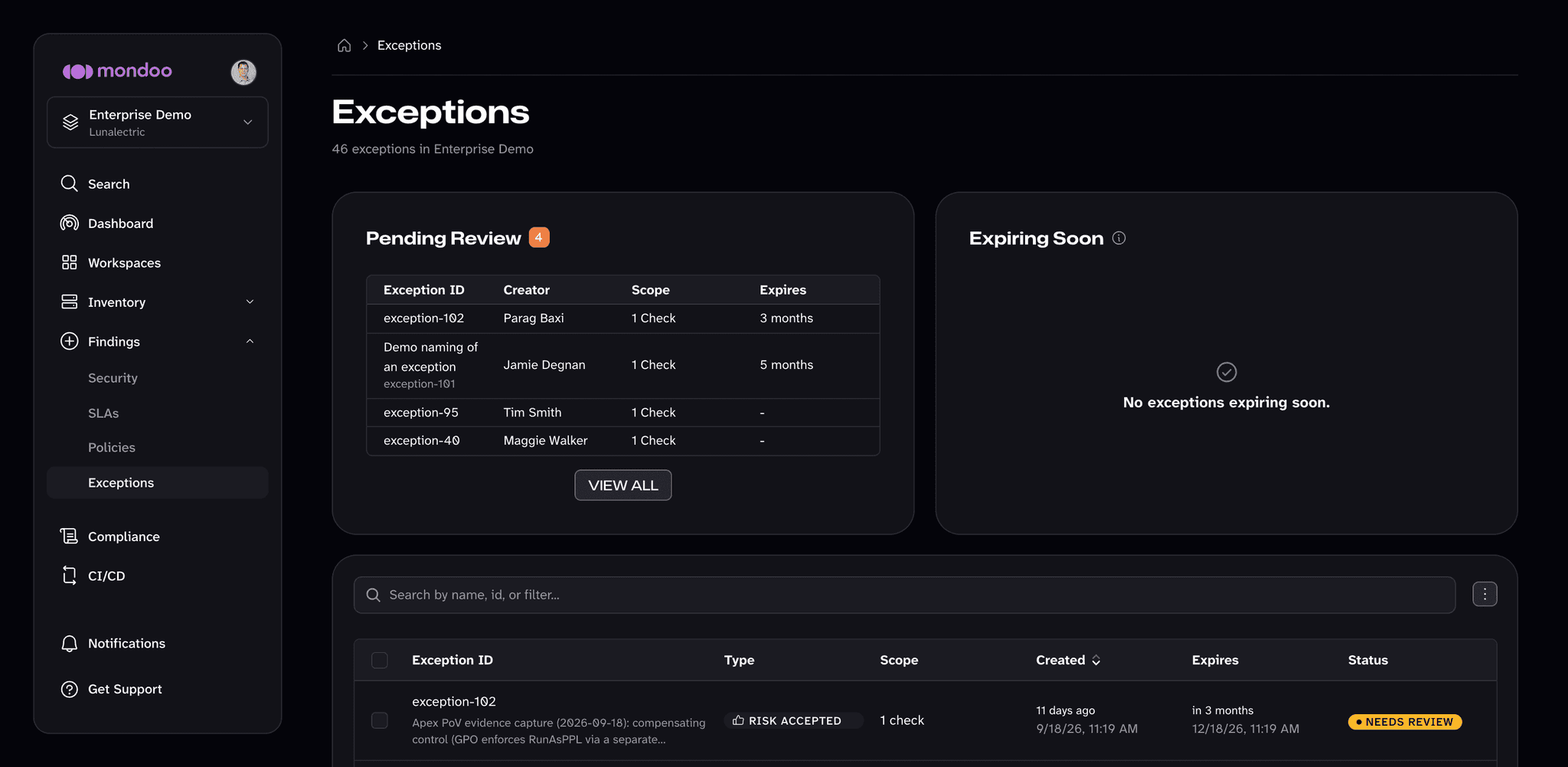
- Pending Review lists exceptions that still need a reviewer's decision.
- Expiring Soon lists approved exceptions that expire within the next three days.
- The table below lists every exception in the space with its type, scope, creation and expiration dates, and status. Search and filter the list, or export it from the menu next to the search box.
Select an exception to open its detail. From there, a reviewer can APPROVE or REJECT it. To review several exceptions at once, check the boxes next to them and select Approve or Reject in the toolbar that appears.
An exception's status is one of:
| Status | Meaning |
|---|---|
| Needs review | No reviewer has approved or rejected it yet. It doesn't apply until approved, unless Require exception approvals is off. |
| Approved | A reviewer approved it. |
| Rejected | A reviewer rejected it. It doesn't apply. |
| Needs extension | Someone requested more time for an approved exception, and a reviewer needs to approve the extension. |
| Expired | Its time limit passed. The finding counts toward scores again. |
| Removed | Someone removed it. The finding counts toward scores again, and a Disable exception's checks run again. |
Extend or remove an approved exception
Open an approved exception and select the Modify exception (pencil) button:
- Request time extension asks for a new expiration date. The extension needs a reviewer's approval.
- Remove exception and enable ends the exception, so the finding counts toward scores again.
How exceptions affect scoring
Exceptions other than Disable keep the underlying check running, but the finding contributes 0 to risk scores. Disable prevents the check from running on the affected scope. To learn how this rolls into the Space Risk Score, read How the Space Risk Score Is Calculated.