Configure Risk Dimensions
Adjust how much each risk dimension influences scores, turn dimensions off, and define business priority tag groups.
Risk dimensions are how Mondoo adjusts each finding's risk score based on the context of the asset it appears on. Out of the box, all five dimensions are enabled with default weights. You tune them at the organization level on the Risk Score Control page; every space in the organization inherits the configuration.
The five dimensions are Business Priority, Attack Surface, Exploitability, Blast Radius, and In the News. For each one you can:
-
Turn it off. Clear Score this dimension to remove its effect entirely. Findings are scored as if the dimension doesn't exist.
-
Adjust its weight. Use the Factor score weighting slider to make the dimension count more or less toward the final score.
-
Tune what's inside it. Each dimension has its own settings:
Dimension What you can tune Business Priority Tag Groups: named groups of asset tags (key-value pairs), each with an Asset score impact from No severity to Most severe. The defaults are Business-critical, Test environments, and Development systems. You can add your own groups. Attack Surface Exposure Level: how much each level (Internet-facing, Network-accessible, Localhost only, System-local, Not exposed) raises or lowers the score. Exploitability Scoring Factors: turn EPSS and KEVs on or off and set how strongly each one influences the score. Blast Radius Connected System Types: how much access to databases and data stores, identity and auth systems, LLM agents, open network connections, Kubernetes orchestration, or cryptographic keys raises the score. In the News Turn news articles and social media on or off as signals and set how strongly each one influences the score.
Open Risk Score Control
Requires Owner or Editor access to the organization, or the Risk Factor Manager role.
-
In the Mondoo App, navigate to the organization.
-
In the side navigation, expand Security Model and select Risk Score Control.
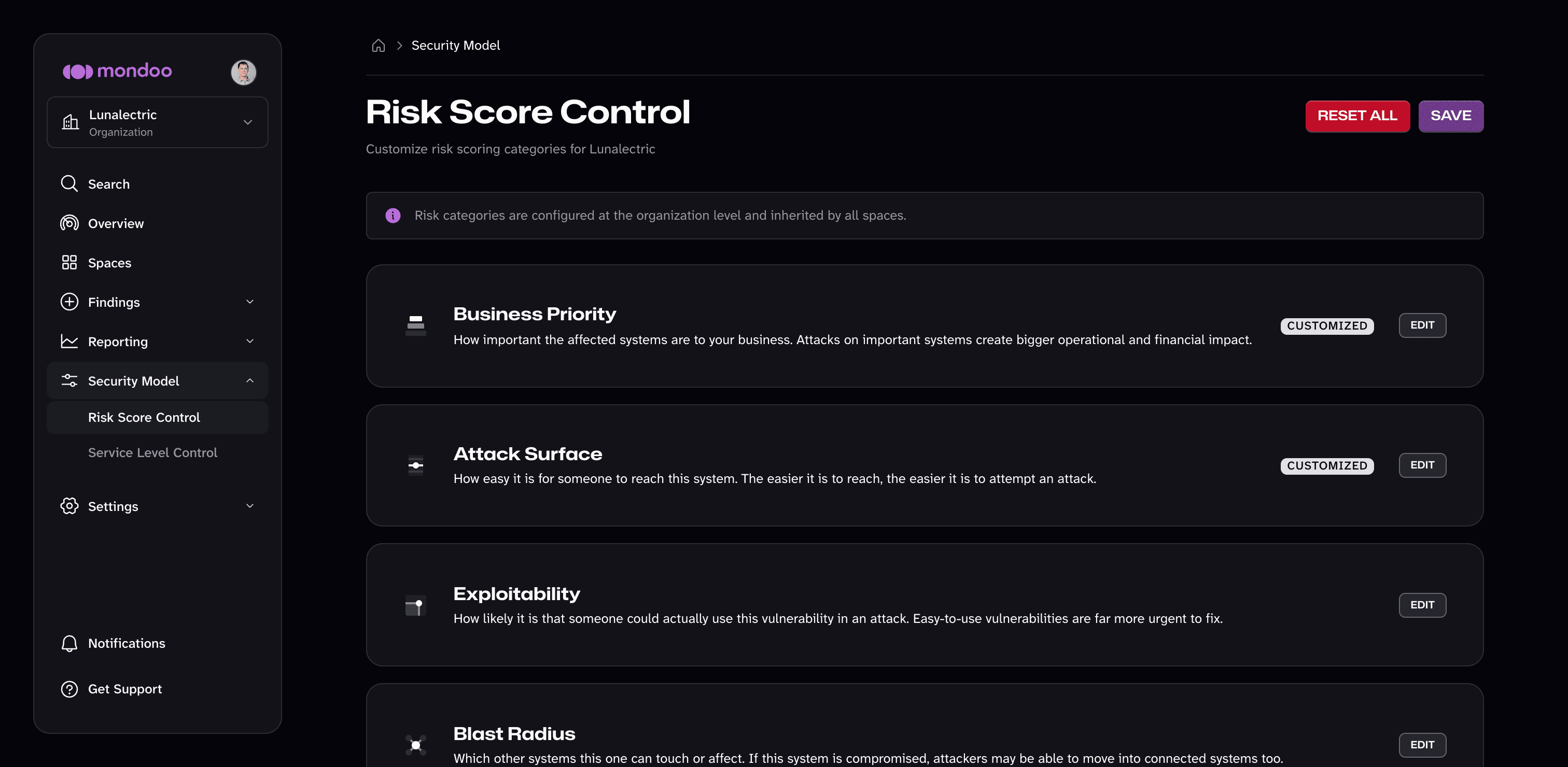
A CUSTOMIZED badge marks dimensions whose settings differ from the defaults. A DISABLED badge marks dimensions that are turned off.
-
Select EDIT on a dimension to turn it on or off, change its weight, or tune its settings. Select DONE to collapse it.
-
Select SAVE to apply your changes to every space in the organization.
To undo customizations, select RESET SECTION TO DEFAULTS inside a dimension, or RESET ALL at the top of the page to restore every dimension. A reset takes effect when you save.
In a space, Security Model > Risk Score Control shows the same dimensions as a read-only view of the organization's configuration, with a link to the organization page.
When to tune
Some examples of when tuning makes sense:
-
Your team doesn't track press coverage as a security signal. Turn off the In the News dimension so trending CVEs don't get an automatic boost.
-
You consider blast radius the dominant factor. Raise the Blast Radius weight so findings on assets with access to databases and identity systems rise to the top of the list.
-
You use your own tag scheme for business priority. Add a tag group (such as one matching
tier: goldorcriticality: high) and set its asset score impact so the Business Priority dimension picks those assets up alongside the defaults.
Override risk dimensions per asset
To correct Mondoo's automatic detection on individual assets or spaces, use annotations. See Override automatic detection.