Continuously Scan Kubernetes with the Mondoo Kubernetes Operator
Deploy the Mondoo Kubernetes Operator to continuously scan clusters, nodes, and workloads for security misconfigurations.
The Mondoo Kubernetes Operator runs inside your cluster and continuously scans it. Because it lives in the cluster, it detects issues as they appear instead of waiting for an external scan window.
The operator can:
- Continuously scan nodes for misconfigurations and vulnerabilities
- Continuously scan workloads in the cluster
- Scan new nodes as they come online
It also includes an admission controller that scans each workload before it's admitted to the cluster, so you catch issues at deploy time. Learn more.
The admission controller scans these workload types on create or update:
- Pods
- Deployments
- DaemonSets
- StatefulSets
- Jobs
- CronJobs
When one workload owns another (a Deployment that creates pods, for example), the admission controller scans only the owner. The owner is the definition where you can actually fix the issue. See the Kubernetes documentation for background.
How the integration model works
A Mondoo Kubernetes integration consists of two parts:
- A service account credential (stored as a Kubernetes Secret) that authenticates to Mondoo Platform
- A MondooAuditConfig custom resource that tells the operator what to scan
Because these are separate, a single operator installation can serve multiple integrations. Each integration gets its own Secret and MondooAuditConfig, but they all share the same operator. This is useful when you want different scan configurations or want to report results to different spaces from the same cluster.
Add a Mondoo Kubernetes integration
You can create Kubernetes integrations at either the space level or the organization level:
-
Space-level integration: In the Mondoo App, navigate to the space where you want to add the integration. In the side navigation bar, select Integrations. In the top right, select INSTALL. On the Install Integration page, find Kubernetes by browsing or searching by name, then select it.
-
Organization-level integration (public preview): Navigate to your organization's Integrations page and follow the same steps. Organization-level integrations use an org-scoped service account, which can route scan results to any space in the organization. To see the organization's Integrations page, turn on Org Integrations in the Feature Flags dialog of the user menu.
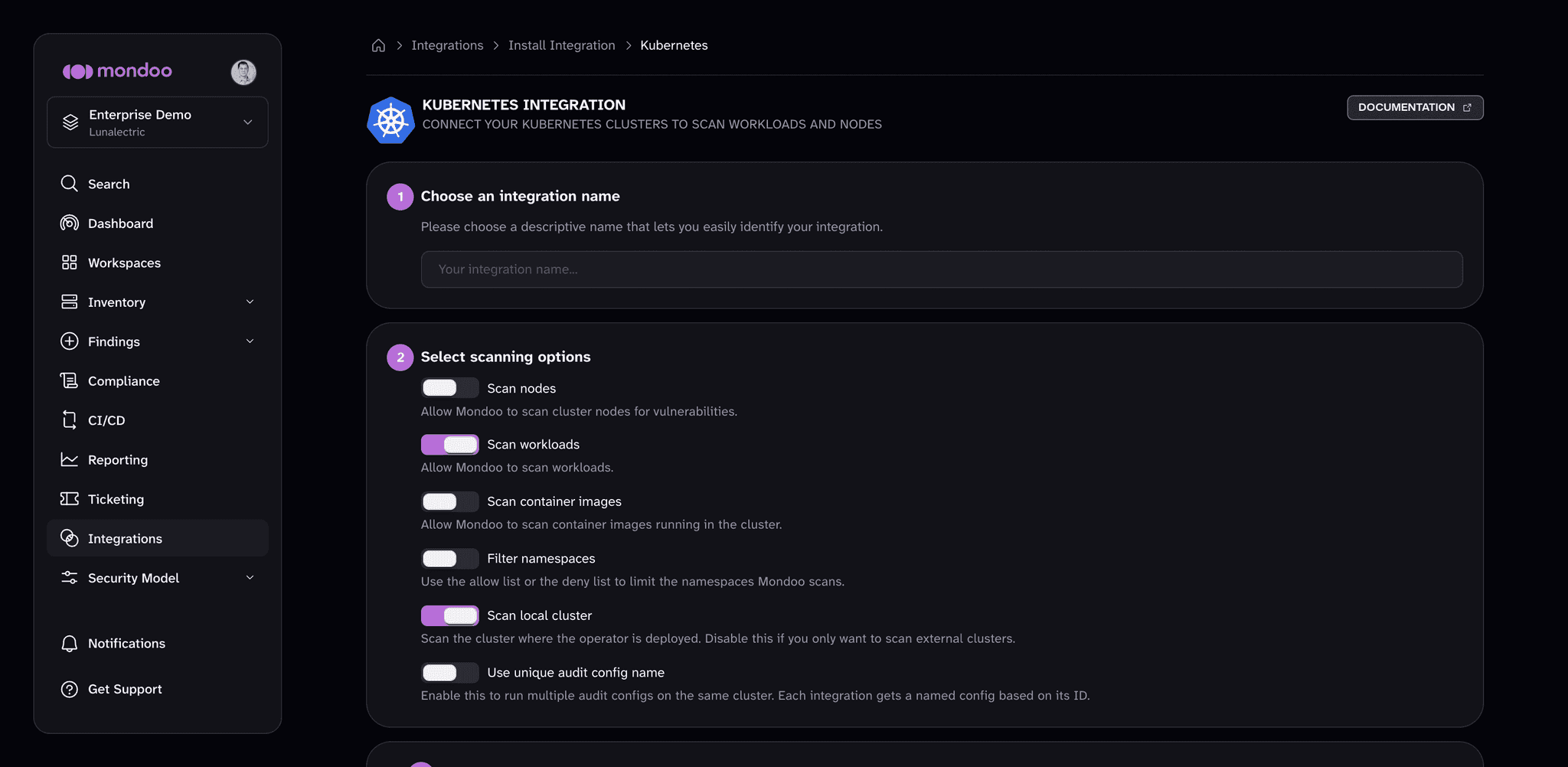
Configure scanning options
-
Under Choose an integration name, type a name for the integration to identify it in lists and distinguish it from other integrations.
-
Under Select scanning options, to continuously assess the security posture of nodes in your Kubernetes cluster, enable Scan nodes.
-
To continuously assess the security posture of workloads and resources in your cluster, leave Scan workloads enabled (the default).
-
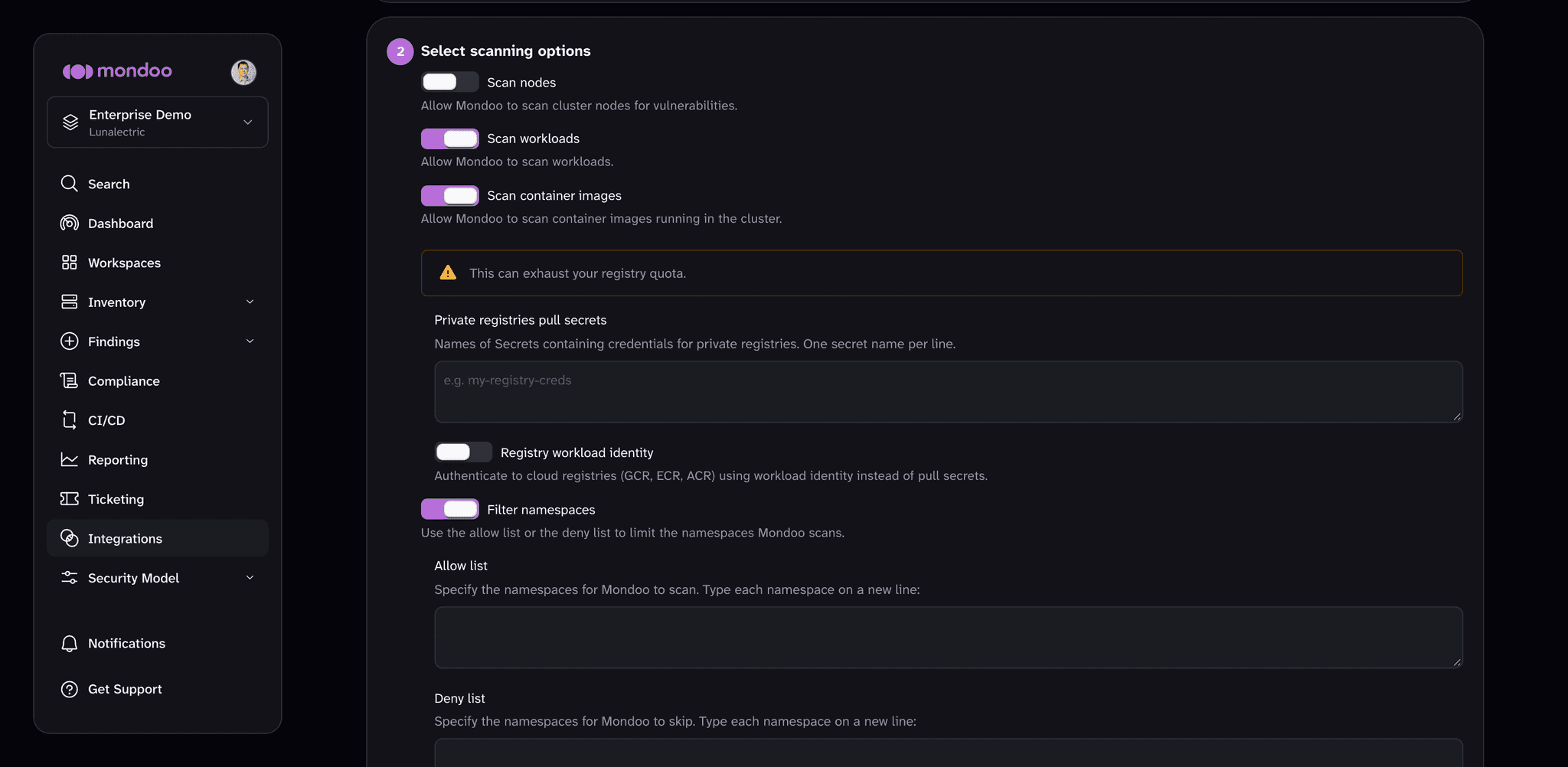
To scan container images running in the cluster, enable Scan container images. Image scanning can exhaust your registry's pull quota. For private registries, either list the Secrets that hold registry credentials in Private registries pull secrets (one per line), or turn on Registry workload identity to authenticate to GCR, ECR, or ACR with workload identity instead. To learn more, read Private container image scanning with Workload Identity.
-
To control which namespaces Mondoo scans, enable Filter namespaces (available when Scan workloads is on) and list the namespaces to which you want to allow or deny access.
You control which namespaces to scan using either the Allow list or the Deny list boxes. To scan only the namespaces you specify, type them in the Allow list box. To scan all namespaces except the ones you specify, type the namespaces to skip in the Deny list box. If you list multiple namespaces, separate them with line breaks.
-
Leave Scan local cluster enabled to scan the cluster where the operator runs. Turn it off if you only want to scan external clusters.
-
If you plan to run multiple integrations on the same cluster, enable Use unique audit config name.
-
(Optional) Expand Advanced options to override defaults:
Option Description Namespace override Deploy the audit config to a namespace other than the default, mondoo-operator.Credentials secret name Name of the Secret with Mondoo client credentials. The default is mondoo-client.Token secret name Name of the Secret with the Mondoo token. The default is mondoo-token.Scan schedule A cron schedule for scanning jobs, such as */5 * * * *. Empty uses the operator default. -
(Optional) Under External clusters (optional), select ADD EXTERNAL CLUSTER to scan remote clusters from this operator. To learn more, read Scan External Kubernetes Clusters.
-
Select CREATE INTEGRATION.
Install the Mondoo Operator
After you create the integration, the Mondoo App shows installation commands. Under Choose an installation method, select either Helm (Recommended) or Kubectl. Then, under Install the Mondoo Operator, copy and run the command.
Install with Helm
helm repo add mondoo https://mondoohq.github.io/mondoo-operator
helm repo update
helm upgrade --install mondoo-operator mondoo/mondoo-operator \
  --namespace mondoo-operator --create-namespace
Install with kubectl
kubectl apply -f https://install.mondoo.com/k8s/operatorIf you already have the operator installed in this cluster, skip the installation step and proceed to applying the token and audit configuration.
Apply the token and audit configuration
Under Create the token secret and apply the audit configuration, the Mondoo App generates two commands for you: one to create a Kubernetes Secret containing the integration token, and one to apply the MondooAuditConfig. Copy and run both commands against your cluster.
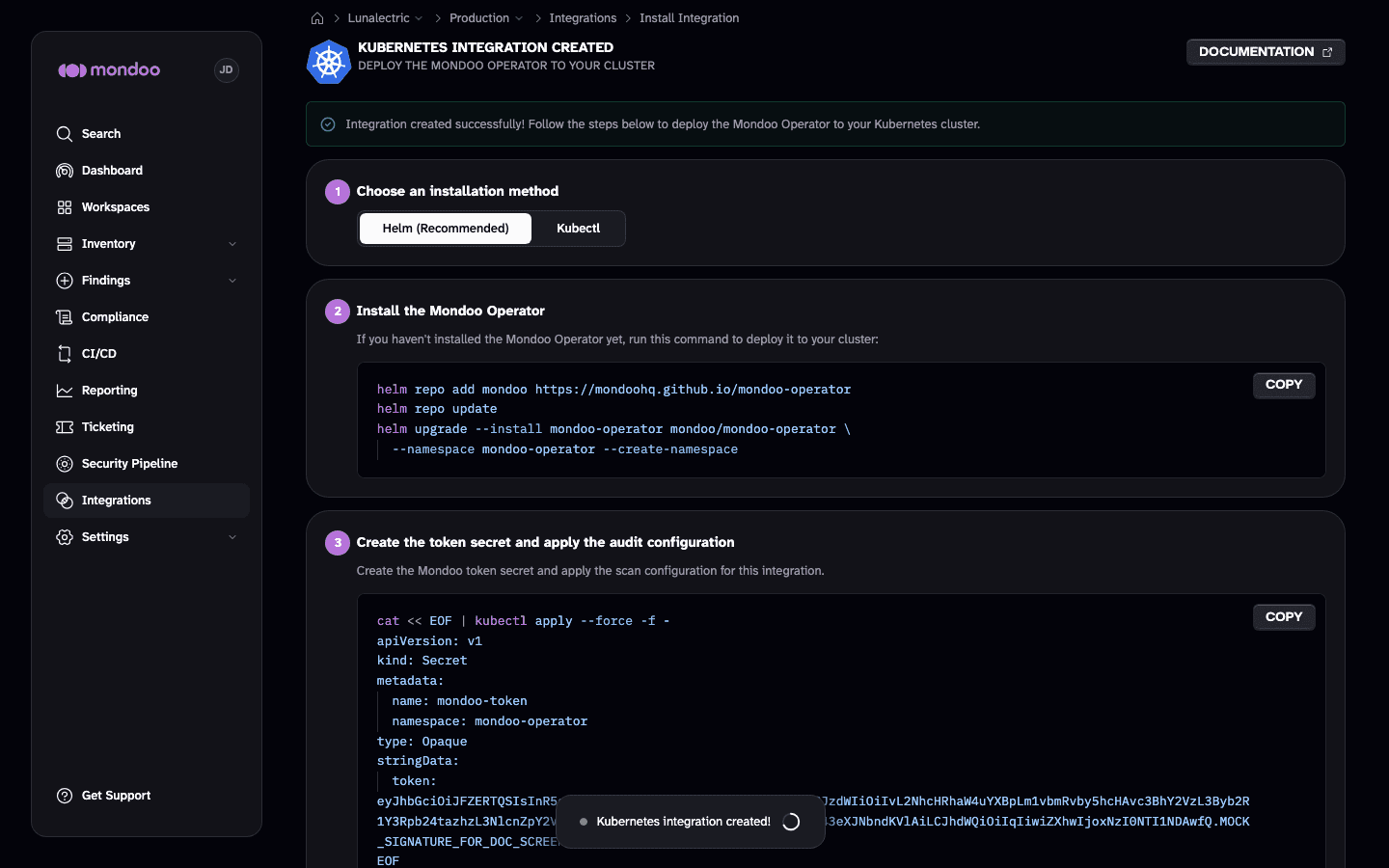
If you configured workload identity for external clusters or container registries, additional steps show the IAM bindings and target cluster RBAC commands to run. When you're done, under Finish, select DONE.
Mondoo scans workloads according to the activated policies. Learn more.
Run multiple integrations on a single cluster
Because the operator and its integrations are decoupled, you can connect a single operator to multiple Mondoo integrations. Each integration gets its own service account Secret and MondooAuditConfig. This lets you:
- Report different parts of the cluster to different Mondoo spaces
- Apply different scan configurations (schedule, namespace filters) side by side
- Use a single org-level service account to route assets to multiple spaces
To run multiple integrations on the same cluster, enable Use unique audit config name when creating each integration. This gives each MondooAuditConfig a name based on the integration ID, preventing naming conflicts.
View a Kubernetes integration
Once you've added a Kubernetes Operator integration, you can view it by selecting Integrations in the side navigation bar and then selecting the Kubernetes card.
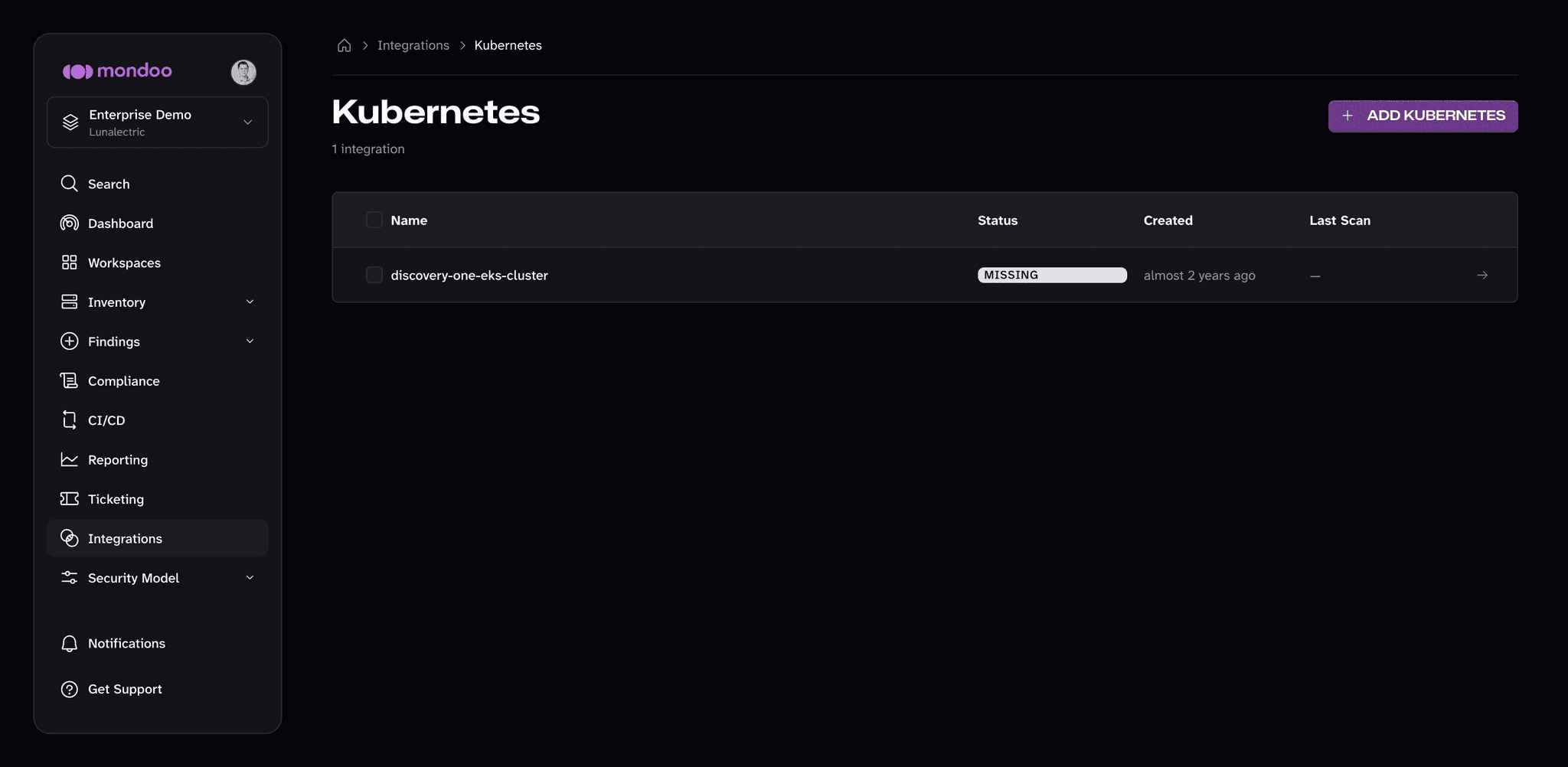
To view additional status details, select its row in the list. The integration page shows the integration's status and last check-in, the Operator Configuration reported by the operator (operator version, admission controller, and which scan types are enabled), the Kubernetes version, and recent activity. To change the integration's configuration, select the edit (pencil) icon.
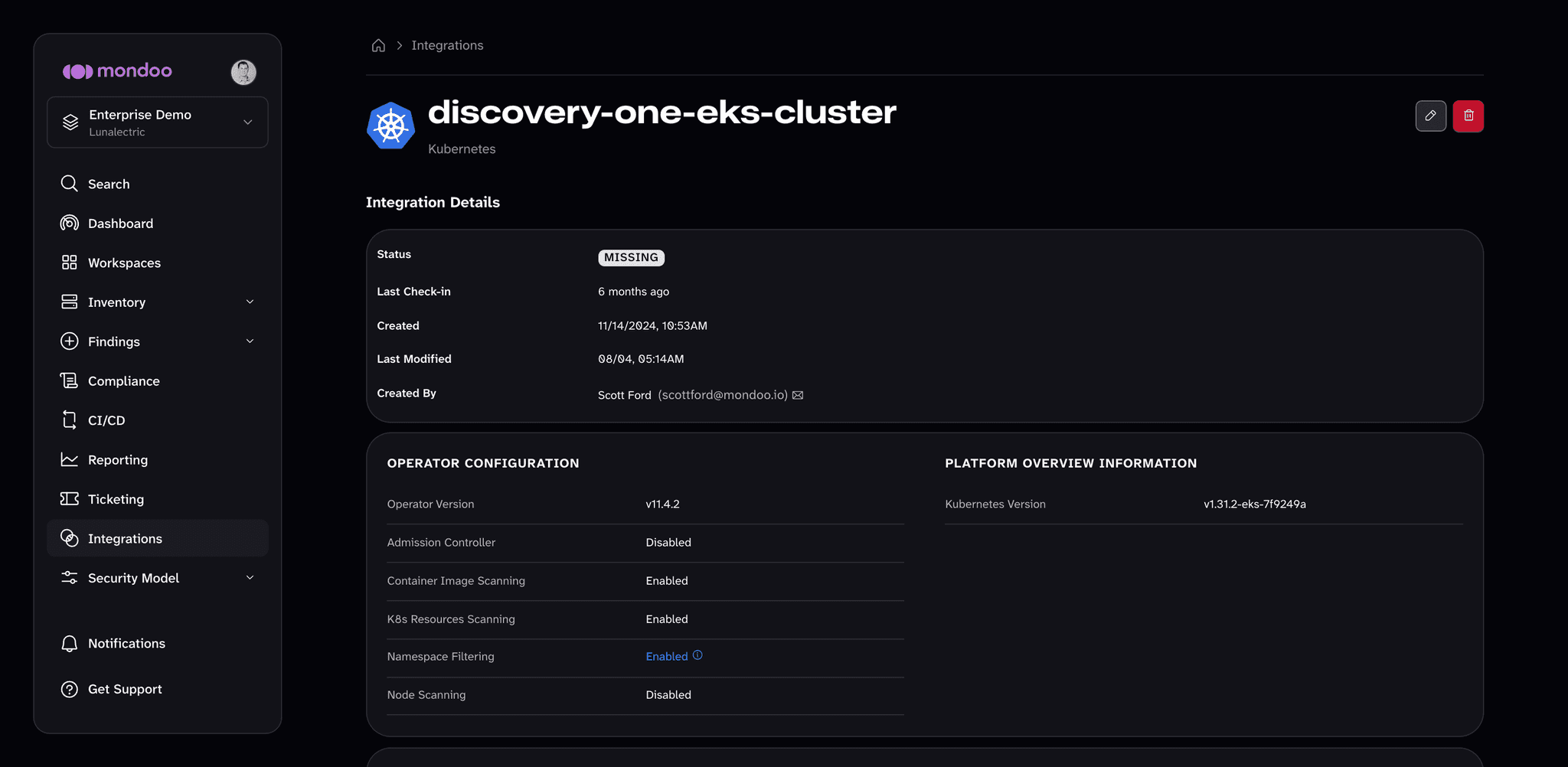
The operator scans on its own schedule and reports in by itself, so a Kubernetes integration page has no button to run a scan on demand.
Remove a Kubernetes integration
-
Follow the instructions above to view your list of Kubernetes integrations.
-
Find the integration you want to remove and check the box beside it.
-
Select the DELETE SELECTED button, then confirm.
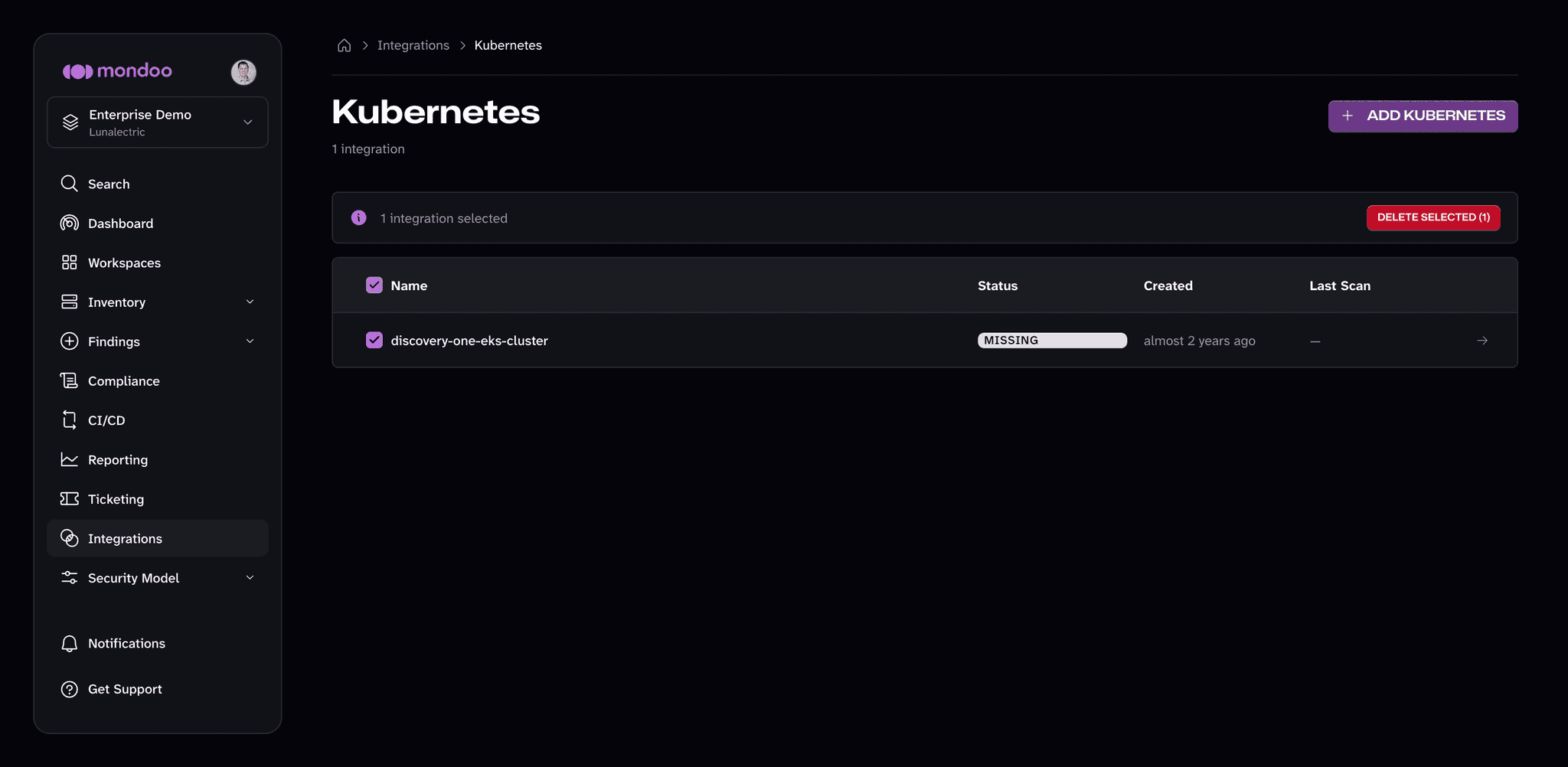
You can also open the integration and select the trash can icon at the top of its page.