Secure Terraform Code with cnspec
Scan Terraform configurations, plans, and state files for security misconfigurations with cnspec. No Terraform CLI required.
Prevent insecure infrastructure from being provisioned by scanning Terraform before it applies. cnspec evaluates HCL configurations, plan files, and state files against security policies on a developer workstation, as a CI/CD gate, or as a post-provisioning check after terraform apply.
Mondoo's cloud security policies (AWS, Azure, Google Cloud) include IaC variants that run against Terraform code, so the same checks that evaluate your live cloud accounts also evaluate the infrastructure as code that defines them. Mondoo additionally ships the Terraform Deprecations policy to flag use of deprecated Terraform providers and resources.
This page is part of scanning your supply chain with cnspec. If you're new to cnspec, start with the Quickstart to install cnspec and run your first scan.
How cnspec reads Terraform
cnspec parses HCL configuration, plan JSON, and state JSON directly and never runs the terraform CLI, so Terraform doesn't need to be installed on the workstation or CI runner that performs the scan. The terraform show -json commands on this page are just one way to produce plan and state JSON. You can also point cnspec at JSON your pipeline already generated.
Throughout this page, terraform in cnspec commands (for example cnspec scan terraform) refers to cnspec's Terraform scanner, not a call to the terraform CLI. It reads a directory the way Terraform does (.tf, .tf.json, .tfvars, and .tfvars.json files) and skips .tofu flavored files, because Terraform never applies them. If a directory holds only OpenTofu configuration files, the scan fails with an error that names the OpenTofu connector.
cnspec resolves var.* and local.* references in block arguments to their effective values: variable defaults, overridden by values in .tfvars files, with locals evaluated from those. References that can't be resolved statically, such as data sources and resource attributes, keep their reference string. To query the arguments with their references left in place, use argumentReferences.
OpenTofu
For OpenTofu projects, use the dedicated OpenTofu connector, cnspec scan opentofu (or its alias cnspec scan tofu). It reads .tofu flavored files the way OpenTofu does and reports assets as OpenTofu. To learn more, read Secure OpenTofu Code with cnspec.
If you're moving a repository from Terraform to OpenTofu, cnspec scan iac can scan both kinds of module in one step. To learn how, read Scan Terraform and OpenTofu together.
Prerequisites
To scan Terraform code with cnspec, you must have:
- cnspec installed on your workstation
- Terraform files to scan (HCL, plan JSON, or state JSON)
The terraform CLI is not required on the machine that runs the scan.
Scan Terraform code
Scan HCL configuration files in a directory:
cnspec scan terraform /path/to/terraform/Add --ignore-dot-terraform to skip the .terraform directory, which holds cached provider plugins and modules.
Scan a Terraform plan file:
terraform plan -out tfplan.binary
terraform show -json tfplan.binary > tfplan.json
cnspec scan terraform plan tfplan.json
Scan a Terraform state file:
terraform show -json > state.json
cnspec scan terraform state state.json
cnspec reads plan and state files only in the JSON representation that terraform show -json produces. If you point cnspec at a raw terraform.tfstate file, the scan fails with an error that tells you to convert it first.
cnspec returns the results to stdout. If you're logged into Mondoo Platform, results are also reported there. To control the output format or send results to a file or CI system, read Report Results.
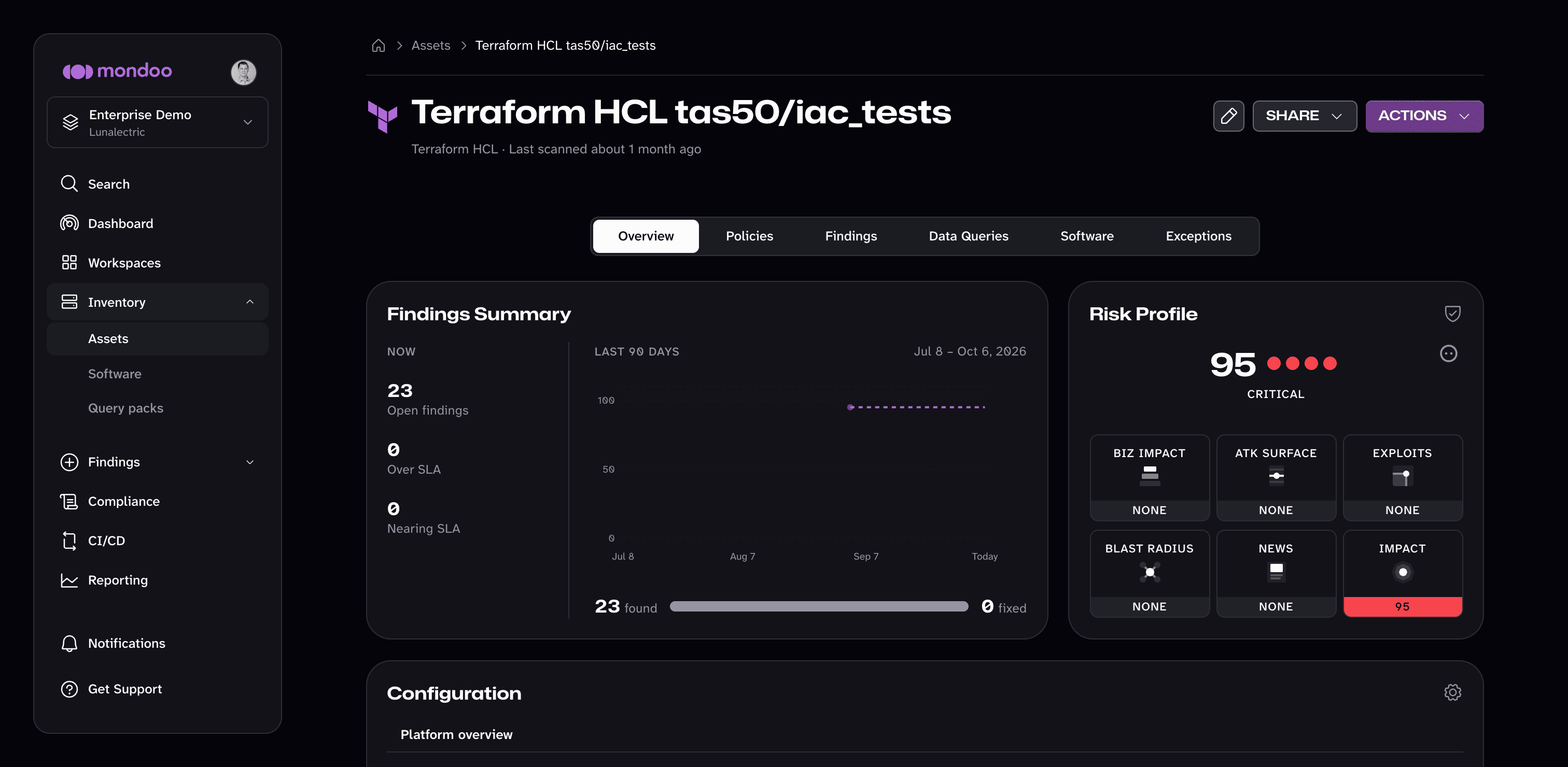
Scan options
| Option | Description |
|---|---|
--asset-name | Override the asset name |
--annotation | Add an annotation to the asset (key=value) |
--incognito | Run in incognito mode (do not report results to Mondoo Platform) |
-o, --output | Set the output format (compact, csv, full, hdf, json, junit, ocsf-json, ocsf-parquet, report, sarif, summary, yaml) |
-f, --policy-bundle | Path to a policy file (local path, s3:// URI, or http(s):// URL) |
--policy | Specify policies to execute (requires --policy-bundle) |
--risk-threshold | Exit with status 1 if any risk meets or exceeds this value (0-100) |
To gate a CI/CD pipeline, combine --risk-threshold with a report file, for example --risk-threshold 90 --output junit --output-target cnspec-junit.xml. 90 fails the job only on critical risks, 70 also fails on high risks, and 40 also fails on medium risks. To scan every infrastructure as code entry point in a repository in one step, use cnspec scan iac. For complete pipeline examples, read Integrate Mondoo with CI/CD Platforms.
Name assets in CI/CD pipelines
cnspec names a Terraform asset after its platform and the file or directory it scanned. Scanning tfplan.json produces the asset name Terraform Plan tfplan. A pipeline that scans one plan per environment gives every environment that same name, which makes the assets hard to tell apart in your inventory.
Pass --asset-name to name each scan yourself:
cnspec scan terraform plan tfplan.json --asset-name "checkout-service-staging"This sets the asset's display name only. cnspec still identifies the asset by the path it scanned, so naming an asset does not change which asset the results report to.
Record exceptions next to your code
To except a check for a Terraform module, add a mondoo.yml file with an exceptions list to the directory you scan. For a plan or state file, put it in the directory that holds the file. The exception is reviewed in the same pull request as the code, and cnspec reports it on every scan:
exceptions:
  - checks:
      - mondoo-aws-security-s3-bucket-logging-enabled
    action: risk-accepted
    justification: Access logging is handled centrally by the organization-wide CloudTrail trail.
    valid_until: 2026-11-01
To learn how to route these changes to the right reviewers and submit them to Mondoo Platform, read Manage Exceptions in Your Code Repositories.
Scan with Mondoo Terraform policies
Mondoo's cloud security policies (AWS Security, Azure Security, Google Cloud Security) include Terraform variants of every check, so the same controls that evaluate your live cloud accounts also evaluate the infrastructure as code that defines them.
Mondoo Platform users: Enable the cloud policy that matches your target. In the Mondoo App, go to Findings > Policies, search for "AWS", "Azure", or "Google Cloud", and add the policy. All future Terraform scans automatically evaluate against the Terraform variants. To learn more, read Manage policies in Mondoo Platform.
Mondoo also ships a standalone Terraform Deprecations policy that flags use of deprecated Terraform providers and resources. Search for "Terraform" in Findings > Policies to add it.
Open source users: The cloud-policy Terraform variants ship inside the open source cloud bundles in mondoohq/cnspec/content. Point cnspec at the matching bundle when you scan, for example AWS:
cnspec scan terraform /path/to/terraform/ \
  --policy-bundle https://raw.githubusercontent.com/mondoohq/cnspec/refs/heads/main/content/mondoo-aws-security.mql.yaml
You can also pin just the standalone Terraform Deprecations bundle:
cnspec scan terraform /path/to/terraform/ \
  --policy-bundle https://raw.githubusercontent.com/mondoohq/cnspec/refs/heads/main/content/terraform-deprecations.mql.yaml
Explore Terraform configurations
Open a cnspec shell to discover resources and try out checks:
cnspec shell terraform /path/to/terraform/List Terraform files
cnspec> terraform.files
files: [
  0: path="main.tf"
  1: path="variables.tf"
  ...
]
List all resources
cnspec> terraform.resources
terraform.resources.list: [
  0: type="resource" labels=[
       0: "aws_instance"
       1: "web"
     ]
     in main.tf:1:1-4:2
     1:  resource "aws_instance" "web" {
     2:    ami           = "ami-0abcdef1234567890"
     3:    instance_type = "t3.micro"
     4:  }

  1: type="resource" labels=[
       0: "aws_s3_bucket"
       1: "data"
     ]
     in main.tf:5:1-14:2
     ...
  ...
]
List modules
cnspec> terraform.modulesRetrieve variables from tfvars files
cnspec> terraform.tfvarsFilter resources by type
Find all AWS S3 bucket resources:
cnspec> terraform.resources.where(resourceType == "aws_s3_bucket")Explore plan-file resource changes
When querying a plan file:
cnspec> terraform.plan.resourceChangesExplore state-file resources
When querying a state file:
cnspec> terraform.state.resourcesExample: Ensure AWS S3 buckets use server-side encryption
This check verifies that every aws_s3_bucket resource defines a server_side_encryption_configuration rule with apply_server_side_encryption_by_default:
terraform.resources.where(nameLabel == 'aws_s3_bucket') {
  blocks {
    blocks.one(_.type == "rule" && _.blocks.one(type == 'apply_server_side_encryption_by_default'))
  }
}
The query targets aws_s3_bucket resources, walks into the nested server_side_encryption_configuration and rule blocks, and asserts that an apply_server_side_encryption_by_default block is present.
Post-provisioning scans
cnspec also fits as a local-exec step at the end of a terraform apply, so the same policies that gate your cloud account also evaluate freshly-provisioned hosts. For example:
resource "aws_instance" "web" {
  # ...launch and provisioning configuration...

  provisioner "local-exec" {
    command = "cnspec scan ssh ubuntu@${self.public_ip} -i ${var.private_key} --risk-threshold 90"
  }
}
--risk-threshold 90 makes the apply fail if any risk meets or exceeds 90, which means a critical risk. To also fail on high risks, set it to 70. To fail on medium risks too, set it to 40.
Learn more
The same policies that scan your Terraform code also scan your live cloud accounts. To close the loop, scan the infrastructure your code provisions:
- Secure Amazon Web Services (AWS) with cnspec
- Secure Microsoft Azure with cnspec
- Secure Google Cloud with cnspec
You can also explore the MQL reference:
- Terraform Resource Pack Reference: every Terraform resource and field cnspec can query
- Write Effective MQL: guide to authoring checks and queries
IaC in Repositories
Scan every Terraform, OpenTofu, CloudFormation, Bicep, Kubernetes, Helm, Kustomize, Ansible, and Dockerfile entry point in a repository with one cnspec command.
OpenTofu
Scan OpenTofu configurations, plans, and state files for security misconfigurations with cnspec. No OpenTofu CLI required.