Introduction to MQL
Learn MQL fundamentals including selectors, filters, assertions, error handling, and the interactive shell. A complete guide to querying and securing your infrastructure with Mondoo.
MQL (Mondoo Query Language) lets you query the configuration of any infrastructure asset, including cloud accounts, Kubernetes clusters, operating systems, SaaS services, and more, and write assertions that verify security and compliance. It's graph-based and declarative: you describe what you want to know, and MQL figures out how to retrieve and evaluate it.
This guide walks you through MQL from the ground up, covering syntax basics, selectors, filters, assertions, control structures, error handling, and the interactive shell, with runnable examples throughout.
- Introduction
- Basic structure
- Control structures
- Functions
- Data
- Error handling
- Concurrency
- The interactive shell
- MQL built-in functions
- Additional resources
Introduction
MQL has two core capabilities: querying infrastructure data and asserting that conditions are true.
Querying: Find all packages with "ssl" in their name and get their name and version:
packages.where( name == /ssl/i ) { name version }packages.where.list: [
0: {
version: "3.5.4-1"
name: "openssl"
}
]Asserting: Write checks that must evaluate to true. This check verifies that no user named "bob" exists on the system:
users.none( name == "bob" )[ok] value: trueInstallation
The recommended way to run MQL is through cnspec, Mondoo's CLI for creating and executing security policies.
Once you have cnspec installed, you can run the above query directly from your terminal:
cnspec run -c "packages.where( name == /ssl/i ) { name version }"packages.where.list: [
0: {
version: "3.5.4-1"
name: "openssl"
}
]Or you can open the interactive shell and paste queries directly:
cnspec shellThis will open:
→ connected to Arch Linux
  ___ _ __  ___ _ __   ___  ___
 / __| '_ \/ __| '_ \ / _ \/ __|
| (__| | | \__ \ |_) |  __/ (__
 \___|_| |_|___/ .__/ \___|\___|
   mondoo™     |_|
cnspec>
Then paste any MQL query at the prompt:
packages.where( name == /ssl/i ) { name version }packages.where.list: [
0: {
version: "3.5.4-1"
name: "openssl"
}
]In both cases, cnspec connects to your local operating system and runs the query against it.
To summarize, cnspec run gives you immediate CLI output, while cnspec shell opens an interactive session. For the rest of this guide, we show MQL queries without the wrapping command. You can run them either way. If you're just getting started, the shell is often easier because it gives you interactive feedback.
Alternative ways to run MQL
Besides cnspec, there are other ways to run MQL queries.
MQL policies
Policies wrap MQL queries and assertions in a structured format that adds titles, authors, versions, remediation guidance, and more. To learn about policies, see the policy guide.
We recommend learning the MQL basics on this page before exploring policies.
Embedded MQL
You can also embed the MQL runtime directly into your own applications. See the Embedding MQL guide for details.
Basic structure
MQL is a type-safe, compiled language that combines ideas from GraphQL and lightweight scripting.
- It has base types like string, number, boolean, array, map, and resource. See Types below.
- It compiles your code before execution, catching errors early. In practice, compilation is instant and transparent.
- It uses GraphQL-style blocks for extracting structured data from resources.
- It includes scripting features for transforming data and writing assertions.
Anatomy of MQL
MQL queries are often short code snippets that either extract data or contain an assertion. Here is an example:
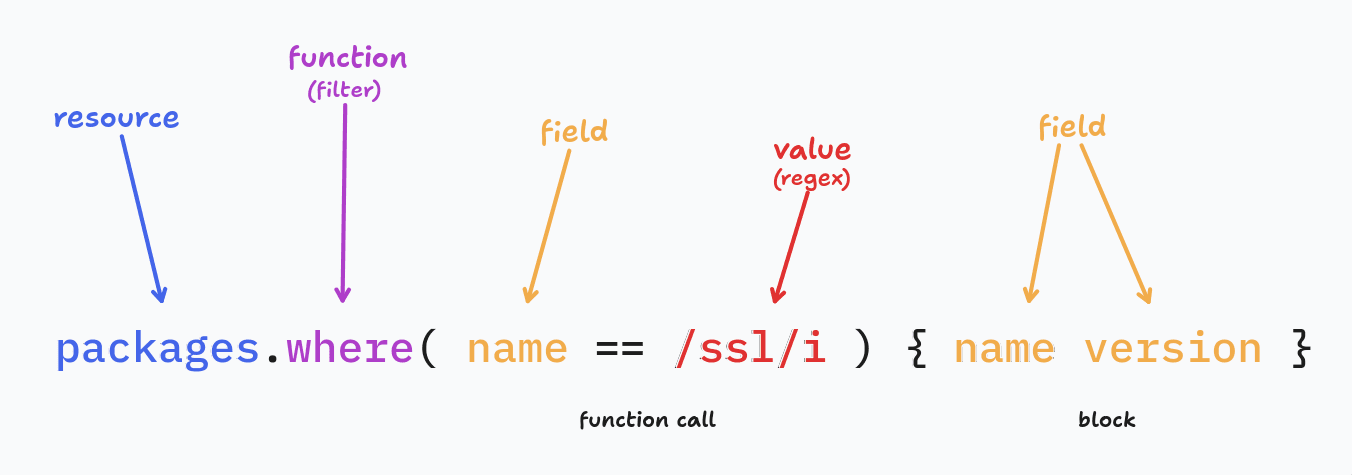
- Resource: An object containing information about a component in your infrastructure or code. In this example we use the
packagesresource to access the operating system's list of packages. See more below. - Functions: Calls that perform operations on resources. In this example,
wherefilters the list of packages. - Function call: The parentheses attached to a function, containing its arguments. Here the argument is a filter that selects only packages whose name matches the regular expression.
- Fields: Contain pieces of information about a resource. Here we use the
namefield of each package both in thewherefilter and in the block call at the end, along with theversionfield. - Value: Literal values used for filtering, comparisons, and assertions. For example,
/ssl/iis a case-insensitive regular expression that matches "SSL", "ssl", "sSl", and so on. - Block: The curly-brace section at the end that specifies which fields to extract. Everything before the block produces a filtered list of packages. The block then extracts the
nameandversionfrom each package. Learn more in Blocks below.
Comments
MQL supports # comments, which are compatible with YAML policy files and query packs.
"hi" # I am a commentMQL also supports // comments.
Types
MQL comes with a set of core types:
- String: A normal string like
"Hello!" - Number: Can represent an integer like
123or a float like1.23 - Bool: For
trueandfalse - Regex: For matching regular expressions like
/my.*re/i - Array: A list of values like
[1,2,3] - Map: Key-value pairs like
{a: 23} - Time: To represent time like
time.nowortime.today - Version: Often used for software and package versions like
version("1.2.3-rc1") - IP: For IP addresses, supporting IPv4
ip("1.2.3.4/24")and IPv6ip("2001:db8::1")
There are also a few special keywords and types:
- Null: Reserved for the
nullvalue when something isn't set - Empty: Can be used to check if something is empty (e.g. empty arrays, empty strings, empty maps, or null values)
There is also a special dict type for representing JSON data. Because JSON types aren't known at compile time, MQL uses dict to handle dynamically typed values. You'll encounter it when working with JSON files, for example parse.json("my.json").params. See Dicts for more.
Schemas
Beyond built-in types, MQL interacts with real infrastructure through providers. A provider is a plugin that connects MQL to a specific platform and exposes its data as queryable resources.
If you've been following the examples above, you've already used one: running cnspec shell without arguments connects through the os provider to your local system.
For example, if you are connected to your local OS, you can use resources like:
users
packages
services
If you connect to a cloud environment like AWS, Azure, or Google Cloud, different resources become available:
aws.ec2.instancesFor a full list of providers and their resources, see the resource reference. To learn about managing providers, see the providers guide.
UTF-8 encoding
All MQL code is encoded in UTF-8 to support arbitrary characters from other languages, symbols, or even emojis:
"UTF-8 in 日本 and 中文 👍".find(regex.emoji)find: [
0: "👍"
]Resources and fields
A resource is a source of information about an asset in your infrastructure. These are examples of resources:
- A user on the asset
- The operating system running on the asset
- An AWS S3 bucket
- A Google Cloud compute instance
- A Terraform state file
- A Microsoft Entra ID domain
Each resource has one or more fields, pieces of information you can request from the resource. These are examples of fields:
- A user can have a unique ID, a group, an SSH key, and more.
- An operating system can have a name, a path, and more.
- An AWS S3 bucket can have a version, can be public or not public, have encryption information, and more.
- A Google Cloud compute instance can have deletion protection on or off, a hostname, and more.
- A Terraform state file can have output values, modules, and more.
- A Microsoft Entra ID domain can have a verified or unverified status, an authentication type, and more.
This example requests the platform of an asset. asset is the resource and platform is the field:
asset.platformThe output would be redhat, windows, k8s-pod, or similar.
You can chain fields to access related resources:
sshd.config.file
=> sshd.config.file: path="/etc/ssh/sshd_config" size=1197 permissions.string="-rw-------"

sshd.config.file.path
=> sshd.config.file.path: "/etc/ssh/sshd_config"
Child resources
Some resources have child resources. For example, the aws.ec2 resource has multiple child resources, including aws.ec2.volume, aws.ec2.snapshot, and more.
Blocks
Blocks are a convenient way to group and extract information. They save you the trouble of repeating multiple requests for fields from one resource.
Instead of making individual requests like this:
sshd.config.file
sshd.config.params
sshd.config.ciphers
You can combine them into a block:
sshd.config {
  file
  params
  ciphers
}
The output is the same.
When writing a check in a policy that you'll execute in the Mondoo App, you must use helper variables inside blocks. If you don't, Mondoo can't render the check output.
Incorrect:
command("ip6tables -L") {
  stdout.contains("Chain INPUT (policy DROP)")
  stdout.contains("Chain OUTPUT (policy DROP)")
}
Correct:
command("ip6tables -L") {
  inputPolicyDrop = stdout.contains("Chain INPUT (policy DROP)")
  chainPolicyDrop = stdout.contains("Chain OUTPUT (policy DROP)")
  inputPolicyDrop
  chainPolicyDrop
}
This requirement applies only to policies you plan to deploy in the Mondoo App. If you're writing ad hoc policies or running queries in the cnspec shell, you don't need helper variables inside blocks.
Nest blocks
You can nest blocks:
sshd.config {
  file {
    path
    permissions
  }
}
Request all fields from a resource
A quick way to request all fields from a resource is by using { * }. For example, this requests all fields from the services resource:
services { * }This expands all immediate fields of the given resource. It does not cascade to list any child resources.
Lists
Some resources provide information in lists. For example, this requests a list of users, a list of packages, and a list of services:
users
packages
services
Using blocks, you can access specific field values from every item in a list. For example, this requests the name, uid, and home field values for each result in a list of users:
users {
  name
  uid
  home
}
Basic functions
Functions let you filter, transform, and assert conditions on resources and fields. Some of the most commonly used functions operate on lists, including where, all, none, and more.
users.where( uid >= 1000 ) {
  name
  uid
}
To learn more, read Functions.
Control structures
MQL provides these control structures:
If
A simple if statement:
if( x > 0 ) {
  return y
}
You can also chain statements with else if and else:
if( x > 10 ) {
  return 1
} else if( x > 0 ) {
  return 0
} else {
  return -1
}
Switch
For multiple conditions, use switch:
switch( x ) {
case _ > 10:
  return 1
case _ > 0:
  return 0
default:
  return -1
}
MQL evaluates the cases from top to bottom until it finds a match. There is no automatic fall-through.
Conditional operators
MQL supports these conditional operators:
==equal!=not equal>greater than<less than>=greater than or equal<=less than or equal&&logical and||logical or
To match a regular expression, compare with == or !=: name == /admin/ matches and name != /admin/ doesn't match.
Use inRange to check if an integer, float, or dict is in a numeric range. Follow this format:
VALUE.inRange(MIN, MAX)Examples:
3.inRange(3, 5)

password.length.inRange(9, 15)
Although MQL is type-safe, it handles type coercion automatically so you don't have to worry about explicit conversions. For example, comparing a number to a string works as expected:
a = 2
b = "2"

a == 2 && b == 2
Here's a real-world example:
sshd.config.params["Port"] == 22params is a map of strings, so values like Protocol and Port are strings, even though they look like numbers.
More examples of automatic type coercion:
"2" == 2

"2" == 2.0

"3" > 2

[1] == 1
This also simplifies regular expression comparisons:
"Hello world" == /H.*o/To learn about conditional operators with lists, see Arrays.
To learn about conditional operators with maps, see Maps.
Arithmetic operators
MQL supports the usual arithmetic operators on numbers:
+add-subtract*multiply/divide (integer division when both numbers are integers, so7 / 2is3)
1 + 2 * 3

(price * quantity) / discount
+ also concatenates strings ("a" + "b") and arrays ([1, 2] + [3]), and adding or subtracting a duration shifts a time (time.now - time.day).
Operator precedence
When you combine operators in a single expression, MQL follows the same precedence rules as JavaScript. The table lists operator tiers from lowest precedence (binds last) to highest (binds first):
| Tier | Operators |
|---|---|
| Assignment | = |
| Logical or | || |
| Logical and | && |
| Equality | ==, != |
| Comparison | <, <=, >, >= |
| Additive | +, - |
| Multiplicative | *, / |
Operators in the same tier have equal precedence and group from left to right.
Some examples of how MQL groups expressions:
1 + 2 * 3
// groups as: 1 + (2 * 3), result 7

a || b && c
// groups as: a || (b && c)

users.length > 0 && active
// groups as: (users.length > 0) && active

age >= 18 && age < 65
// groups as: (age >= 18) && (age < 65)

name == /admin/ || role == "root"
// groups as: (name == /admin/) || (role == "root")

10 - 4 - 3
// groups from left to right: (10 - 4) - 3, result 3
Use parentheses whenever you want to override the default grouping:
(a + b) * cFunctions
Parameters
Many fields take unnamed parameters by default:
sshd.config( "/path/to/my/sshd" )You can also use named parameters to initialize resources. For example, parse.json reads a file by default, and the named content parameter makes it parse a string instead:
parse.json(
  content: command('lsblk --json').stdout
)
Anonymous functions
Many functions accept an expression as their argument. For example, where takes a condition that is evaluated against each item in the list:
users.where( uid >= 1000 )Inside the expression, field names like uid refer to the current item (in this case, each user in the list).
You can combine these with global resources and variables:
users.where( name == regex.email )Some functions support both embedded and static values:
[1,2,3].contains( 3 )
[1,2,3].contains( _ > 2 )
Named arguments in functions
You can assign a name to the current item in a function expression. This is especially useful when nesting multiple levels, where it's otherwise unclear which resource a field belongs to:
users.all(user:
  groups.contains(group:
    user.uid == group.gid
  )
)
Naming the binding also changes how bare identifiers resolve inside the expression. With an anonymous binding, MQL first tries each bare identifier against the bound resource's fields, and only falls back to global resources if no field matches. When you name the binding, MQL stops that fallback: bare identifiers resolve against the global namespace, and the bound resource is reachable only through the name you gave it or through _.
That difference matters when a field shares a name with a global resource. For example, every process has a command field, and command is also a global resource. Inside an anonymous block, bare command is the field. Inside a named block, bare command is the resource:
// Anonymous binding: `command` is the process.command field.
processes.list { command }

// Named binding: `command` is the global `command` resource.
// Use `p.command` (or `_.command`) to read the process field.
processes.list.map(p: command("echo " + p.command))
Data
This section covers MQL's data types in detail, including how to work with strings, numbers, arrays, maps, and JSON data.
Basic data types
MQL's basic data types are:
s1 = "I am a string"
s2 = 'I am also a string'
re = /Reg.* Expression/

n1 = 1.0 + 2

n  = null
b  = true || false
Regular expressions
The regex resource provides pre-built patterns for common formats. Here are a few examples:
"anya@forger.com" == regex.email

"10.0.0.255" == regex.ipv4
"fe80::1042:2c47:b787:f6bb" == regex.ipv6

"4832500902091714" == regex.creditCard
To learn about all the pre-built expressions, read the regex resource reference.
Time
MQL includes built-in time functions for working with dates and durations:
time.now
# 2022-10-13 14:42:35 -0700 PDT

time.now - time.day
# 2022-10-12 14:42:35 -0700 PDT
# subtracts a day from the current time

time.now - 2*time.hour
# 2022-10-13 11:42:35 -0700 PDT
# subtracts 2 hours from the current time

parse.date("2022-10-12T14:42:35Z")
# 2022-10-12 14:42:35 +0000 UTC
# uses RFC3339 layout by default
Use inRange to check if a date and time is in a range. Follow this format:
DATE.inRange(MIN, MAX)Example:
time.now.inRange(time.now - time.day, time.now + time.day)MQL can also parse durations:
parse.duration("3days")

parse.duration("1y")
A duration is a whole number followed by a single unit. These forms work:
30s = 30 seconds
1m = 1 minute
3h = 3 hours
90d = 90 days
5y = 5 years
Combined values such as 1h30m and fractions such as 1.5h aren't supported. To learn about every accepted unit spelling, read parse.duration.
To turn a duration into a number, use days, hours, minutes, or seconds. For example, this returns the number of whole days since a date:
(time.now - parse.date("2025-01-01")).daysEmpty
The empty data type saves you the trouble of checking for different kinds of empty values, such as:
[]null''{}
For example, this query finds any type of empty value:
users.list == emptyVersions
Use the version type for software and package versions. Create a version with version(), which takes a string as an argument:
version('3.12.1')You can compare a version with another version or with a string:
version('1.2.3') < version('2.3')

version('1.10') >= '1.2'
Versions compare component by component and understand epochs (1:2.4.52), prerelease tags (1.0.0-rc1 is older than 1.0.0), and distribution revisions (1.2.3-1ubuntu1 is newer than 1.2.3). To check a range, use inRange:
version('1.2.3').inRange('>= 1.0.0', '< 2.0.0')semver() is a deprecated alias for version(). To learn more, read Version functions.
Arrays
Many resources contain lists of entries, like this example:
users {
  name
  uid
}
You can filter these lists using the where clause:
users.where( uid >= 1000 ) {
  name
  uid
}
Array assertions
To avoid unnecessary loops, MQL provides some keywords that make assertions on lists a lot simpler. For example:
users.all( uid >= 0 )When an assertion fails, MQL prints the elements that caused the failure:
> users.all( uid > 0 )
[failed] users.all()
  actual:   [
    0: user name="root" gid=0 uid=0
  ]
The available assertions for all lists are:
users.all( name != "anya" )   <= make sure no user is called anya
users.one( name == "anya" )   <= one user must exist, but no more than one
users.none( name == "anya" )  <= no user exists with the name anya
users.contains( uid >= 1000 ) <= contains one or more users with uid >= 1000
A filter that matches nothing gives all nothing to object to, so users.where( name == "anya" ).all( shell == "/bin/bash" ) passes when no user is called anya. To also require a match, use having in place of where:
users.list.having( name == "anya" ).all( shell == "/bin/bash" )For lists of strings, you can use the in assertion, which is the inverse of contains:
"anya".in(["abel","amos","anya"])An ideal use for in is to combine it with properties. For example, if you define a property named allowedCiphers, you can assert that a configured cipher is in that list:
sshd.config.ciphers.in( props.allowedCiphers )Another useful assertion for lists of strings is containsAll:
["abel","amos","anya"].containsAll(["abel","amos"])Mapping fields
When you use a block to extract fields from a list, MQL returns an array of maps:
> users { name }
[
  0: { name: "root" }

  ...

]
You can map these values into a simple list:
> users.map(name)
[
  0: "root",

  ...

]
This makes many queries and assertions easier:
users.map(name).contains( "anya" )Maps
Maps are key-value structures where keys are strings and values can be any type. You can access individual entries with [] or retrieve all keys and values.
Here are some basic examples:
m = {"a": 1, "b": 2}

> m.b
# 2

> m.keys
# ["a", "b"]

> m.values
# [1, 2]
Here's how you'd use bracket notation with a real resource:
> os.env["SHELL"]
"/usr/bin/zsh"
Map assertions
The available assertions for maps are:
{'a': 1, 'b': 2}.contains( key == 'b' )
{'a': 1, 'b': 2}.all( value > 0 )
{'a': 1, 'b': 2}.one( value != 1 )
{'a': 1, 'b': 2}.none( key == /d-f/ )
Dicts
Dicts handle data where value types aren't known ahead of time, such as parsed JSON. Unlike maps (which have a fixed value type), dicts can contain mixed types in the same structure:
> parse.json("my.json").params
parse.json.params: {
  1: 1.000000
  1.0: 1.000000
  _: null
  date: "2016-01-28T23:02:24Z"
  dict: {
	ee: 3.000000
	ej: 4.000000
	ek: 5.000000
  }

  ...
As shown, a single dict can hold strings, numbers, nulls, and nested dicts.
You can access keys, values, and nested entries the same way as with maps:
> parse.json("my.json").params.keys
parse.json.params.keys: [
  0: "int-array"
  1: "f"
  2: "string-array"
  3: "hello"


> parse.json("my.json").params.values
parse.json.params.values: [
  0: null
  1: true
  2: 1.000000
  3: "hello"

> parse.json("my.json").params["f"][0]
parse.json.params[f][0]: {
  ff: 3.000000
}

> parse.json("my.json").
    params["f"].
    all( _.keys.contains("ff") )
[ok] value: true
recurse helper for dicts
The recurse helper makes it easy to extract data from a dict structure made up of mixed value types.
For example, suppose you need to retrieve all users from this JSON data structure, stored in a file named users.json:
{
  "users": [{ "name": "bob" }],
  "owners": {
    "admins": [{ "name": "joy", "isOwner": true }]
  }
}
Because users appear at different nesting levels and under different keys, finding them all requires knowing the exact structure. recurse solves this by searching the entire tree for entries that match a condition:
parse.json("users.json").params.recurse( name != empty )parse.json.params.recurse: [
0: {
name: "bob"
}
1: {
isOwner: true
name: "joy"
}
]You can then map the user names:
parse.json("users.json").params.recurse( name != empty ).map(name)parse.json.params.recurse.map: [
0: "bob"
1: "joy"
]Nested data
JSON, Terraform, and Kubernetes artifacts often have deeply nested structures. MQL supports simple dot-notation accessors to reach into them:
terraform.resources.where( nameLabel == "google_storage_bucket" ) {
  arguments.labels.environment
}
Helpers for data type conversions
Helpers let you convert data to the type you need:
> int(1.23)
1

> bool(1)
true

> float(12)
12

> string(1.89)
"1.89"

> regex("w.r.d") == "world 🌎"
/w.r.d/
To find out what type a value has, use typeof:
> typeof(version("1.2.3"))
"version"
Error handling
When a value can't be accessed, MQL returns an error with a description of what went wrong:
> file("/etc/shadow").content
[failed] file.content
  error: open /etc/shadow: permission denied
Null chaining
When a field in a chain returns null, MQL propagates the null through the rest of the chain instead of throwing an error:
> sshd.config.params["NONE"].downcase == null
[ok] value: _
This is the default behavior. It's convenient when you explore an asset, but it can hide mistakes in a check: a mistyped key or a value that couldn't be read produces the same null as a setting that's genuinely absent. Strict mode turns those cases into errors.
Strict mode and the ? operator
Strict mode, available starting with MQL 14, makes MQL report a broken chain instead of quietly passing null along. The rule is: every link in a chain must resolve, and a ? after a link waives that link.
A link fails to resolve when the value it reads from is null, or when it looks up a map or dict key that doesn't exist. The two kinds of lookup behave differently:
- A field always resolves. A resource field is declared in the schema, so reading it is fine even when its value is
null. Reading through anullfield, as ina.f.cwhenfisnull, is an error. - A map or dict key may not resolve. Naming a key claims that the key exists. In strict mode, a key that isn't there is an error at the lookup itself. Without strict mode, the lookup returns
null.
That difference is what catches a typo. In non-strict mode, a misspelled key compares as a plain failure. In strict mode, the lookup errors and names the key:
> sshd.config.params["PermitRootLogn"] == "no"
[failed] sshd.config.params[PermitRootLogn] == "no"
  error: cannot find key "PermitRootLogn"
When a key or value may legitimately be missing, put ? after the link that may not resolve. The ? waives that link and, if it yields null, skips the rest of the chain:
sshd.config.params["PermitRootLogin"]? == "no"The ? always guards the link to its left. In m.k?.c it guards the k lookup, and in a?.f it guards a. To guard two links, use two marks, as in a?.f?.c. A ? also guards a block: x? { ... } yields null instead of an error when x is null.
This table shows how strict mode treats common chains, where m is a map or dict and a is a resource:
| Query | Non-strict | Strict | Guarded form |
|---|---|---|---|
m.k, key absent | null | error at .k | m.k? |
m.k == "no", key absent | false | error at .k | m.k? == "no" |
m.k.c, key absent | null | error at .k | m.k?.c |
m.k.c, key present, value null | null | error at .c | m.k?.c |
a.f, field null | null | null | not needed |
a.f == "no", field null | false | false | not needed |
a.f.c, field null | null | error at .c | a.f?.c |
Operators that accept null as an input, such as == null, != null, == empty, != empty, &&, and ||, don't count as links. They still see the result of the chain in front of them, though, so m.k == null errors in strict mode when the key is absent. Write m.k? == null to test for a key that may be missing.
Arrays are the same in both modes: an index past the end of an array, such as [1, 2][5], is always an error.
Turn on strict mode
Strict mode is off by default. To turn it on:
- For a single query or shell session, add
--stricttocnspec run,cnspec shell,mql run, ormql shell. - As the default for a machine, set
strict: truein the cnspec configuration file or set theMONDOO_STRICT=trueenvironment variable. - For a policy, set
strict: trueon the policy. The setting applies to every query in the policy, and it wins over--strictand the configuration default. A policy that setsstrict: falsealways runs in non-strict mode. To learn more, read Strict mode in the policy authoring guide.
If you embed MQL in Go, pass mqlx.WithStrict(true) when you create the environment. To learn more, read Embedding MQL.
Concurrency
MQL runs operations concurrently by default. When a query involves multiple independent data sources, MQL fetches them in parallel automatically.
For example:
hosts = [
  tls("mondoo.com"),
  tls("mondoo.io"),
  ...
]

hosts.all(
  ciphers
    .none( /cbc/i )
)
This query checks TLS ciphers across all the listed hosts. Rather than connecting to each host one at a time, MQL sends all the TLS requests in parallel and aggregates the results.
This works the same regardless of whether the data comes from an API, a file, a system command, or any other source. You don't need to configure anything; concurrency is always automatic.
The interactive shell
cnspec provides a built-in interactive shell that acts like an IDE for MQL. This is one of the most powerful tools for:
- Learning MQL: experiment with selectors, built-ins, regex, and comparisons live.
- Testing policies: copy queries from a policy file and run them interactively.
- Investigating live systems: connect to a cloud account, Kubernetes cluster, or host to query live state.
- Incident response: during a security event, you can ask questions of your infrastructure in real time, without writing code or waiting for dashboards to refresh.
Think of the shell as a REPL (Read-Eval-Print Loop) for your infrastructure. You type MQL queries, it evaluates them against your connected system, and prints results immediately.
How to launch the interactive shell
Pick a target and start a shell:
# Local OS
cnspec shell local

# AWS account (uses your AWS credentials)
cnspec shell aws

# GCP project (replace with your project ID)
cnspec shell gcp project <project-id>

# Azure -- lists your subscriptions, select one by number
cnspec shell azure

# Kubernetes -- uses current KUBECONFIG and lists clusters/namespaces to select
cnspec shell k8s
When you connect, you'll see a banner confirming the provider and the asset you are connected to.
Built-in help
The shell has a built-in help command. Use it to explore what resources are available and what fields they expose.
Provider-level help:
cnspec> help aws
cnspec> help gcp
cnspec> help k8s
Resource-level help:
cnspec> help aws.ec2.instance
cnspec> help gcp.project
cnspec> help k8s.deployment
Each help command shows fields, types, and nested resources you can query.
Examples of shell in action
The following examples show how you might investigate a live security incident.
Which AWS EC2 instances have a public IP?
aws.ec2.instances.where(publicIp != empty) { instanceId region state tags publicIp }Which GCP compute instances are running with external NAT?
gcp.compute.instances.where(nics.any(externalIpConfigs.any(name == "External NAT"))) { name zone }Which Kubernetes pods are not in Running state?
k8s.pods.where(manifest.status.phase != "Running") { name namespace }Which Linux services are running?
services.where(running == true) { name enabled type }You can run these queries live during incident response to quickly answer pressing questions without waiting for dashboards to refresh.
Why the shell matters
The interactive shell is more than a convenience:
- It is the fastest way to learn MQL by trial and error.
- It provides deep visibility into resources through the
helpcommand. - It allows ad-hoc investigation without pre-built dashboards.
- It bridges the gap between writing policies and running live checks.
MQL built-in functions
Built-in functions let you filter, transform, and make assertions across collections of data. They are the building blocks for turning raw data into meaningful answers.
.where()narrows down what you're looking at..map()transforms the results..all(),.any(),.none(),.one()let you assert truth over collections..having()filters and asserts that something matched..list,.length, and.containsOnlyhelp you structure and compare results.
For detailed documentation with examples of every built-in function, see the MQL Functions Reference.
Quick reference for MQL built-ins
| Built-in | Input types | Output | Typical use |
|---|---|---|---|
address | IP | string | Return the IP address without its prefix length |
all(cond) | arrays, maps, lists | boolean | Assert all elements match (universal requirement) |
any(cond) | arrays, lists | boolean | Assert at least one element matches |
camelcase | string | string | Convert to camelCase |
cidr | IP | string | Return the address in CIDR notation |
contains(val) | arrays, maps, strings | boolean | Check membership or substring presence |
containsAll([]) | arrays | boolean | Assert all listed values are present |
containsNone([]) | arrays | boolean | Assert none of the listed values are present |
containsOnly([]) | arrays | boolean | Assert only allowed values are present |
days | duration | integer | Convert a duration to whole days |
downcase | string | string | Convert to lowercase |
duplicates | arrays | array | Return duplicate elements |
epoch | version | integer | Return the epoch of a version |
first | arrays, lists | element | Return the first element |
flat | nested arrays | array | Flatten nested arrays |
having(cond) | arrays, maps, lists | same | Filter like where and assert that something matched |
hours | duration | integer | Convert a duration to whole hours |
in(list) | string, array of strings | boolean | Test membership in a list |
inRange(min, max) | numbers, time, version | boolean | Check if value is within range |
isPublic | IP | boolean | Test if the IP is publicly routable |
isUnspecified | IP | boolean | Test if the IP is unspecified (for example, 0.0.0.0) |
join(sep?) | arrays | string | Join values into one string |
json | string | dict | Decode JSON (experimental) |
keys | map, dict | array | Return keys of a map |
last | arrays, lists | element | Return the last element |
length | arrays, maps, strings | integer | Count elements, entries, or bytes |
lines | string | array | Split into lines |
map(expr) | arrays, lists | array | Transform or project values |
minutes | duration | integer | Convert a duration to whole minutes |
none(cond) | arrays, maps, lists | boolean | Assert no elements match |
notIn(list) | string, array of strings | boolean | Test value is not in list |
one(cond) | arrays, maps, lists | boolean | Assert exactly one element matches |
parse.date(str, fmt?) | string | time | Parse a string into a time value |
parse.duration(str) | string | time | Parse a string like "3days" into a duration |
prefix | IP | string | Return network prefix |
prefixLength | IP | integer | Return prefix length |
recurse(cond) | dict | array | Find matching entries at any depth |
reverse | arrays | array | Reverse the order of elements |
sample(n) | arrays, maps, lists | same | Return n random elements |
seconds | duration | integer | Convert a duration to seconds |
split(sep) | string | array | Split by delimiter |
subnet | IP | string | Return the subnet mask or subnet ID |
suffix | IP | string | Return the host portion of the address |
trim(chars?) | string | string | Remove leading and trailing whitespace or characters |
unique | arrays | array | Return only unique elements |
unix | time | integer | Convert a time to Unix epoch seconds |
upcase | string | string | Convert to uppercase |
values | map, dict | array | Return values of a map |
version(str) | string | version | Parse a string so it compares as a version |
where(cond) | arrays, maps, lists | same | Filter a collection by condition |
Additional resources
Explore more in the Mondoo docs:
| Page | Purpose |
|---|---|
| Get started with cnspec | Install and configure cnspec to scan and query your infrastructure |
| Policy Authoring Guide | Describes how to write Mondoo security policies |
| MQL Resources | Lists all of the information that MQL can retrieve from infrastructure assets and describes how to use them |
| Create Checks in cnspec Shell | Describes how to use the cnspec shell for ad hoc MQL queries and assertions |
| cnspec CLI commands | Details all commands in the cnspec command line interface |
MQL Docs Home
MQL (Mondoo Query Language) is a graph-based language for querying and validating infrastructure. Learn what MQL is, where it runs, and how to get started.
Terraform
Learn how to write Mondoo MQL checks for Terraform HCL, Plan, and State. Use the cnspec shell, Mondoo Terraform provider, filters, and variants to build production-grade Policy as Code across your IaC and runtime.