Secure an OCI Tenancy
Scan an Oracle Cloud Infrastructure tenancy against security and compliance best practices with cnspec.
Scan your Oracle Cloud Infrastructure (OCI) tenancy to find security risks before they become incidents. cnspec evaluates tenancy-level settings such as user MFA enrollment, audit log retention periods, identity policy statements, VCN security lists, and Object Storage bucket access. All you need is your existing OCI CLI configuration.
Prerequisites
To scan OCI with cnspec, you must have:
- cnspec installed on your workstation
- Access to an OCI tenancy
Authenticate
cnspec uses the OCI CLI configuration to authenticate. Generate an API key in the OCI Console, then create a config file that points cnspec at it.
Step 1: Generate an API key
-
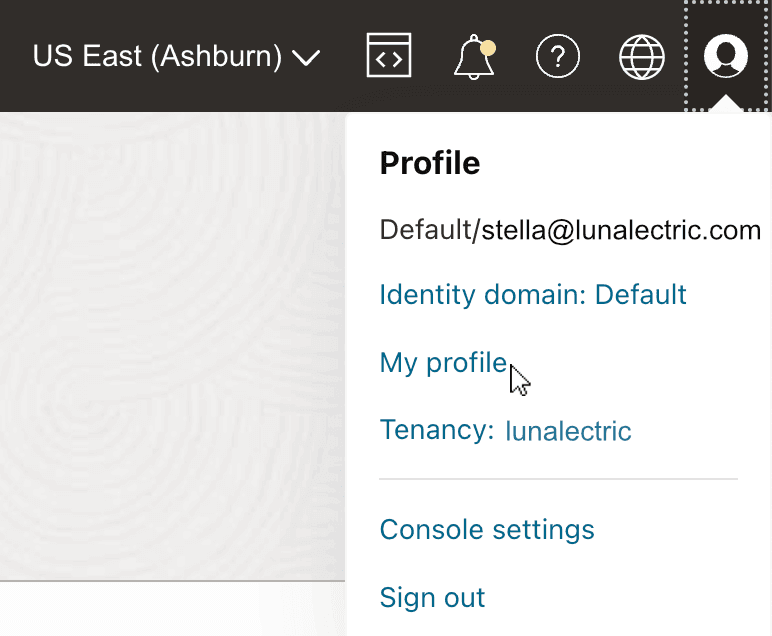
In the top-right corner of the Oracle Cloud Infrastructure Console, select your profile icon and select My profile.
-
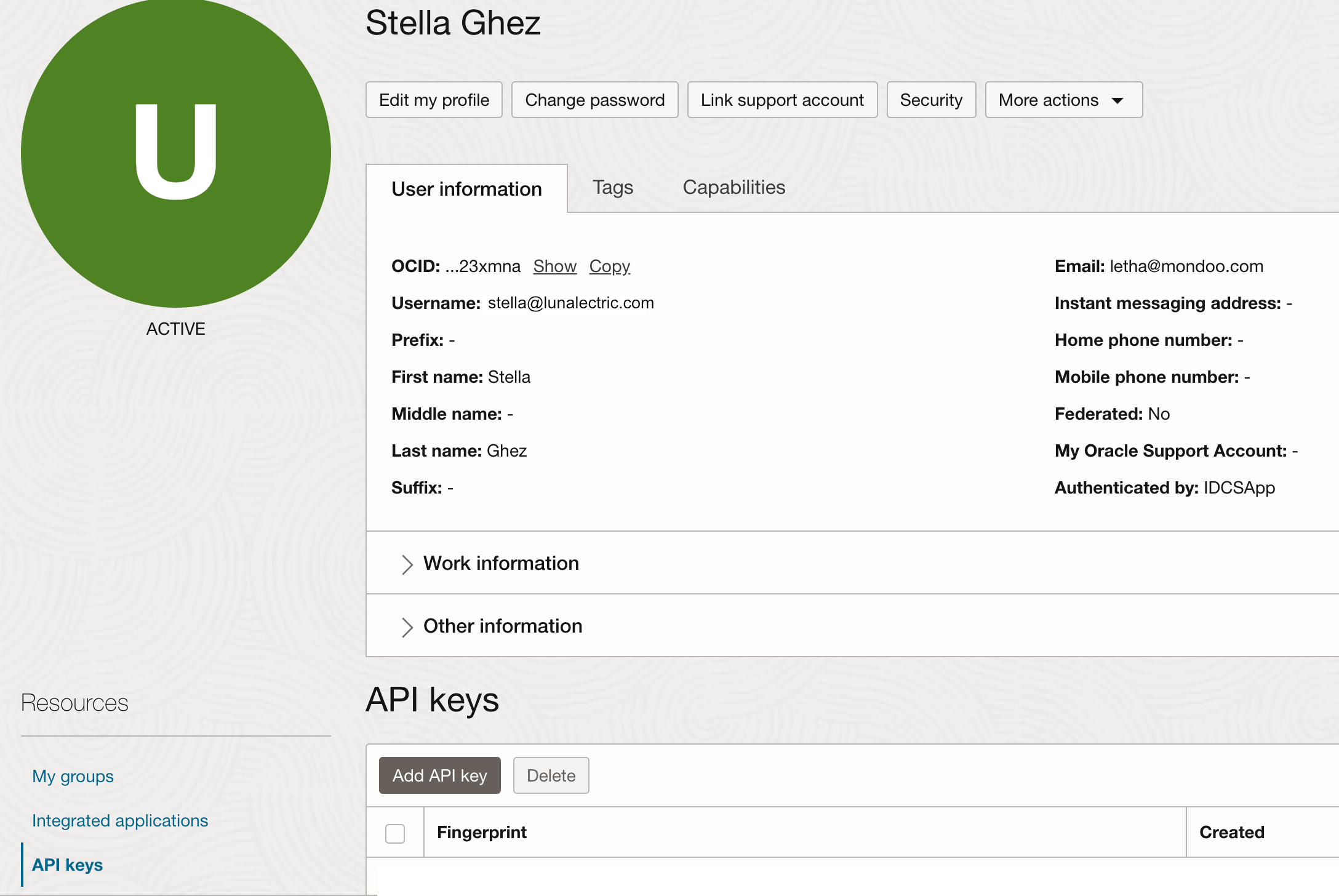
Under Resources, select API keys.
-
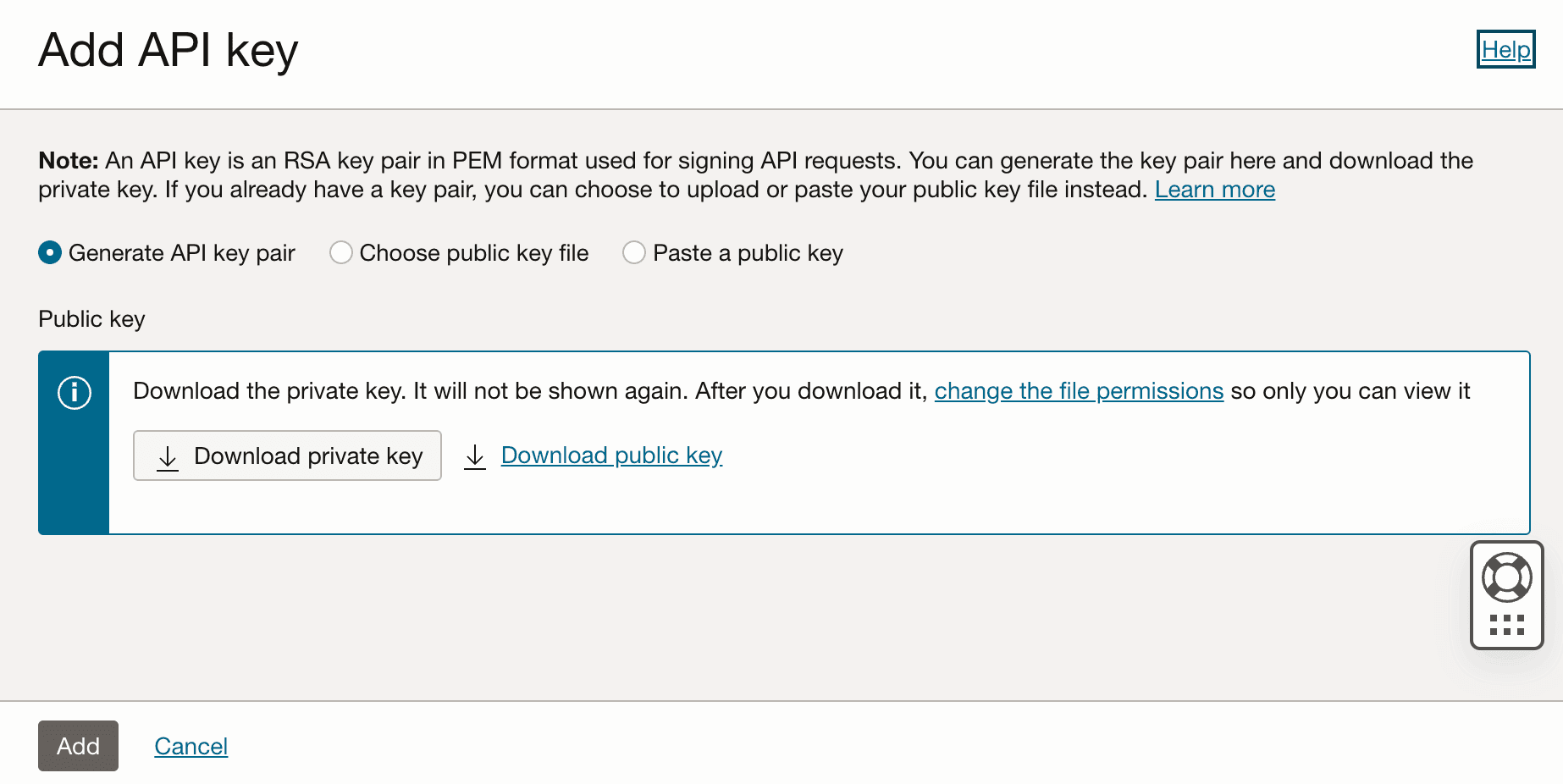
Select Add API key.
-
Leave Generate API key pair selected, then select Download private key.
-
Create a
~/.oci/directory on your workstation and move the downloaded private key file into it.
Step 2: Create the config file
-
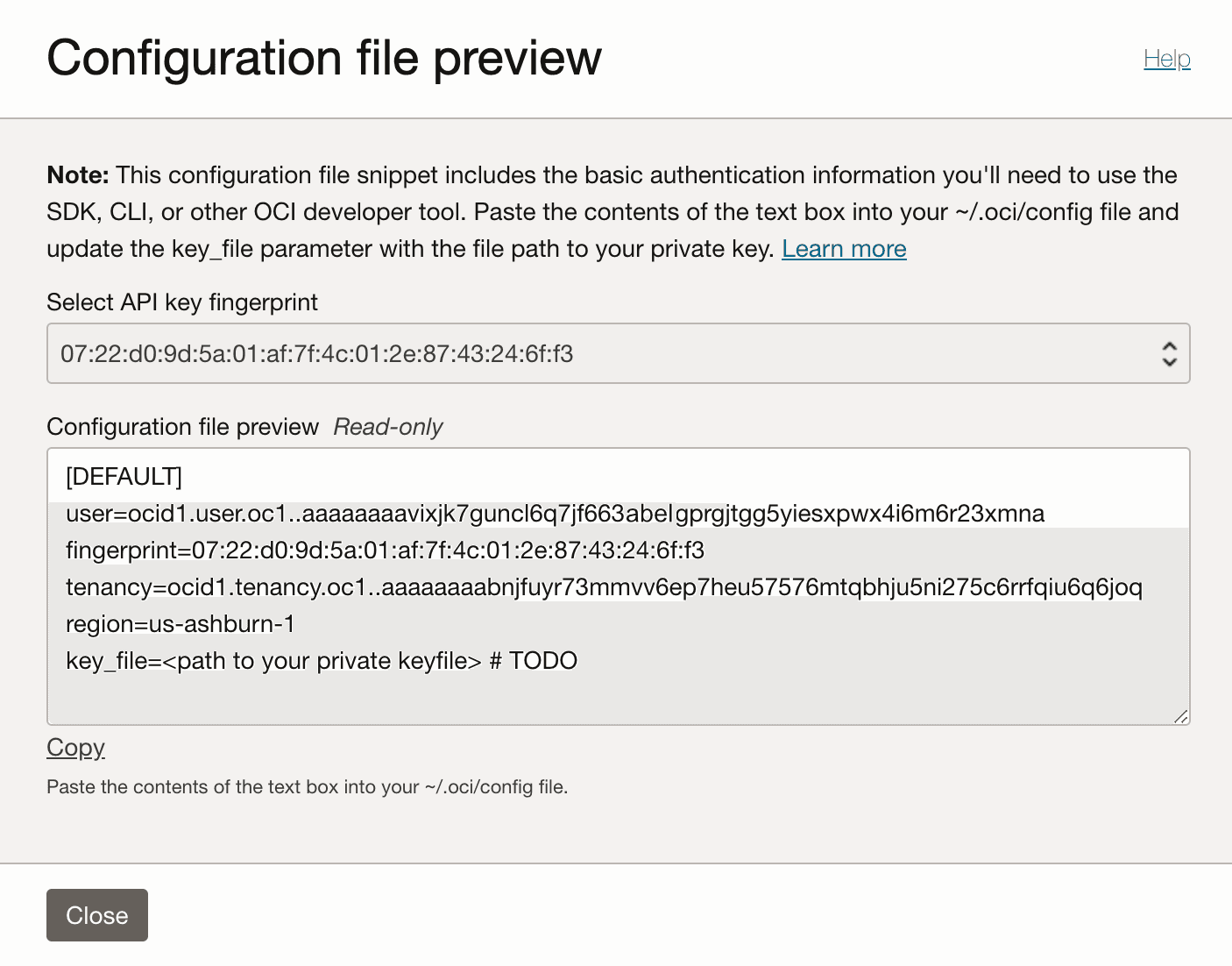
Select Add. OCI generates a config file for you. Copy the contents of the Configuration file preview box.
-
In the
~/.oci/directory, create a file namedconfigand paste the content you copied. Replace thekey_fileplaceholder on the last line with the path to your private key file.[DEFAULT] user=ocid1.user.oc1..aaaaaaaavixjk7guncl6q7jf663vyeygprgjtgg5yiesxpwx4i6m6r23xmna fingerprint=c9:1d:c8:e1:54:26:b7:82:2c:7d:b5:be:0a:62:b7:b8 tenancy=ocid1.tenancy.oc1..aaaaaaaabnjfuyr73mmvv6ep7heu57576abelhju5ni333c6rrfqiu6q6joq region=us-ashburn-1 key_file=~/.oci/oci_api_key.pem
Connection options
By default, cnspec reads the DEFAULT profile from ~/.oci/config. The oci provider also accepts these connection options:
| Option | Description |
|---|---|
--profile | OCI config profile name (for example, DEFAULT) |
--config-file | Path to the OCI config file (default: ~/.oci/config) |
--auth-method | Authentication method: api-key (default), instance-principal, resource-principal, workload-identity, or security-token |
--tenancy | The tenancy's OCID |
--user | The user's OCID |
--region | The OCI region to connect to (for example, us-ashburn-1) |
--key-path | Path to the private key file for API key authentication |
--fingerprint | The fingerprint of the private key |
--key-secret | Passphrase for the private key file, if encrypted |
--filters | Filter discovered resources, for example --filters regions=us-ashburn-1 or --filters exclude:compartments=sandbox |
For example, to use a non-default profile:
cnspec scan oci --profile PRODUCTIONVerify with a quick OCI check
Confirm that cnspec can reach your OCI environment:
cnspec run oci -c 'oci.tenancy.name != empty'If cnspec connects, it returns the tenancy name and confirms the check passed:
[ok] value: "my-tenancy"If the command fails, verify that your ~/.oci/config file is configured correctly.
Scan OCI
To scan your OCI tenancy:
cnspec scan ocicnspec automatically applies all enabled policies that are applicable to OCI. Enable the Mondoo Oracle Cloud Infrastructure (OCI) Security policy to assess identity management, networking, logging, storage, and more. To learn how to enable policies, read Manage policies in Mondoo Platform.
Open source cnspec users can find this policy in the cnspec GitHub repository and scan with a local copy or directly from a URL using --policy-bundle:
cnspec scan oci --policy-bundle https://raw.githubusercontent.com/mondoohq/cnspec/refs/heads/main/content/mondoo-oci-security.mql.yamlDiscover resources during a scan
By default, cnspec scans your tenancy and also discovers every supported resource type as its own asset. Use the --discover flag to choose which resource types become their own assets:
| Value | Discovers |
|---|---|
auto | The tenancy and every resource type below |
all | The tenancy and every resource type below |
tenancy | The tenancy |
identity-users | IAM users |
identity-policies | IAM policies |
network-securitylists | VCN security lists |
objectstorage-buckets | Object Storage buckets |
apigateway-deployments | API Gateway deployments |
loadbalancer-loadbalancers | Load balancers |
redis-clusters | Redis clusters |
vault-secrets | Vault secrets |
oke-clusters | OKE Kubernetes clusters |
generativeai-endpoints | Generative AI endpoints |
cnspec scan oci --discover tenancy,objectstorage-bucketsCombine discovery with --filters to narrow which resources become assets. For example, --filters regions=us-ashburn-1, --filters compartments=production, --filters exclude:compartments=sandbox, --filters tag:env=prod, or --filters exclude:tag:env=dev.
Understand scan output
When a scan completes, cnspec prints a summary of all the checks it ran, grouped into passing and failing checks. Each failed check shows its risk rating. For example:
Passing:
✓ Ensure MFA is enabled for all users with a console password
✓ Ensure default security list of every VCN restricts all traffic

Failing:
✕ MEDIUM (50):    Ensure audit log retention period is set to 365 days
At the end of the output, cnspec shows a risk score from 0 (no risk) to 100 (highest risk). Failed checks include remediation guidance to help you fix issues. To learn how to read a report in depth, see Understand Scan Results.
Explore and test checks interactively
Open a cnspec shell to discover resources and try out checks:
cnspec shell ociEnsure MFA is enabled for all users
cnspec> oci.identity.users.all( mfaActivated )
[failed] [].all()
  actual:   [
    0: oci.identity.user name="mwezi@lunalectric.com" {
      mfaActivated: false
    }
    1: oci.identity.user name="stella@lunalectric.com" {
      mfaActivated: false
    }
  ]
Ensure audit log retention is set to 365 days
cnspec> oci.tenancy.retentionPeriod == 365 * time.day
[ok] value: 365 days
Ensure no Object Storage buckets are publicly accessible
cnspec> oci.objectStorage.buckets.all( publicAccessType == "NoPublicAccess" )
[ok] value: true
Ensure Object Storage buckets have versioning enabled
cnspec> oci.objectStorage.buckets.all( versioning == "Enabled" )
[failed] [].all()
  actual:   [
    0: oci.objectStorage.bucket {
      versioning: "Disabled"
    }
  ]
List identity policies and their statements
cnspec> oci.identity.policies { name statements }
oci.identity.policies: [
  0: {
    name: "admin-policy"
    statements: [
      0: "Allow group Administrators to manage all-resources in tenancy"
    ]
  }
]
Ensure Object Storage buckets have event notifications enabled
cnspec> oci.objectStorage.buckets.all( objectEventsEnabled == true )
[ok] value: true
Continuously scan with Mondoo Platform
Go beyond one-off scans. Use Mondoo Platform and the Mondoo OCI integration to continuously monitor your OCI tenancy. Get a real-time security dashboard, track your posture over time, and catch new misconfigurations as your infrastructure changes.
Learn more
- Mondoo OCI Resource Pack Reference: every OCI resource and field cnspec can query
- Write Effective MQL: a guide to authoring checks and queries