xgrep vs Semgrep
How xgrep compares to Semgrep. A single local binary with no Python runtime that runs your existing Semgrep rules and adds native taint analysis, secrets, and dependency scanning, with all analysis on your machine.
Semgrep is a well-known pattern-based static analysis tool. xgrep runs the same rule syntax, so moving over is a swap rather than a migration. What differs is how it installs, where it runs, and how accurate it is.
At a glance
| xgrep | Semgrep | |
|---|---|---|
| Install | single static binary | Python package (pip/pipx) or container |
| Runtime dependency | none | Python interpreter |
| Account required to scan | no for SAST and secrets; dependency vulnerability matching needs a Mondoo account | no for the OSS CLI; yes for the platform |
| Where your code is analyzed | always local | OSS CLI: local · Platform / AI features: code context sent to the cloud |
| Runs your Semgrep rules | yes | yes |
| Taint / dataflow analysis | yes, in the one binary | yes; cross-file / cross-function is a Pro (paid) feature |
| Secrets scanning | built in | Semgrep Secrets (platform) |
| Dependency (SCA) + vuln matching | built in | Semgrep Supply Chain (platform) |
| Reachability | yes, ranks dependency CVEs by whether your code reaches the vulnerable function | Semgrep Supply Chain (platform) |
| SBOM / CBOM from source | built in | not a core CLI capability |
| AIBOM (AI/ML inventory) from source | built in, 20 languages, fully offline | no |
| Sensitive-data (PII/PHI/PCI) flow | yes, xgrep dspm reports what data the code holds and where it leaks | no |
| Scan a remote repo by URL | yes (xgrep scan github.com/org/repo) | scan a local checkout |
| Language coverage | broad, see supported languages | broad |
Install: one binary vs a Python toolchain
Semgrep is distributed as a Python package: you install a Python interpreter, then
pip install semgrep (or run its container), and keep that environment working
across your laptops and CI runners.
xgrep is a single static binary. Download one file and run it. No interpreter, no
pip, no virtualenv. The install is the same on a laptop, a CI runner, or an
air-gapped host.
Where your code runs
Semgrep's command-line scan runs locally. Its richer capabilities live in the Semgrep AppSec Platform: cross-file and cross-function analysis, the AI assistant, managed scanning, the findings dashboard. Those require an account, and some of them send code context to their cloud.
xgrep runs its analysis on your machine, always. Taint analysis and secret scanning need no account and no network: your source is never uploaded, and there is no server-side mode that could receive it.
What crosses the boundary is results, not code. xgrep integrates natively with
Mondoo Platform. With a Mondoo account, findings publish there automatically for
organization-wide posture, and --incognito turns that off. Dependency vulnerability
matching sends your SBOM, meaning package names and versions, to be matched
against
Mondoo Vulnerability Intelligence.
The distinction matters. Semgrep's platform is where its cross-file analysis and AI features run, so code context goes up to be analyzed. Mondoo Platform is where findings land, after the analysis finished on your machine.
Your existing rules keep working
xgrep reads Semgrep rule syntax: pattern, patterns, pattern-either,
metavariable-*, mode: taint with sources and sinks, and the rest. Point it at your
existing rule files and they run. See
Semgrep compatibility for the
detailed parity matrix and the xgrep-only extensions.
Accuracy
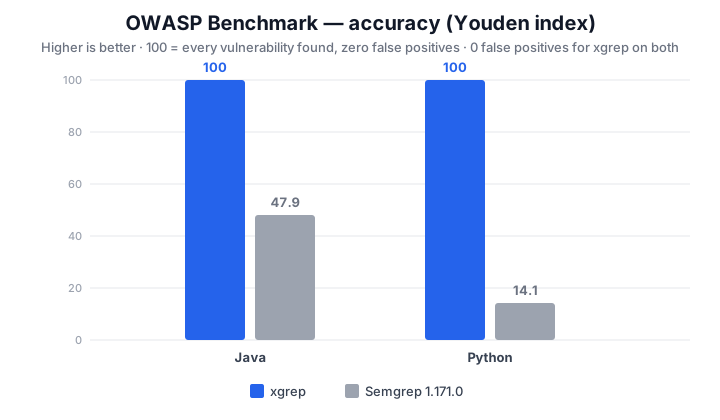
The OWASP Benchmark is a large, labeled corpus where every case is known to be either a real vulnerability or a safe look-alike. xgrep finds every planted vulnerability in it with zero false positives, on both the Java and Python suites.
| OWASP Benchmark | tool | found | false alarms | missed | precision | recall |
|---|---|---|---|---|---|---|
| Java | xgrep | 1415 | 0 | 0 | 100% | 100% |
| Java | Semgrep 1.182.0 | 1224 | 512 | 191 | 70.5% | 86.5% |
| Python | xgrep | 452 | 0 | 0 | 100% | 100% |
| Python | Semgrep 1.182.0 | 115 | 88 | 337 | 56.7% | 25.4% |
Recall is how much of what is really there a tool finds. Precision is how much of what it reports is real. Either is easy to win alone: flag one line you are sure of, or flag everything. So F1 and the Youden index combine the two into one score, where 100 means every vulnerability found and nothing safe flagged.
These numbers are reproducible from the pinned tool versions in the benchmark's metrics ledger. The OWASP corpus labels a single vulnerability class per test case, so a saturated score there reflects that corpus and not every workload.
Real applications
The suite also scores both tools against deliberately vulnerable real applications with hand-triaged ground truth. xgrep comes out ahead on every one where both tools run:
| application | language | xgrep recall | Semgrep recall | xgrep F1 | Semgrep F1 |
|---|---|---|---|---|---|
| aspgoat | C# | 100% | 25% | 100% | 40% |
| demo-netflicks | C# | 100% | 0% | 92% | — |
| railsgoat | Ruby | 94% | 56% | 89% | 56% |
| java-sec-code | Java | 100% | 40% | 87% | 57% |
| webgoatnet | C# | 88% | 0% | 84% | — |
| webgoat | Java | 90% | 40% | 78% | 49% |
| juice-shop | JavaScript | 96% | 21% | 61% | 26% |
| shopizer | Java | 100% | 0% | 38% | — |
A dash means Semgrep found none of that application's vulnerabilities, which leaves F1 undefined.
When Semgrep is the better fit
Language coverage used to be one reason, and mostly no longer is. The languages that were once Semgrep-only — Apex, Hack, Jsonnet, and Cairo — now parse in xgrep too. xgrep has since added Julia, OCaml, HCL and Dockerfile as full tree-sitter languages, and Perl, Elixir, Erlang, Clojure, Scheme and Lisp as newer parsers whose bundled rule coverage is lighter but against which structural matching and your own Semgrep rules still run. It runs the other way too, since xgrep covers PowerShell and Semgrep does not — not only parsing it, but taint-based detection such as reflected XSS traced from request input to an HTML response.
Your rules are not lock-in: xgrep reads the same rule syntax, so they move across unchanged (below). The platform is not the gap it looks like either. Mondoo Platform already gives you managed scanning, an org-wide findings dashboard, risk scoring, exceptions and fix status across every repository (below), so "their platform is more complete" does not survive a close look. What is genuinely Semgrep's own is its AI assistant; if your team is built around that one feature, that is the reason to stay.
Two things that look like reasons to stay are not:
- The community rules. They are open-source YAML, and xgrep
runs them unchanged when you point
it at them with
-f. You can keep the rules your team relies on and change the engine underneath them. They are not what runs by default, though: xgrep ships its own built-in rule corpus and runs that, so bringing your own rules is an option rather than a prerequisite. - Cross-repository dashboards. These are not exclusive to Semgrep's platform. xgrep publishes to Mondoo Platform, where code, IaC, secrets, vulnerability and malware findings from every repository sit together with risk scoring, exceptions and fix status, as part of Mondoo's software supply chain security.
When Mondoo is the better fit
xgrep is the code half of Mondoo. The other half is cnspec, which covers infrastructure as code, cloud accounts, containers, Kubernetes and running hosts, checked against policy and compliance frameworks. Both report to Mondoo Platform and land on the same asset, which gives you code, build and runtime in one view. Semgrep stops at the code; Mondoo follows the same finding from source to the host it ships to.
That matters once the question moves past "is this code vulnerable" to "did it ship, and where is it running". A SAST tool cannot answer that alone, and neither can a posture tool. If you would otherwise buy both, buy Mondoo instead.
Try it
# scan the current directory with the built-in rules
xgrep scan .

# run your existing Semgrep rules
xgrep scan --rules ./my-semgrep-rules/ .
See Getting started for installation and your first scan.
Last updated on
Overview
How xgrep compares to other code security scanners. A single local binary that runs SAST, secrets, dependency and SBOM scanning on your machine, with no language runtime and without uploading your source code.
vs Snyk
How xgrep compares to Snyk. A single local binary whose analysis finishes on your machine and never uploads your source, versus a cloud service that analyzes your code server-side.