Code DSPM (Data Security Posture Management)
Inventory the sensitive data a codebase handles and find where it leaks — PII, PHI, PCI, and secrets flowing to logs, external services, AI models, responses, or storage — from source alone, no datastore access.
Code DSPM
Traditional DSPM (Data Security Posture Management) scans live datastores. Code DSPM answers the same questions one step earlier — from source code alone, with no database access — so you see how an application handles sensitive data before it ever runs:
- What sensitive data does this codebase declare? The entities (structs, ORM models, schema types) and, for each, the fields classified as PII, PHI, PCI, secrets, customer content, or AI context — with a category and a confidence.
- Where does that data leak? The places a classified value actually flows to a risky sink: logs, third-party egress, AI prompts, API responses, or storage.
xgrep dspm .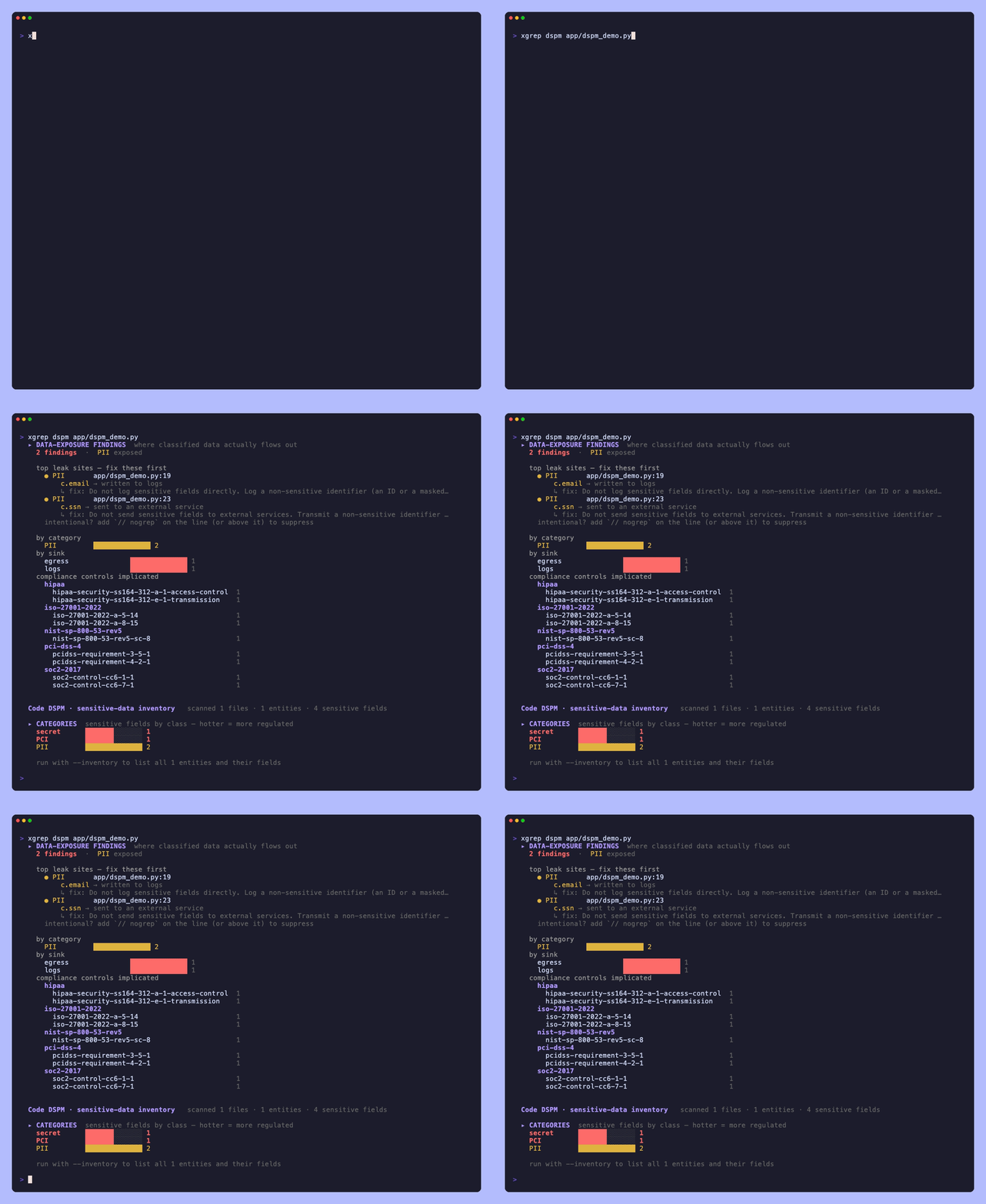
By default dspm leads with the leak sites — the actionable worklist — followed
by a compact inventory summary. The full per-entity listing is opt-in
(--inventory).
The leak-site worklist
The most actionable half is where sensitive data escapes. Each site names the data
class, the exact file:line, which value leaks (the taint source, e.g.
c.password), where it goes, and the fix:
▸ DATA-EXPOSURE FINDINGS  where classified data actually flows out
  13 findings  ·  secret, PII exposed

  top leak sites — fix these first
    ● secret    providers/cassandra/connection/connection.go:104
        c.password → sent to an external service
        ↳ fix: Do not send sensitive fields to external services. Transmit a non-sensitive identifier…
    intentional? add `// nogrep` on the line (or above it) to suppress

  by category
    secret   ██████████████ 9
    PII      ██████░░░░░░░░ 4
  by sink
    external egress  ██████████████ 9
    logs             ██████░░░░░░░░ 4
  compliance controls implicated
    hipaa
      hipaa-security-ss164-312-a-1-access-control  4
    pci-dss-4
      pcidss-requirement-3-5-1                     4
Sites are heat-ordered — most-regulated category first (secret/PCI/PHI before PII), then by confidence — so the worst exposure leads. The roll-up groups the same findings by category, by sink (leak class), and by the compliance controls the firing rules map to (SOC 2, HIPAA, PCI-DSS, ISO 27001).
For the individual findings inside your normal scan output — with full file/line and
SARIF/JSON — run the scan --dspm flag instead.
The sinks
A finding fires when a classified value reaches one of these sink classes:
| Sink | Example |
|---|---|
| logs | log.Printf("user %s", u.Email) |
| external egress | sending a value out over an HTTP client |
| third-party service | passing a value to a vendor SDK — sentry_sdk.capture_exception(err, user=u.email) |
| AI | putting a value in an LLM prompt or embedding input |
| response | returning a value in an HTTP/API response body |
| storage | writing a value to a file, cache, or unencrypted store |
| environment-crossing | production data hardcoded in a seed/fixture script |
Which third parties receive it
The third-party sink class names its recipient. A vendor SDK call is not an HTTP
call in your code — the transport lives inside the client library — so a
generic egress check cannot see it, and even when it can, "data left the process"
is where the work starts rather than ends. The fix depends on who received it:
a scrubber in an error tracker's send hook, a removed trait on an analytics
identify, a dropped column at a warehouse loader.
Each such finding carries the service and what kind of service it is, and the report rolls them up into the list a vendor review or a subprocessor page asks for:
▸ third-party processors receiving classified data
  Sentry             error-tracking · PII 2
  Segment            product-analytics · PII 1
Attribution is evidence-based, never guessed. A call that names its vendor —
sentry_sdk.capture_exception, Sentry.captureException, newrelic.addCustomAttribute —
always resolves. A bare call resolves only when the method name belongs to one
vendor: capture_exception does, track, identify, notify and index do
not, because a bare one of those is far more likely to be your own method. When
the recipient cannot be established the finding still reports the flow, with no
service named.
Error trackers, APM/telemetry, and product-analytics SDKs are covered today. A
client whose vendor is knowable only from where it was constructed
(c := statsd.New(...); c.Event(...)) is a known gap rather than a guess.
The inventory
The other half is what sensitive data exists. Pass --inventory to list every
declared entity and its classified fields:
xgrep dspm --inventory .▸ CATEGORIES sensitive fields by class — hotter = more regulated
secret ██████████████ 226
PCI █░░░░░░░░░░░░░ 1
PII ██████████████ 301
▸ ENTITIES 356 declared models carrying sensitive fields
User · go internal/user.go
Email PII ◐ medium
SSN PII ● highWithout --inventory the report prints just the compact category chart plus a
one-line teaser, so the (often large) per-entity listing stays out of the way.
Whose data it is
The category says what is sensitive. It does not say whose, and those are
different questions with different answers: Customer.email,
Employee.national_id, Applicant.date_of_birth and Child.first_name are all
PII, under four regimes with different lawful bases, retention limits and breach
duties.
Every entity therefore carries a data subject, resolved from its name:
▸ DATA SUBJECTS  whose data these entities hold — entities, not fields
  patient       ███████░░░░░░░ 1
  employee      ███████░░░░░░░ 1
  customer      ██████████████ 2
  non-personal  ███████░░░░░░░ 1
The taxonomy is fixed — child, patient, employee, applicant, customer,
user, non-personal — so the same word means the same thing in every report.
Two of the values are worth knowing:
usermeans the entity holds personal data and its name does not say whose. That is a real answer, not a blank.non-personalmeans nobody's personal data. AServiceAccountholding anapi_keyis genuinely sensitive and genuinely not a privacy finding, and this is what keeps the two apart.
Counts are per entity, not per field, so one wide table cannot outweigh ten
narrow ones. Where an entity's name carries two subjects, the more protected one
wins: a ChildPatientRecord is a child's record.
Ambiguous names are held to a higher bar. client, member, profile and
visitor are person-words that are also ordinary software words, so they name a
subject only when the entity actually holds a personal field — ApiClientConfig
stays non-personal.
Categories and confidence
Every classified field carries a category and a confidence.
| Category | What it covers |
|---|---|
| PII | personal data — email, name, date of birth, address, government IDs |
| PHI | protected health information — diagnosis, medical record number, lab results |
| PCI | cardholder data — card number, CVV, primary account number |
| SECRET | credentials — passwords, API keys, tokens, private keys |
| CUSTOMER_CONTENT | user-authored content — message bodies, chat content |
| AI_CONTEXT | data destined for or returned by models — prompts, completions, embeddings |
Confidence reflects how strongly the identifier alone implies the sensitive value:
- HIGH — unambiguous (
ssn,credit_card,private_key). - MEDIUM — common but compoundable (
email,password). - LOW — ambiguous or infrastructure metadata (
ip_address,mac_address). LOW classifications are review hints; they never seed a finding on their own.
Classification is precision-first: it deliberately ignores generic tokens
(name, id, value) and suppresses obvious metadata framings — max_password_age
and secret_arn are policy and a reference, not a credential, and don't classify.
Marking a field explicitly
Where a field name isn't self-describing, an explicit annotation forces (or asserts) its classification at HIGH confidence — the domain escape hatch:
- Struct tags / keys:
pii:"true",phi:"true",pci:"true",secret:"true",sensitive:"true", orclassification:"PHI"/dataclass:"pci". - Java annotations:
@PII,@SensitiveData. - C# attributes:
[PersonalData](ASP.NET Identity). - JS/TS decorators:
@PII/@Sensitive, plus common class-validator decorators that assert a field's data type —@IsEmail,@IsPhoneNumber,@IsCreditCard,@IsIBAN,@IsJWT— so@IsEmail() contactPoint: stringclassifies as PII even though the name wouldn't.
Marking a field not sensitive
The inverse escape hatch corrects a false positive — a field whose name matches
the lexicon but that isn't actually the sensitive value (a password field that is a
password-strength label, not a credential). Marking it de-classifies the field, so it
neither appears in the inventory nor seeds a finding:
- Struct tags / keys:
sensitive:"false"ordspm:"ignore". - Java/C#/JS-TS: a
@NotSensitive/@NonSensitive/@NotPIIannotation, decorator, or attribute.
This is distinct from marking an intentional flow: use
a not-sensitive marker when the field isn't sensitive; use // nogrep when the
field is sensitive but a specific flow is deliberate.
Filtering the output
| Flag | Effect |
|---|---|
--min-confidence low|medium|high | only report classifications at or above this confidence |
--category pii,pci,secret,… | only these data categories (pii, phi, pci, secret, customer_content, ai_context) |
--severity critical,high,… | only findings at these severities |
--inventory | list every entity and its fields (default: compact summary) |
--no-flows | inventory only — skip the findings pass (faster) |
# Only high-confidence secrets and cardholder data, findings only.
xgrep dspm --min-confidence high --category secret,pci .
Marking intentional flows
Some flows are deliberate — a database driver legitimately transmits the password it connects with. Accept an intentional leak site with xgrep's standard inline suppression comment (Semgrep-compatible), on the reported line or the line directly above it:
// nogrep: go-classified-data-egress — audit connection legitimately needs the credential
cluster.Authenticator = gocql.PasswordAuthenticator{Username: c.user, Password: c.password}
// nogrep(or// nosemgrep) — suppress every rule on the line.// nogrep: <rule-id>— suppress only that rule (e.g.go-classified-data-in-logs).// nosem— Semgrep's short form (blanket-suppresses the line).
Suppressed sites are retained as is_ignored in JSON/SARIF (dismissed, not deleted),
and xgrep scan --disable-nosemgrep reports them all again so suppressions stay
auditable.
As part of a scan
The same data-exposure rules run inside a normal scan with --dspm, so the leak
sites appear as ordinary findings with full file/line, SARIF/JSON output, and — when
a Mondoo Platform service account is configured — upload to the platform:
xgrep scan --dspm .Output formats
--format summary(default) — the human report above.--format json— the inventory and findings as JSON. Each finding site carries itspath,line,source(the leaking value),category,confidence, andhint, so tooling gets actionable locations, not just counts.--format graph— nodes and edges for the DSPM data graph:entity,field, andcategorynodes (withcontainsandclassifiededges), plussinknodes andflowsedges wherever a classified field is actually exposed (logs, egress, an AI prompt, …) — so the graph shows not just what sensitive data exists but what leaks. Pass--no-flowsfor the inventory-only graph.
Supported languages
Field-and-flow classification is wired for Go, Python, Java, JavaScript/TypeScript,
and C#, with inventory extraction also covering PHP, Kotlin, Scala, Rust, Ruby,
and Swift. On top of application code, dspm reads cross-language schema files
that declare data models independently of the app language — .proto, .graphql,
SQL DDL, and schema.prisma — plus config and IaC surfaces (dotenv, Terraform
variable files, Kubernetes manifests) where sensitive keys live.
Attribution
Generate the third-party attribution document — components, licenses, copyright holders and license texts — deterministically, with a CI gate that catches it going stale.
Overview
Turn xgrep findings into fixed code — apply the safe fixes automatically, hand the judgement calls to a coding agent, and prove every change by re-scanning it.